

The release of the Firefox 120 web browser has taken place, and a long-term support branch update — 115.5.0 — has been created. The Firefox 121 branch has entered beta testing, with its release scheduled for December 19.
Key innovations in Firefox 120:
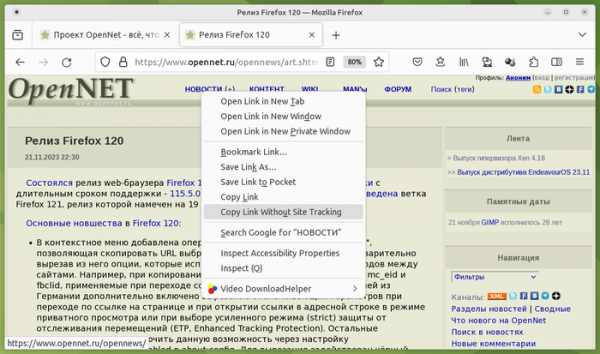
- A new operation called 'Copy Link Without Site Tracking' has been added to the context menu, allowing users to copy the URL of a selected link to the clipboard while removing options used for tracking navigation between sites. For instance, parameters such as mc_eid and fbclid, applied when copying links from Facebook pages, will be removed. Additionally, for users in Germany, the removal of tracking parameters is also enabled when navigating via links on the page and when opening links in the address bar while in private browsing mode or when choosing enhanced tracking protection (ETP, Enhanced Tracking Protection). Other users can enable this feature through the privacy.query_stripping.enabled setting in about:config. A blacklist containing known tracking parameters for site navigation has been employed for stripping.

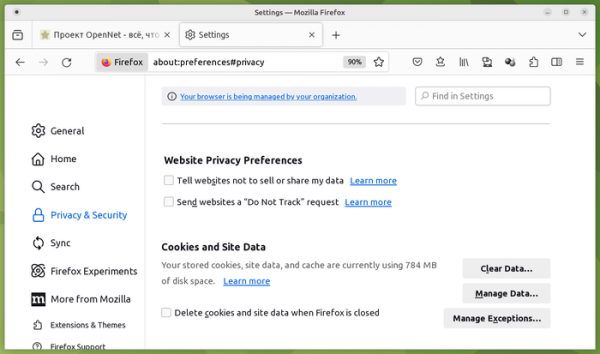
- An option to enable the Global Privacy Control (GPC) mechanism has been added to the Privacy & Security settings section. This replaces the 'DNT' (Do Not Track) header and allows websites to be informed of the prohibition on selling personal data and using it for tracking preferences or navigation between sites.
- In the enhanced strict tracking protection (ETP, Enhanced Tracking Protection) mode and in private browsing mode, protection against passive user identification through the Canvas API has been strengthened.
- For users in Germany, automatic closure of cookie consent pop-ups (Cookie Banner Blocker) has been enabled by default. These pop-ups appear on websites to obtain confirmation for saving identifiers in cookies in compliance with European Union personal data protection regulations (GDPR). Since such pop-up banners distract attention, cover content, and require user time to close, Firefox developers deemed it reasonable to automatically decline such requests.
You can enable the blocker in the settings under 'Security and Privacy' or through the 'cookiebanners.service.mode' parameter in about:config (0 — disables the automatic closing of cookie banners; 1 — rejects permission requests and ignores banners that require consent in all cases; 2 — rejects permission requests when possible, and when it is not possible, agrees to save cookies). Unlike the similar mode provided in the Brave browser and in ad blockers, Firefox does not hide the block but automates the user's action on it. There are two modes for handling banners — mouse click simulation (cookiebanners.bannerClicking.enabled) and cookie injection with the selected mode flag (cookiebanners.cookieInjector.enabled).
- On Windows, macOS, and Android, import is enabled by default for TLS certificates from the operating system's root certificate store. If necessary, this option can be disabled in the settings (Preferences → Privacy & Security → Certificates).
- Keyboard shortcuts have been added for editing (Alt + enter) and deleting (Alt + Backspace) selected accounts in the about:logins interface.
- The Firefox builds shipped in Ubuntu in Snap format now support importing data from the Chromium browser, which is also installed in snap format.
- On Linux and Windows platforms, the ability to snap video windows to the corners of the screen (automatic alignment to corners) has been implemented when holding the Ctrl key while moving it.
- Integration of a new portable component for displaying contextual hints in the address bar, rewritten in Rust, has begun.
- The User Activation API (navigator.userActivation) has been added, allowing you to determine whether the user has interacted with the page before (for example, clicked the mouse), is currently interacting, or has done nothing on the page (the page is just loaded and remains untouched).
- Support for a new HTTP response code – 103 ('Early Hints') has been added, which can be used for preemptively sending headers. Code 103 allows informing the client about the contents of certain HTTP headers immediately after the request, without waiting for the server to complete all operations related to the request and start delivering the content. In this way, hints about elements related to the page being served can be communicated, which can be preloaded (for example, links to CSS and JavaScript used on the page can be provided). Upon receiving information about such resources, the browser will begin loading them without waiting for the main page to finish delivering, thus reducing the overall request processing time.
- New size units lh and rlh have been added to CSS, allowing the specification of sizes corresponding to the line-height (CSS property line-height) of an element or the root element.
- The light-dark() function has been added to CSS to set colors simultaneously for light and dark color schemes without using the prefers-color-scheme media query.
- The JavaScript function Date.parse() has been enhanced to support additional date formatting options, such as '01-12-1999', '1999-1-5', '10000-01-12', '99-01-05', '1999-01-05 10:00:00'.
- Support for the media attribute in the element, nested within ,
- Support for the WasmGC extension, which simplifies porting to WebAssembly for programs written in programming languages that use garbage collection (such as Kotlin, Dart, etc.), has been enabled by default. WasmGC adds new types of structures and arrays for which non-linear memory allocation can be applied.
- The web development tools now include the capability to simulate tab behavior in offline mode.
- A 'Pretty Print' button has been added to the style editing panel for formatting and presenting minified style sheets in a clear format (previously, minified styles were formatted automatically).
- In the developer tools, the debugger's performance has been significantly (up to 70%) accelerated when dealing with large source texts. Refactoring of the debugger has been conducted, aimed at ensuring proper functioning of breakpoints associated with the 'unload' event.
- The Android version has fixed an error that caused tabs to close when selected. Work continues on creating an open ecosystem of browser extensions for the mobile version of Firefox. By the official launch of the ecosystem planned for December, more than 200 extensions suitable for installation in Firefox for Android will be available in the addons.mozilla.org (AMO) directory.
In addition to new features and bug fixes, Firefox 120 addresses 19 vulnerabilities. 14 vulnerabilities (11 grouped under CVE-2023-6212 and CVE-2023-6213), marked as critical, are caused by memory issues such as buffer overflows and access to already freed memory areas. These issues could potentially allow for the execution of malicious code when opening specially crafted pages. Another critical vulnerability (CVE-2023-6206) enables confirmation requests through clickjacking.
The beta release of Firefox 121 is notable for the ability to force link underlining, regardless of CSS settings (this may be useful for individuals with color perception issues). On Linux, using a composite Wayland instead of XWayland has enabled the resolution of trackpad issues, gesture support on touchscreens, and DPI settings for each monitor in Wayland-based environments. The use of Wayland also demonstrates improved graphics performance. However, due to the limitations of the Wayland protocol, there are issues with bringing the 'picture-in-picture' window to the foreground. server The release of the Firefox 120 web browser has taken place, and an update for the long-term support branch - 115.5.0 has been formed. The Firefox 121 branch has entered beta testing, with a planned release on December 19.
Source: opennet.ru
