

The release of the web browser Firefox 122 has taken place, and an update for the long-term support branch — 115.7.0 has been created. The Firefox 123 branch has entered beta testing, with a release date planned for February 20.
Key innovations in Firefox 122:
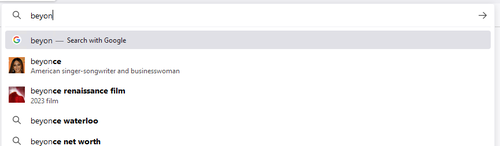
- Enhanced capabilities for displaying suggestions when typing in the address bar. For some search engines, the ability to show images and text descriptions in suggestions has been implemented. When searching for information related to web development, links to documentation on MDN (Mozilla Developer Network) are now included in the suggestions.

- Ready deb packages for Ubuntu, Debian, and Linux Mint have begun to be formed. The packages being created are compatible with the traditional Firefox builds for Debian and Ubuntu, which are available for download in '.tar.bz2' archives. Additional optimizations and security flags have been included in the build compiler. A .desktop file has also been included for placing a shortcut on the desktop and in the distribution menu. Instructions for installing Firefox from the Mozilla APT repository.
- Improved page translation quality with the built-in machine translation system. Issues with the loss of translated pages and the malfunctioning of interactive widgets have been resolved.
- To enhance protection against XSS attacks and improve compatibility between browsers, support for 'data:' URLs in SVGUseElement has been discontinued.
- Protection against the leakage of information about previously visited links through pixel color analysis using filters that utilize the currentColor parameter has been added. The output of such filters can no longer be read from the canvas in SVG, as they could be used to determine the color set by the ':visited' selector.
- Support for Passkey technology (available only in iCloud Keychain) has been added in builds for macOS, allowing users to authenticate without passwords using biometric identifiers such as fingerprints or facial recognition.
- Processing of the auto-fill token 'webauthn' has been ensured. The auto-fill dialogs feature an interface for connecting using Passkey.
- In private browsing mode, scripts are allowed to save data via the Cache API to unify the behavior in private and regular modes (the existing difference could be used to determine whether the user is operating in private mode).
- By default, WebRTC includes support for the ULPFEC (Uneven Level Protection Forward Error Correction) mechanism, which allows for the recovery of damaged or lost packets. The use of ULPFEC enables improved video quality for users with faulty communication channels.
- The use of the element is allowed <hr> within the element <select> to insert separators in lists generated based on the element <select>.
- The showPicker method can now be used with elements to programmatically invoke the browser's provided dropdown menu implementation.
- The rules for line breaks to display text on web pages have been updated to conform to the Unicode standard. For Asian languages such as Japanese and Chinese, support for selecting entire words with a double-click in text has been implemented.
- The CSS property offset-position has been introduced, which sets the starting position of an element and is typically used together with the offset-path property to define the movement trajectory of animated objects.
- Support for the ray() function, which defines a line segment for the animated element to follow, as well as for basic-shape and coord-box values, has been added to the CSS offset-path property.
- Support for the rect() and xywh() functions for creating basic shapes has been added to the CSS clip-path and offset-path properties.
- Support for animating the SVG attribute viewBox has been introduced using the SMIL (Synchronized Multimedia Integration Language), which is designed for animating SVG elements.
- The URL parser, invoked for links with an unknown scheme, has been changed to DefaultURI in accordance with specification requirements.
- Support for the ArrayBuffer.prototype.transfer() and ArrayBuffer.prototype.transferToFixedLength() methods has been included for transferring ownership of memory from one ArrayBuffer to another. After the transfer, the buffer is detached from the original memory space and becomes unusable. The state of the buffer can be checked using the ArrayBuffer.prototype.detached property.
- The LargestContentfulPaint API has been implemented, providing information on the rendering time of the largest image or text before the user interacts with the page.
- Added support for the Screen Wake Lock API, allowing web applications, such as media players, to prevent the screensaver from activating after a prolonged period of user inactivity.
- Added experimental support for the API:
- Declarative Shadow DOM API (enabled via dom.webcomponents.shadowdom.declarative.enabled in about:config) for creating new root branches in the Shadow DOM, for example, to separate an imported third-party element style and its associated DOM subtree from the main document. The proposed declarative API allows detaching DOM branches using only HTML without the need for JavaScript code.
- Popover API (enabled via dom.element.popover.enabled in about:config) for creating user interface elements displayed above other elements of the web interface. For instance, with the new API, you can create action menus, show form fill tooltips, develop tutorial interfaces, and capture content. Displaying above other elements is achieved by setting the 'popover' attribute, while positioning, cascading, and input focus are handled automatically. Unlike the 'dialog' element, elements with the 'popover' attribute do not use modal mode, support events, and can be easily canceled.
- Clipboard reading and writing tools (enabled via dom.events.asyncClipboard.clipboardItem, dom.events.asyncClipboard.readText, and dom.events.asyncClipboard.writeText in about:config) that allow the use of the ClipboardItem interface and methods read(), readText(), and write().
- Intl.Segmenter object (available only in Firefox Nightly builds) for precise text segmentation in strings considering locale, for example, to separate words in languages that do not use spaces to delineate words.
- In the web developer tools in inspect mode, pressing the Enter key while editing a selector or properties now confirms the input and sets focus on the corresponding element, instead of moving focus to the next input field (to move focus to the next field, you can use the Tab key).
- The Android version introduces the ability to enable the GPC (Global Privacy Control) mechanism, which replaces the 'DNT' (Do Not Track) header, allowing websites to be informed about the prohibition of the sale of personal data and its use for tracking preferences or movements between sites. It also allows setting Firefox as the default application for viewing PDFs. To enhance protection against passive user identification, the User-Agent header is now always set to 'Android 10', regardless of the actual platform version.
In addition to new features and bug fixes, Firefox 122 addresses 15 vulnerabilities (5 marked as critical). Eight vulnerabilities are caused by memory handling issues, such as buffer overflows and access to already freed memory areas. These issues could potentially result in the execution of malicious code when specially crafted pages are opened.
Additionally, Mozilla has announced the creation of a separate service to track instances of discrimination against Firefox on various platforms and collaboratively solve the identified issues with platform manufacturers. Currently, technical problems arising from Firefox operation on Apple, Google, and Microsoft systems are summarized on the website. For example, on the Android platform, the inability to import browser settings and a decrease in search quality are noted. In Windows, there's mention of a prohibition on programmatically changing the default browser and the imposition of Microsoft Edge. In both Android and Windows, some bindings to Chrome and Edge remain even after changing the default browser.
Source: opennet.ru
