

The release of the Firefox 125 web browser has taken place, and a long-term support branch — 115.10.0 has been formed. Due to issues identified at a late stage, build 125.0 was canceled, and release 125.0.1 was announced. The Firefox 126 branch has entered beta testing, with the release scheduled for May 14.
Key features in Firefox 125:
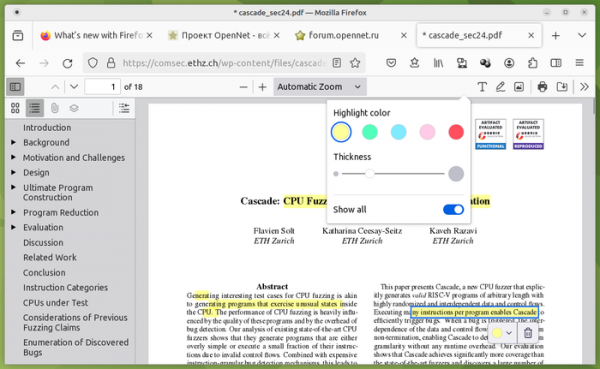
- The built-in PDF viewer now includes a text selection feature with a chosen color and outline enabled by default.

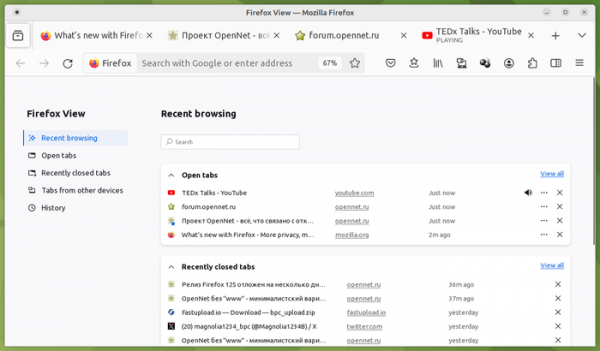
- On the Firefox View page, which simplifies access to previously viewed content, pinned tabs are now displayed in the section with open tabs, and support for status indicators has been added, which indicate when sound or video is playing on a specific tab, allowing users to mute or unmute audio with a click on the indicator. Similar indicators have also been added for bookmarks and notifications.

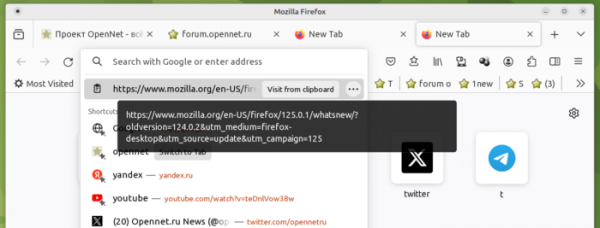
- A quick link navigation feature has been implemented for URLs saved in the clipboard. If a URL is present in the clipboard when clicking on the address bar, that URL will automatically be suggested as the initial recommendation for navigation.

- Support for playback of protected content (EME, Encrypted Media Extensions) using the AV1 codec has been added, which is employed by some streaming providers to deliver higher quality content.
- When filling out addresses in web forms, a prompt to save the address is displayed (currently only for users in the U.S. and Canada). It is planned to use the saved data for auto-filling addresses in the future.
- Downloading files from URLs listed as potentially harmful content has been blocked.
- On systems utilizing tab container extensions, support for address bar searches from tabs placed in different containers has been added.
- A new option has been added to the settings that allows for the automatic detection of proxies using the WPAD (Web Proxy Auto-Discovery) protocol, despite enabled settings for connecting through the system proxy.
- The behavior of radio buttons has been changed — if no option is selected, pressing the tab key now activates focus only on the first option, and the next press shifts input focus to another element, rather than cycling through all options. Arrow keys still allow navigation through options of a single element.
- Support for the popover attribute has been added, allowing for the creation of elements displayed above other elements in the web interface. For example, with the new attribute, you can create action menus, display form filling hints, create educational interfaces, and implement content capture. Unlike the dialog element, elements with the popover attribute do not use modal mode, support events, and can be easily dismissed. Positioning, cascading, and input focus are chosen and handled automatically.
- The multi-memory mode is enabled by default in WebAssembly, allowing wasm modules to use and import multiple independent linear memory spaces.
- JavaScript has added support for Unicode text segmentation, implemented through the Intl.Segmenter object. This object allows precise text segmentation in a string according to locale, for example, for separating words in languages that do not use spaces to separate words.
- Support for the ContextLost and ContextRestored events has been added to the HTMLCanvasElement and OffscreenCanvas interfaces, allowing user code to handle situations of context loss and restoration in hardware-accelerated rendering.
- The navigator.clipboard.readText() method has been enabled for reading from the clipboard with a confirmation request (after the API call, a paste context menu is shown to the user for action confirmation).
- Support for stroke-box and content-box values has been added to the CSS property transform-box, allowing the method of calculating the reference area for transformation operations to be changed, for example, to implement advanced graphic effects.
- The CSS property align-content has been enhanced to work with block containers. For instance, display: block and display: list-item can now be aligned using align-content without the need for flex and grid containers.
- Support for the SVGAElement.text method has been discontinued; instead, it is recommended to use the more widely used SVGAElement.textContent method.
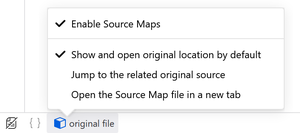
- A new dropdown menu has been implemented in the web development tools at the bottom of the debugger panel, with actions related to Source Map. The 'devtools.debugger.features.overlay' setting has been returned in about:config to disable the overlay indicator for pausing JavaScript code execution by the debugger (Pause Debugger Overlay).

- The Android version now allows the selection of theme settings for tabs (dark theme, light theme, and system theme selection). The menu for login and password settings has been improved. The 'Open in App' button is hidden if Firefox is selected as the system PDF viewer.
In Firefox 125, along with new features and bug fixes, 18 vulnerabilities have been addressed (12 marked as critical). 11 vulnerabilities (4 categorized under CVE-2024-3865) are due to memory management issues, such as buffer overflows and accessing already freed memory areas. These issues could potentially allow an attacker to execute code when opening specially crafted pages.
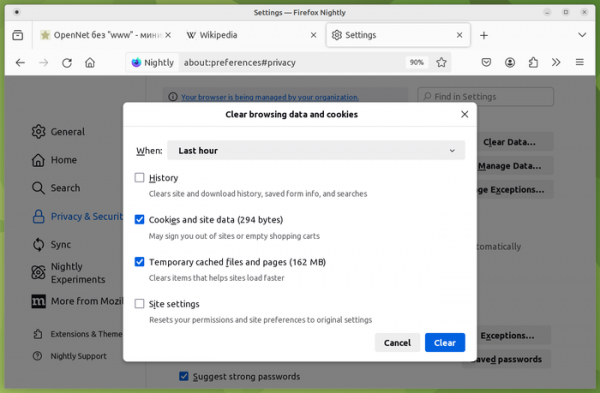
In the beta version of Firefox 126, a new simplified and unified dialog for clearing user data has been proposed, which enhances the categorization of data and adds information about the size of data saved over the selected time period.
Source: opennet.ru
