

The release of the Firefox 127 web browser has taken place, and the long-term support branch update — 115.12.0 has been formed. The Firefox 128 branch has entered beta testing, with its release scheduled for July 9.
Key Features in Firefox 126:
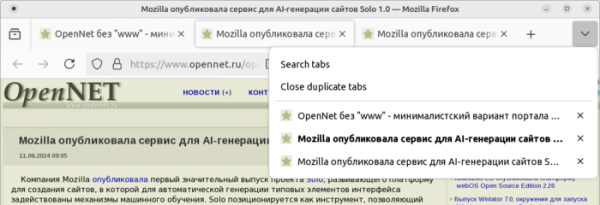
- In the ‘V’ menu displaying all open tabs and in the tab context menu, a button has been added to close all duplicate tabs in the current window.

- Automatic HTTP to HTTPS protocol replacement is enabled for resources in tags <img>, <audio> and <video>, if these tags are used on a page opened via HTTPS. If the resources being loaded are not available via HTTPS, they will no longer be displayed on pages opened via HTTPS.
- Support for proactive resolution has been added (the key to connect to is specified, and iroh finds the associated host and establishes an encrypted connection using the QUIC protocol). Direct P2P connections are established whenever possible, but if not, it falls back to using relays, which are also employed for host discovery by keys. You can run your own relay or connect to public relays supported by the community. of hosts without waiting for the user to click the link or request the specified resource on the page. Domains that need to be resolved in advance in DNS should be listed through the ‘link’ element with the attribute ‘rel="dns-prefetch"’.
- To reduce the information that can be used for indirect user identification, for 32-bit x86 systems in the User-Agent header, as well as in the JavaScript API navigator.platform and navigator.oscpu, the architecture x86_64 will now be specified.
- The screenshot tool now supports creating screenshots for files in SVG and XML formats, as well as for service pages like 'about:'. It has added the ability to control screenshot creation using keyboard shortcuts, and compatibility with high-contrast themes (HCM, High Contrast Mode) has been implemented. The performance of saving large areas of the screen has been improved.
- In about:config, new settings toolkit.scrollbox.pagescroll.maxOverlapPercent and toolkit.scrollbox.pagescroll.maxOverlapLines have been added, allowing users to change the page shift when scrolling, specified in percentages and lines.
- On the Windows platform, the capability for Firefox to automatically start after the computer boots has been implemented. Thanks to preloading, users don’t have to wait during the initial launch of the application — the browser will be ready for use instantly. This mode can be enabled in the General/Startup settings section or through a notification, similar to the prompt for setting Firefox as the default browser.
- On macOS and Windows platforms, additional access protection has been implemented when using the autofill feature for saved passwords or when viewing password information in the password manager. Such operations with the password manager will require system authentication confirmation (for example, entering the system password, fingerprint verification, or voice/face authentication).
- On the macOS platform, navigation through input elements via the tab key is enabled by default, instead of using the macOS-specific keyboard navigation mode, which does not correspond to behavior on other platforms (the old mode can be restored in settings).
- For texts using the WebVTT (Web Video Text Tracks Format), support for characters allowed in HTML markup has been added. WebVTT is used to organize text output at specific moments in time, for example, for displaying subtitles.
- The Clipboard API now includes the ClipboardItem interface by default and supports the methods navigator.clipboard.read() and navigator.clipboard.write(), allowing web applications to read and write data to the clipboard.
When attempting to read data from the clipboard that was not written by the current web application, the user will be presented with a confirmation prompt before proceeding with the operation. - Experimental support for setting symmetrical inter-character spacing through the CSS property letter-spacing has been implemented. In the new mode, the spacing is not set between the current and next character, but is divided into two parts that apply before and after the character. This mode can be enabled through the layout.css.letter-spacing.model setting in about:config.
- In the 'href' attribute of the '<base>' tag, used to set the base path for relative links, the use of the 'data:' and 'javascript:' schemes is prohibited.
- In gradients created using the CSS functions conic-gradient(), linear-gradient(), radial-gradient(), repeating-conic-gradient(), repeating-linear-gradient(), and repeating-radial-gradient(), the type '<color-interpolation-method>' is now allowed.
- The Set object, which defines a collection of values, has been added with methods implementing typical set operations: Set.prototype.intersection(),
Set.prototype.union(),
Set.prototype.difference(),
Set.prototype.symmetricDifference(),
Set.prototype.isSubsetOf(),
Set.prototype.isSupersetOf(), and Set.prototype.isDisjointFrom(). - The installation of extensions whose XPI files are signed using insecure algorithms is prohibited (the PREF_XPI_WEAK_SIGNATURES_ALLOWED setting is set to false by default).
- In the version for the Android platform:
- Support has been added for translating content from one language to another. As in the desktop version of Firefox, the built-in translation system in the app performs translations on the user's local system without resorting to external cloud services.
- A new item "Passwords" has been added to the "…" menu.
- The Enter key on the side numeric keypad of desktop keyboards is now allowed to confirm the URL entered in the address bar.
- Additional optimizations have been included at the compilation stage, allowing for increased interface responsiveness, reduced startup time, and extended device battery life.
- The section with a list of recently saved pages has been moved to the bookmarks section. The items in the list no longer disappear after becoming outdated.
In addition to new features and bug fixes in Firefox 127, 22 vulnerabilities have been addressed. 11 vulnerabilities are marked as critical, of which 9 are due to memory handling issues such as buffer overflows and access to already freed memory areas. These issues could potentially lead to the execution of malicious code when opening specially crafted web pages.
Source: opennet.ru
