

The release of the Firefox 143 web browser has taken place, along with updates for previous long-term support branches — 140.3.0 and 115.28.0. The Firefox 144 branch has entered beta testing, with a release scheduled for October 14.
Key innovations in Firefox 143 (1, 2, 3):
- A feature has been added to pin tabs as permanently visible shortcuts by dragging the tab to the beginning of the tab bar, without needing to use the context menu. Unpinning a tab is also simple; just move the pinned shortcut back to the main area of the tabs.

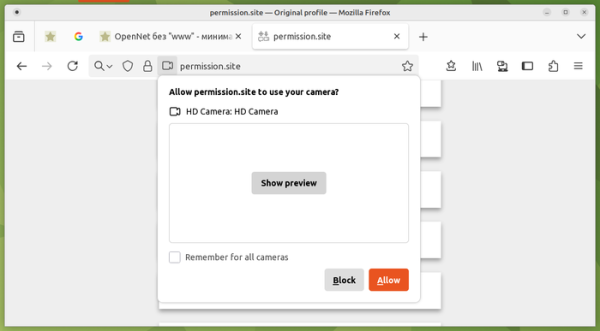
- When a website requests permissions to access the camera, a preview of the image from the camera is now displayed in the confirmation dialog. The preview can be useful to ensure the correct device is selected in systems with multiple cameras.

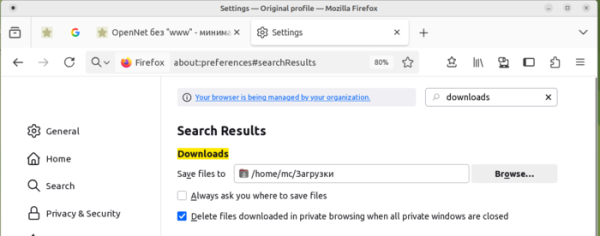
- A new option has been added to settings for deleting files downloaded in Private Browsing mode after closing the window. After the Private Browsing window closes, a prompt appears, allowing users to delete or keep the downloaded files.

- Support has been added for displaying important dates and events in the address bar. Currently, this feature is enabled for events such as Mother's Day for users in the USA, UK, Germany, France, and Italy.
- The capabilities of the Fingerprinting Protection mode have been expanded. Consistent values are returned for parameters that can be used as additional identifiers. For instance, locally installed non-system fonts are excluded from the list of available fonts.
- Support for audio playback in the xHE-AAC format (Extended High-Efficiency AAC, ISO/IEC 23003-3 standard) has been added, which is used in Netflix streaming. The xHE-AAC codec is currently available only on Windows 11 22H2+, macOS, and Android 9+ platforms.
- An option has been added to the context menu for searching images using Google Lens.
- The address bar now supports context hints with information about stock prices and other securities from the financial market.
- Microsoft Copilot has been added to the list of AI chatbots that can be integrated into the sidebar.
- The Windows platform builds now allow websites to be used as web applications pinned to the taskbar. Additionally, support for the Windows UI Automation API has been implemented to enhance tools for people with disabilities.
- The web developer tools have introduced a setting to disable grouping similar messages in the web console. The debugger has stopped opening new tabs for formatted content when switching between the unmodified and formatted views of the source code.
- The algorithm for calculating element sizes in the CSS Grid has been updated to more accurately conform to the specification, ensuring correct layout rendering for CSS Grids that use percentage-based row sizes or contain elements with specified aspect ratios.
- The elements now support advanced options for color specification, such as 'rgb(200 200 200)', in addition to the hexadecimal format (#ffffff).
- Restrictions that prevented setting the CSS 'display' property for HTML elements '' have been removed. A pseudo-element '::details-content' has been added in CSS for customizing the appearance of the collapsible and expandable block.
- The Android platform version has added a setting to enable DoH (DNS over HTTPS) and simplified the interface for managing downloads.

In addition to new features and bug fixes, Firefox 143 addresses 16 security vulnerabilities. Eight of these vulnerabilities are related to memory management issues such as buffer overflows and accessing freed memory areas. These issues could potentially lead to the execution of malicious code when opening specially crafted pages.
Source: opennet.ru

 Russian
 Italian
 German
 Polish
 Estonian
 Albanian
 Bulgarian
 Croatian
 Czech
Czech Danish
 Dutch
Dutch English
 French
 Hungarian
 Latvian
 Portuguese
 Romanian
 Slovak
 Slovenian
 Spanish
 Swedish