

The release of the Firefox 144 web browser has occurred, along with updates for the previous long-term support branches — 140.4.0 and 115.29.0. The Firefox 145 branch has entered beta testing, with a release scheduled for November 11.
Key innovations in Firefox 144 (1, 2, 3):
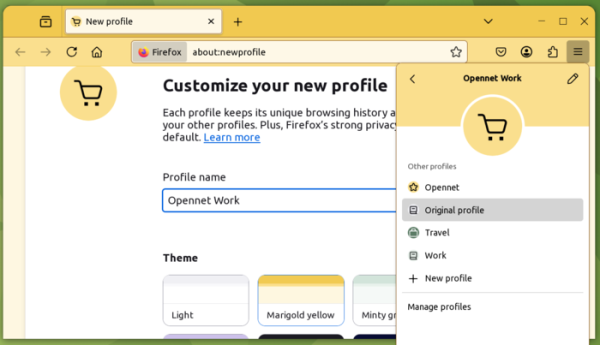
- A new profile management system has been activated for all users. In the profile form, users can create fully independent browsing sessions with their own settings, history, bookmarks, extensions, and internal databases. Each profile is stored in a separate subdirectory ‘~/.mozilla/firefox/’. Users can assign their own color scheme, icon, and name to a profile. Switching between profiles and creating new profiles is done through a new section displayed at the top of the main menu.
The session separation technology is similar to older profiles, which were activated from the command line using the ‘-P’ option, but the interfaces and profile lists of the old and new systems do not overlap (new profiles are not shown in the old interface launched by the ‘firefox --ProfileManager’ command, and the new one accessed through the menu does not show old profiles).

- The ability to keep a visible active tab while minimizing the other tabs in a group has been introduced (you can work with a separate tab without expanding the whole group).

- Support has been added to move a tab into a minimized group with the mouse without automatically expanding the group.

- It is now possible to close the window of a video shown in Picture-in-Picture mode without stopping the video playback (the video will continue playing in the main window immediately). Closing without stopping is done by clicking the close window button while holding the Shift key or pressing the Shift + Esc key combination.
- For encrypting accounts saved in the built-in password manager, the AES-256-CBC algorithm has been employed. Previously, the AES-256-CBC algorithm was only used for end-to-end encryption of accounts in Firefox Sync, but on local storage, data was encrypted using the outdated 3DES-CBC algorithm.
- A new option has been added to the context menu that appears when right-clicking on an image, allowing users to search using Google Lens. With Google Lens, you can perform operations such as searching for similar products and objects, as well as copying, translating, and searching for text displayed in the image. This feature is only available when Google is selected as the default search engine.
- Users can now send queries to the Perplexity search service via the address bar, which utilizes AI to generate responses to questions asked in natural language.
- On the Windows platform, when opening links from other applications, Firefox now uses the existing window on the current virtual desktop or creates a new window if there isn’t one (but does not switch to other virtual desktops).
- In the web developer tools, the ability to navigate to definitions of custom CSS properties from var() functions shown on the styles inspection page has been implemented. The pop-ups in the style inspection page provide a clear distinction between built-in and user-defined events.
- An Element.moveBefore API has been added to move an element in the DOM tree without resetting its state.
- The CSS property math-shift now supports the value 'compact', which includes a compact representation of superscripts in MathML formulas.
- In the PerformanceEventTiming API, which provides additional information for measuring and optimizing interface responsiveness, the InteractionID attribute has been added to identify user interactions. This identifier allows different metrics to be linked to a single user action, for example, when touching a touchscreen, multiple events such as pointerdown, mousedown, pointerup, mouseup, and click are generated, and InteractionID allows all these events to be connected to a single touch.
- HTML attributes "command" and "commandfor" have been implemented, which can be used in buttons instead of the attributes "popovertargetaction" and "popovertarget" for declarative menu interaction settings upon button clicks. When using the new attributes, all the menu interaction logic is handled by the browser, without the need for custom JavaScript handlers. For example, to create a dropdown menu, it is sufficient to specify: <button commandfor="»my-menu»" command="»show-popover»">Open Menu</button> <div popover id="»my-menu»"> … </div>
- Support for the View Transitions API has been added, designed to create animation effects when switching between different states of the DOM (for example, a smooth transition from one image to another) or transitioning from one page to another within the same site.
- The ability to use dithering when rendering gradients defined through CSS properties linear-gradient, conic-gradient, and radial-gradient has been provided using hardware-accelerated WebRender.
- The 'upsert' specification has been implemented in Map and WeakMap objects, simplifying work with collections of key/value pairs. New methods getOrInsert and getOrInsertComputed have been added, which return the existing value associated with the specified key or create a new entry if the key is not found.
- The ScreenOrientation API has been enhanced with lock() and unlock() methods to fix the screen orientation on tablets running Windows and Android.
- Support for transferring RTCDataChannel objects within WebWorker messages has been added.
- The getUserMedia method has been updated with a resizeMode parameter, enabling cropping and scaling during video capture from the camera.
- The WebGPU API now includes the GPUDevice.importExternalTexture method for importing textures from HTMLVideoElement or VideoFrame objects.
- A machine translation indicator has been added in Firefox for Android, allowing users to assess the status of the page translation (whether the entire page has been translated). Firefox is now available for installation from the Huawei AppGallery app store. The platform version requirements have been raised — at least Android 8 is needed for operation.

In addition to new features and bug fixes, Firefox 144 addresses 24 vulnerabilities. Sixteen of these vulnerabilities are due to memory management issues, such as buffer overflows and access to already freed memory areas. These issues may potentially allow an attacker to execute code by opening specially crafted pages.
The beta version of Firefox 145 available for testing is notable for enhancing the rounding of buttons, tabs, the address bar, and input fields, as well as adding support for Matroska containers (for codecs AVC, HEVC, VP8, VP9, AV1, AAC, Opus, and Vorbis) and discontinuing support for 32-bit Linux systems. It is noted that maintaining Firefox on 32-bit platforms is becoming increasingly complicated and unreliable, with support for 32-bit builds having already been discontinued in most Linux distributions. Users of 32-bit Linux distributions are advised to switch to using 64-bit operating systems. For those who cannot promptly update their distribution, the ESR branch of Firefox 140 can be used, with security updates being generated at least until September of next year.
Source: opennet.ru

 Russian
 Italian
 German
 Polish
 Estonian
 Albanian
 Bulgarian
 Croatian
 Czech
Czech Danish
 Dutch
Dutch English
 French
 Hungarian
 Latvian
 Portuguese
 Romanian
 Slovak
 Slovenian
 Spanish
 Swedish