

release of the web browser , as well as Firefox 67 for the Android platform. Additionally, an update has been formed with long-term support . Soon moving to the stage of the Firefox 68 branch will transition, with a release scheduled for July 9.
:
- The ability to automatically unload tabs to free up resources has been implemented. This feature activates when memory is low (less than 400 MB of free memory) and primarily unloads long-unused tabs. The tabs do not disappear but are put into a state ready for loading (standby mode), similar to what is observed after session recovery. To control this mode, an option 'browser.tabs.unloadOnLowMemory' has been added in about:config;
- Page loading has been accelerated when there are tasks that heavily load the CPU. The optimization has been implemented by lowering the priority of the event handlers of setTimeout timers during page loading (analogous to background tabs where the provided time budget for executing the timer's event handler is reduced). Limiting background handlers allows more resources to be allocated to main handlers affecting the initial rendering of the page. For example, core scripts from Instagram, Amazon, and Google now run 40-80% faster thanks to this added optimization;
- Some secondary handlers have been deferred to later stages of the loading process. For example, scanning alternative CSS styles now occurs not during, but after the page has loaded. The loading of the input autocomplete module has been postponed until the input forms are ready;
- The approach to rendering during the page load has been changed — rendering now begins at an earlier stage of loading, but rendering operations are called less frequently;
- The initialization of some browser subsystems and those related to modifying themes for add-ons has been delayed until the main loading is complete, which has reduced the time between launching the browser and its readiness to display pages;
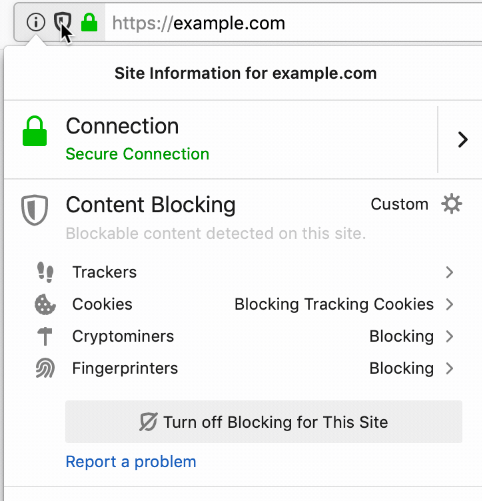
- If the user refreshes the page in private browsing mode, Firefox will interpret this as a problem and suggest blocking JavaScript inserts that mine cryptocurrency or track users using hidden identification methods ('browser fingerprinting'). Blocking by ( and ) in the Disconnect.me list, which includes hosts caught using miners and code for hidden identification. By default, new blocking modes are turned off, and new options for enabling them, 'Cryptominers' and 'fingerprinters', have been added to the privacy settings. You can track the blocker’s activation through
the website's context menu, displayed when clicking on the shield icon in the address bar;
- In the main menu and the dialog with form-filling recommendations, there is a quick access option to saved passwords for the site;
- finalrd compositing system , written in Rust and offloading rendering operations of the page's content to the GPU. When using WebRender instead of the built-in compositing system in the Gecko engine, which processes data using the CPU, shaders executed on the GPU are used for composite rendering of the page elements, resulting in a significant increase in rendering speed and a reduction in CPU load.
By default, WebRender is currently activated for about 4% of Windows 10 users with NVIDIA graphics cards. Activation for other users will depend on testing results. If all goes well, on May 27th, the testing coverage will expand to 25%, on May 30th to 50%, and within the first week of June to 100%. You can check the activation of WebRender on the about:support page. To force activation, go to about:config and enable the settings 'gfx.webrender.all' and 'gfx.webrender.enabled' or start Firefox with the environment variable MOZ_WEBRENDER=1 set. In Linux, WebRender support is more or less stabilized for Intel graphics cards with Mesa 18.2+ drivers;
- The profile management mechanism has been reworked: previously, when installing multiple different instances of Firefox, one common profile with settings, extensions, and data sources (bookmarks, history, saved passwords, cookies, etc.) was used by default, but now a separate individual profile will be created for each parallel instance installed. For example, with simultaneous installations of ESR, beta versions, nightly builds, the Developer Edition, and the standard release of Firefox, separate profiles will be created for them.
The main reason for switching to separate profiles is the potential issues that may arise when using a profile from a newer release in an older version of Firefox, as well as when accessing the profile database simultaneously from different running instances of Firefox, which could potentially lead to data corruption. To select an existing profile as before, you can use the interface "firefox -ProfileManager." After the installation of Firefox, when an existing profile is detected, a special warning will be displayed suggesting to synchronize settings via a Mozilla Sync account.
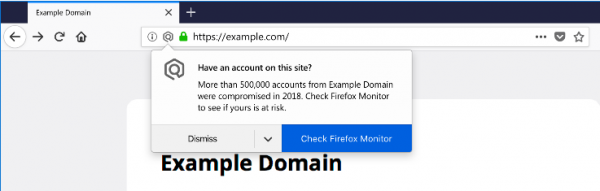
- Main composition system extension , experiments for which were conducted for a limited number of users starting from Firefox 62, but the final activation for all users has only been done now. The Firefox Monitor extension provides a warning in case of account compromise (checked via email) or an attempt to log into a previously hacked site. The check is carried out through integration with the database of the project , which includes information about 7.8 billion accounts stolen as a result of breaches of 364 websites. A warning is displayed only for websites whose breach information has been added to the haveibeenpwned.com database within the last 12 months. If less than 2 months have passed since the breach information became available, a repeated warning will be shown.

- The number of API calls has been extended, which only applies when opening a page in a secure context (), i.e., when opened over HTTPS, via localhost, or from a local file. In Firefox 67, for pages opened outside of a secure context, system notifications via the API , shown outside the browser window, is prohibited.
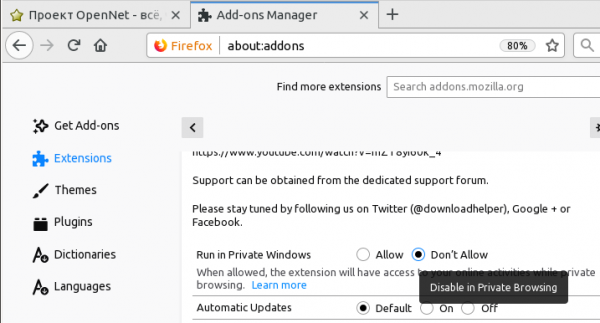
- The capabilities of private browsing mode have been expanded. Users can now save passwords in forms on sites opened in private mode. Controls for managing the activation of extensions in private mode have been implemented — the extension manager now allows users to determine which extensions to enable in private mode and which should only be used in the main session. For new extensions, activation in private mode is disabled by default (changing settings is required to enable it);

- Implementation of support for video codec has been transitioned to use the library , developed by the VideoLAN and FFmpeg communities, focused on achieving maximum possible decoding performance and ensuring quality operation in multi-threaded mode. It is noted that the AV1 format is beginning to gain popularity, with the share of AV1 videos viewed in Firefox beta versions at 0.85% in February and 3% in March, now standing at 11.8%;
- for browser management via keyboard — the toolbar and dropdown menu can now be controlled solely with the keyboard, including access to buttons placed on the toolbar, elements that do not fit on screen, loading indicators, page actions, etc. Navigation through toolbar elements is accomplished using the Tab key and arrow keys on the keyboard;
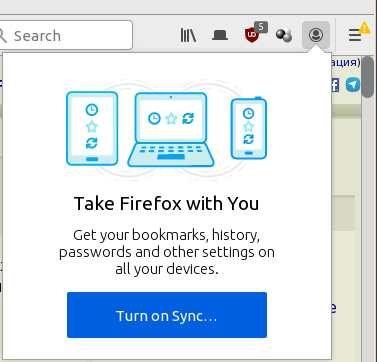
- A has been added to the toolbar to assess synchronization status, connection to the account, and data sharing across multiple devices, as well as for quick access to operations that utilize the Firefox Account. Users have the option to display their avatar instead of the standard icon;

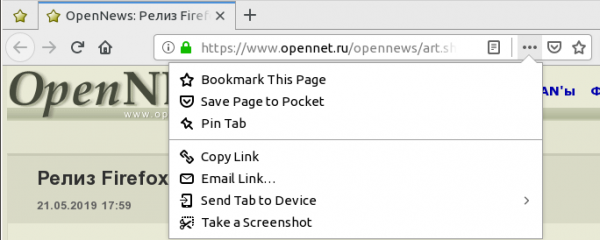
- Added pinned tabs through the menu in the address bar. Pinned tabs remain active at all times, launch automatically, and simplify access to frequently used sites;

- A system of contextual hints has been implemented, recommending various possibilities to users based on the context;
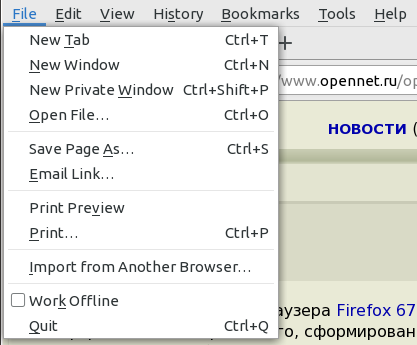
- A new button has been added to the 'File' menu for importing settings and data from other browsers (import from Chrome and Chromium is supported);

- Support for the use of the 'webcal:' protocol in URLs, associated with the 30boxes.com service, has been discontinued;
- The ability to upload screenshots to the Firefox Screenshots server and share screenshots via the Mozilla server has been removed. In the coming months, the screenshot server will be disabled, and users are advised the existing data from it.
- The included Twemoji font has been updated. The new version adds support for the Emoji 11.0 specification.
- Additional user categories are invited to participate in with the display of additional informational content recommended by the Pocket service, as well as changes to the layout of information on the homepage. For example, some users will see changes in block sizes and the number of recommendations, with new thematic sections proposed (Health, Science, Technology, and Entertainment). To opt out of the experiment, the 'Content Discovery' option should be disabled in the upper right corner of the new tab page.
- by default the API , designed to facilitate two-factor authentication across various web services. U2F is permitted for Google accounts.
- The JavaScript optimizing compiler has added support for ARM64 architecture devices running Windows.
- Support for dynamic import of JavaScript modules has been added using the expression ;
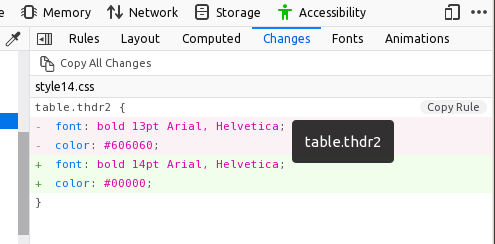
- The web development tools now support arbitrary string selections and copying content from the 'Changes' panel, which reflects the history of all CSS changes made through the Rules panel during the current session in the developer tools.

- The built-in JavaScript debugger provides the Threads panel with tools for debugging Web Workers. The quality of handling inline breakpoints has improved — the debugger now stops more accurately at specified points in the code.
- In the Android version, behavior related to handling viewport parameters has been aligned with other browsers. The addition of a Firefox search widget with voice input capabilities to the home screen has been introduced. Support for guest sessions has been discontinued, with the recommendation to use private browsing mode instead.
In addition to new features and bug fixes, Firefox 67 has addressed , some of which are marked as critical, meaning they could allow an attacker to execute code by opening specially crafted pages. Currently, detailed information about the fixed security issues is not available, but the list of vulnerabilities is expected to be released within a few hours.
Source: opennet.ru

 Russian
 Italian
 German
 Polish
 Estonian
 Albanian
 Bulgarian
 Croatian
 Czech
Czech Danish
 Dutch
Dutch English
 French
 Hungarian
 Latvian
 Portuguese
 Romanian
 Slovak
 Slovenian
 Spanish
 Swedish