

release of the web browser , as well as Firefox 68 for Android platform. This release is categorized under long-term support (ESR) branches, with updates being released throughout the year. Additionally, an update for the previous version has been formed. with long-term support . Soon moving to the stage of The branch will transition to Firefox 69, scheduled for release on September 3.
:
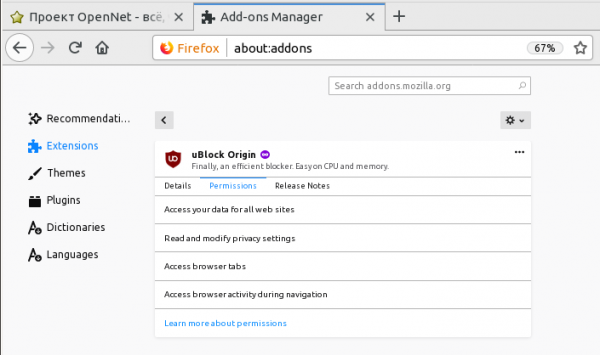
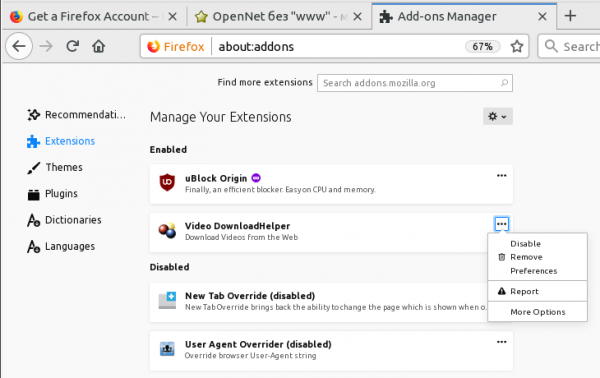
- A new add-on manager (about:addons) is enabled by default, fully using HTML/JavaScript and standard web technologies as part of an initiative to remove XUL and XBL-based components from the browser. The new interface allows for a complete description, settings changes, and access permission management for each add-on, all within the main add-on list page.

Instead of separate buttons for managing add-on activation, a context menu is offered. Disabled add-ons are now explicitly separated from active ones and listed in a separate section.

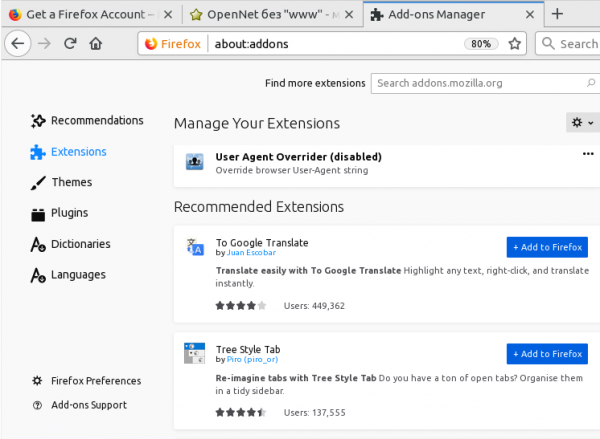
A new section with recommended add-ons has been added, tailored based on installed add-ons, settings, and user activity statistics. Add-ons are included in the contextual recommendation list only if they meet Mozilla's standards of security, usefulness, and user-friendliness, and effectively address relevant issues of broad interest. Suggested add-ons undergo thorough security reviews with each update;

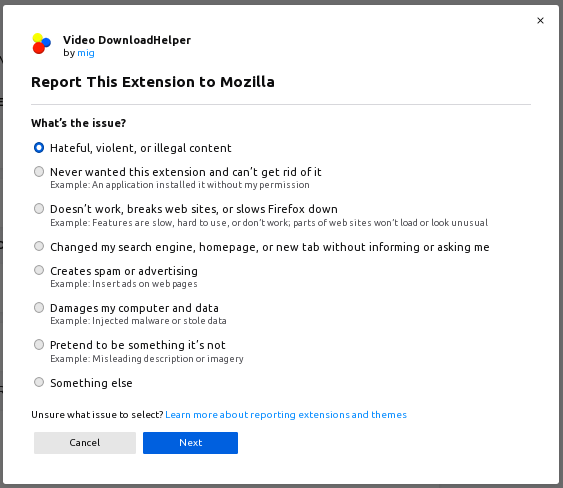
- A button has been added for reporting issues with add-ons and themes to Mozilla. For instance, through the provided form, developers can be alerted about malicious activity, display issues caused by an add-on, discrepancies in stated functionality, add-ons appearing without user actions, or problems with stability and performance.

- A new implementation of the Quantum Bar address line has been introduced, which is visually and functionally similar to the old Awesome Bar, but differs in a complete internal overhaul and code rewriting, replacing XUL/XBL with the standard Web API. The new implementation significantly simplifies the process of extending functionality (support for creating extensions in the WebExtensions format), removes rigid ties to browser subsystems, allows easy integration of new data sources, and offers higher performance and interface responsiveness. A notable change in behavior is the requirement to use Shift+Del or Shift+BackSpace (previously it worked without Shift) to delete browsing history entries from the suggestions displayed when input begins.
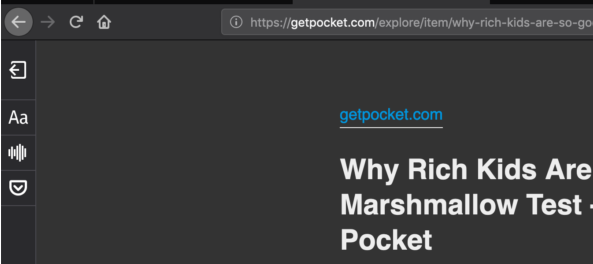
- A full dark theme has been implemented for the reader view mode, which, when enabled, displays all window and panel design elements in dark shades (previously, switching between dark and light modes in Reader View only affected the text content area).

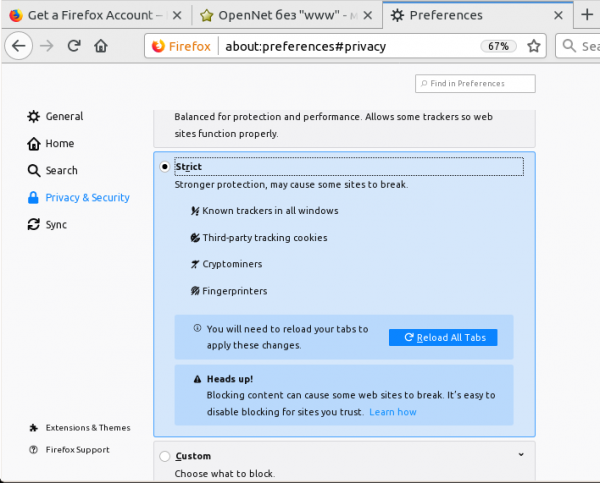
- In strict mode for blocking unwanted content, all known tracking systems and all third-party cookies are now blocked, as well as JavaScript inserts that engage in cryptocurrency mining or track users through hidden identification methods. Previously, this blocking was enabled through explicit selection in the customizable blocking mode. Blocking is performed based on additional categories (fingerprinting and cryptomining) in the Disconnect.me list.

- The phased implementation of the compositing system has continued , written in Rust, offloading page content rendering operations to the GPU. When using WebRender instead of the built-in compositing system of the Gecko engine, which processes data using the CPU, shaders executed in the GPU are used to perform effective element rendering operations, allowing for a significant increase in rendering speed and reducing CPU load.
In addition to users with NVIDIA graphics cards starting from
Firefox 68 WebRender will be activated for systems based on Windows 10 with AMD graphics cards. You can check the activation of WebRender on the about:support page. To forcibly enable it in about:config, you need to activate the settings 'gfx.webrender.all' and 'gfx.webrender.enabled' or launch Firefox with the environment variable MOZ_WEBRENDER=1. In Linux, WebRender support is more or less stabilized for Intel graphics cards with Mesa 18.2+ drivers; - A section for quick access to account settings in Firefox Account has been added to the 'hamburger' menu on the right side of the address bar;
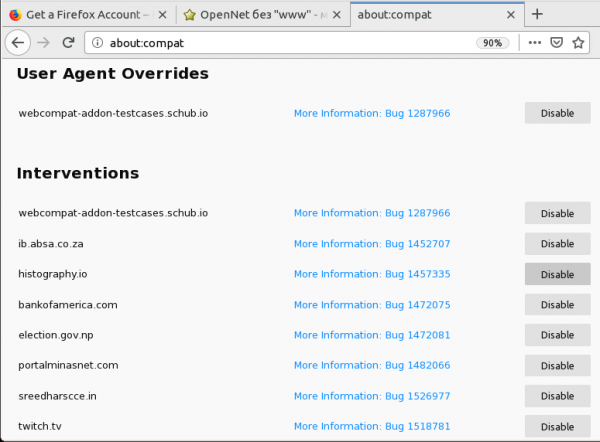
- A new built-in page 'about:compat' has been added, which lists workarounds and patches applied to ensure compatibility with specific sites that do not work correctly in Firefox. The changes made for compatibility in simple cases are limited to changing the 'User Agent' identifier if the site is hardcoded to specific browsers. In more complex situations, JavaScript code is executed in the context of the site to fix compatibility issues;

- Due to potential stability issues when switching the browser to single-process mode, where the interface and tab content processing occur in the same process, from about:config; the settings 'browser.tabs.remote.force-enable' and 'browser.tabs.remote.force-disable', which could be used to disable the multiprocess mode (e10s). Furthermore, setting 'false' in the 'browser.tabs.remote.autostart' option will no longer automatically disable the multiprocess mode on desktop versions of Firefox, in official builds, and when launching without enabling automated testing mode;
- The second phase of the expansion of API call limits has been implemented, which only applies when opening a page in a secure context (), i.e., when accessed over HTTPS, through localhost, or from a local file. For pages opened outside of a secure context, requests to the getUserMedia() call to access multimedia data sources (e.g., camera and microphone) will now be blocked;
- Automatic error handling for HTTPS access has been ensured, due to the activity of antivirus software. Issues arise when the Web protection module is enabled in Avast, AVG, Kaspersky, ESET, and Bitdefender antivirus programs, which analyzes HTTPS traffic by substituting its certificate into the list of root certificates in Windows and replacing the original site certificates with it. Firefox uses its own list of root certificates and ignores the system certificate list, so it perceives such activity as a MITM attack.
The problem is resolved by automatically enabling the setting ““, which additionally imports certificates from the system store. When using a certificate from the system store instead of the one embedded in Firefox, a special indicator is added in the menu that opens from the address bar with site information. The setting is automatically enabled upon detecting MITM interception, after which the browser attempts to re-establish the connection, and if the problem is resolved, the setting is saved. It is claimed that such manipulation is not a threat, as in the case of a compromise of the system certificate store, an attacker could compromise the Firefox certificate store as well (excluding by hardware manufacturers that may to carry out MITM, but are blocked when using the Firefox certificate store);
- Local files opened in the browser will no longer be able to access other files in the current directory (for example, when opening an HTML document sent by email in Firefox on the Android platform, a JavaScript insertion in that document could view the contents of the directory with other saved files);
- the method of synchronizing settings changed via the about:config interface. Now only settings that are included in the whitelist defined in the “services.sync.prefs.sync” section are synchronized. For example, to synchronize the parameter browser.some_preference, the value “services.sync.prefs.sync.browser.some_preference” must be set to true. To allow synchronization of all settings, there is a parameter “services.sync.prefs.dangerously_allow_arbitrary”, which is disabled by default;
- A technique has been implemented to combat intrusive requests for additional permissions to send push notifications to the site (access to the Notifications API). Such requests will now be silently blocked if no explicit user interaction with the page is recorded (mouse click or key press).
- In the enterprise environment () support has been added for for customizing the browser for employees. For instance, an administrator can now add a section in the menu for contacting the local support service, add links to intranet resources on the new tab page, disable contextual recommendations during searches, add links to local files, configure download behavior, define whitelists and blacklists of acceptable and unacceptable add-ons, and activate certain settings.
- The issue that could lead to the loss of settings (corruption of the prefs.js file) during an emergency process termination (for example, when power is turned off without shutting down or a browser crash) has been addressed.
- Support added , a set of CSS properties scroll-snap-*, allows for controlling the stopping point of the slider during scrolling and the alignment of shifted content, as well as performing anchoring to elements during inertial scrolling. For example, scrolling can be set to shift at the edges of an image or to center the image.
- A new numeric type has been implemented in JavaScript, , which allows for storing integers of arbitrary size, for which the Numbers type is insufficient (for example, identifiers and precise time values had to be stored as strings previously).
- The ability to pass the 'noreferrer' option when calling window.open() to block the leakage of Referrer information when opening a link in a new window has been added.
- The ability to use the .decode() method with HTMLImageElement for loading and decoding elements before adding them to the DOM has been added. For instance, this capability can be used to simplify the instant replacement of compact placeholder images with high-resolution versions loaded later, as it allows checking when the browser is fully ready to display the new image.
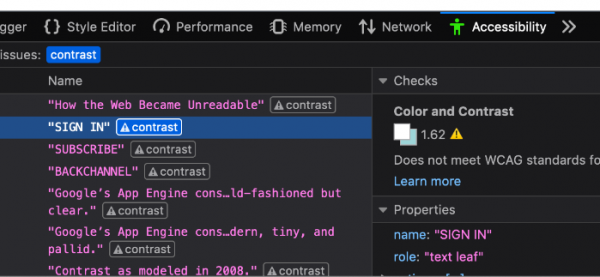
- The developer tools include tools for auditing the contrast of text elements, which can be used to identify elements that may not be perceived correctly by individuals with visual impairments or color perception issues;

- The Inspect mode has added a button to simulate print output, allowing you to identify elements that may be invisible when printed;
- The web console has expanded information displayed along with warnings about CSS issues, including links to the relevant nodes. It also implements the ability to filter output using regular expressions (for example, "/(foo|bar)/");
- The font editor has added the ability to adjust letter spacing;
- In the storage inspection mode, the ability to delete records from local and session storage has been added by selecting the appropriate elements and pressing the Back Space key;
- The network activity inspection panel now offers the ability to block certain URLs, resend requests, and copy HTTP headers to the clipboard in JSON format. New features are accessible via the selection of appropriate options in , displayed when right-clicking;
- The built-in debugger now features a search function across all files in the current project by pressing Shift + Ctrl + F;
- The setting for displaying system add-ons has changed: in about:debugging, instead of devtools.aboutdebugging.showSystemAddons, the parameter devtools.aboutdebugging.showHiddenAddons is now offered;
- When installed on Windows 10, a shortcut is ensured on the taskbar. Windows also added the ability to utilize the BITS (Background Intelligent Transfer Service) to continue downloading updates, even if the browser was closed;
- The Android version has improved rendering performance. The WebAuthn API (Web Authentication API) has been added for site access using a hardware token or fingerprint sensor. The API has been added to determine the actual visible area considering the display of the on-screen keyboard or scaling. In new installations, the automatic loading of the Cisco OpenH264 plugin for WebRTC has been discontinued.
In addition to new features and bug fixes, Firefox 68 has resolved , some of which are marked as critical, meaning they could allow an attacker to execute code by opening specially crafted pages. Currently, detailed information about the fixed security issues is not available, but the list of vulnerabilities is expected to be released within a few hours.
Firefox 68 is the last release that will include an update for the classic version of Firefox for Android. Starting with Firefox 69, expected on September 3, new Firefox releases for Android, , and fixes will be delivered as updates to the ESR branch of Firefox 68. The classic Firefox for Android will be replaced by a new mobile browser developed under the Fenix project, utilizing the GeckoView engine and a set of libraries. Currently, under the name Firefox Preview, testing of the first beta release of the new browser (today the corrective update 1.0.1 for this beta release, but it has not yet been published in ).
Source: opennet.ru

 Russian
 Italian
 German
 Polish
 Estonian
 Albanian
 Bulgarian
 Croatian
 Czech
Czech Danish
 Dutch
Dutch English
 French
 Hungarian
 Latvian
 Norwegian
 Portuguese
 Romanian
 Slovak
 Slovenian
 Spanish
 Swedish