

release of the web browser , as well as Firefox 68.1 for the Android platform. Additionally, updates have been formed. with long-term support and (The ESR branch 60.x will no longer receive updates; transitioning to the 68.x branch is recommended). Soon, the Firefox 70 branch will transition, with the release scheduled for October 22.
:
- The default standard mode for blocking unwanted content has been enhanced with features that ignore cookies from all third-party tracking systems and block JavaScript inserts that facilitate cryptocurrency mining. Mining code significantly increases the load on the user's system CPU and is generally implemented on websites following hacks or used on dubious sites as a monetization method.
Previously, these blocking options were only enabled when strict blocking mode was selected, which now makes sense to activate only if blocking methods of ("browser fingerprinting") is desired. Blocking occurs based on the list from .When blocking is active, a shield icon appears in the address bar, and the context menu allows you to see which specific websites had their cookies blocked that were used for tracking movements. In the same menu, you can selectively disable blocking for specific sites.
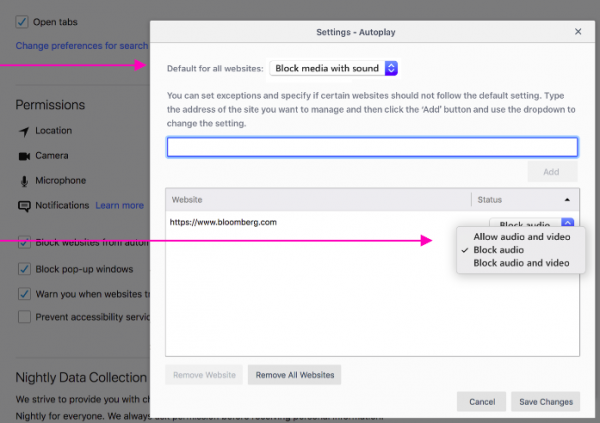
- The capabilities for blocking automatic playback of multimedia content have been expanded. In addition to the previously added mute feature for automatically playing videos, users now have the option to completely stop video playback, beyond just muting the sound. For instance, previously, advertising videos on sites would play without sound, but in the new mode, they won't start playing without an explicit click. To enable this mode, a new option ‘Block audio and video’ has been added to the autoplay settings (Options > Privacy and Security > Permissions > Autoplay), complementing the default setting ‘Block audio.’

This mode can be selected in relation to specific websites through the context menu displayed when clicking the ‘(i)’ button in the address bar.
- For users in the US and 'en-US' builds, the layout of the homepage displayed when opening a new tab has been changed, and additional content recommended by the Pocket service has been added. The size of blocks and the number of recommendations have been modified, and new thematic sections have been offered (Health, Science, Technology, and Entertainment);
- The ability to play Flash content via the Adobe Flash plugin is disabled by default. The settings for the Adobe Flash Player plugin have removed the option for permanently enabling Flash, leaving only the options to disable Flash and selectively enable it for specific sites (enabled by explicit click) without remembering the chosen mode. In the ESR branches of Firefox, support for Flash will remain until the end of 2020;
- by default the handling of files and , allowing users to override the styling of websites or the Firefox interface. The reason cited for the default disabling is work on reducing browser startup time. Changing behavior through userContent.css and userChrome.css is done by users very rarely, and loading CSS data consumes additional resources (optimization eliminates unnecessary disk access). To restore handling of userChrome.css and userContent.css, a setting "toolkit.legacyUserProfileCustomizations.stylesheets" has been added to about:config, which will be automatically activated for users who already use userChrome.css or userContent.css;
- For WebRTC, the capability to process channels using different video codecs has been implemented, simplifying the creation of video conferencing services where participants can use different client software;
- For the ARM64 architecture in the JavaScript engine, support for JIT compilation has been implemented;
- Information about the use of the 32-bit version of Firefox in a 64-bit OS environment has been excluded from the browser identifiers (navigator.userAgent, navigator.platform, and navigator.oscpu) (previously required for Flash but left an additional vector for covert user identification);
- A picture-in-picture (PiP) video viewing feature has been added, allowing you to detach the video into a floating window that remains visible while browsing. To use this mode, you need to click on the tooltip or right-click on the video to select “Picture in picture” from the context menu. For YouTube, which uses its own context menu handler, you should right-click twice or click while holding the Shift key. Support for this mode can be enabled in about:config using the option “media.videocontrols.picture-in-picture.enabled”;
- the implementation of a password generator ("signon.generation.available" in about:config), which prompts users with a securely generated password while filling out registration forms;
- In the password manager, the ability to handle accounts within the context of a top-level domain, enabling the suggestion of a single password saved for all subdomains. For example, a password saved for login.example.com will now be suggested for autofill in forms on www.example.com;
- which processes handlers, to inform the operating system about the most priority processes. For instance, the content processing task handling the active tab will receive a higher priority (more CPU resources) than the processes related to background tabs (if they are not playing video or sound). This change is currently enabled by default only for the Windows platform; other systems require the activation of the option dom.ipc.processPriorityManager.enabled in about:config;
- the Password Checkup component, designed to analyze the security of the passwords used by the user. When attempting to log in to any site, Password Checkup API , allowing the creation of extensions based on the WebExtensions technology in the style of Greasemonkey for executing user scripts in the context of web pages. For example, by connecting scripts, you can modify the appearance and behavior of the viewed pages. This API is already part of Firefox, but until now, enabling it required setting the parameter "extensions.webextensions.userScripts.enabled" in about:config. Unlike existing extensions with similar functionality that use tabs.executeScript, the new API allows isolating scripts in separate sandbox environments, addresses performance issues, and provides the ability to handle various stages of page loading.
- The navigator.mediaDevices property is now only available when the page is opened in a secure context (Secure Context), i.e., when opened via HTTPS, through localhost, or from a local file;
- CSS properties have been added and , allowing control over the display of content that overflows the boundaries of blocks and inline elements (to truncate the tail or display a scrollbar). The properties are implemented through automatic transformation into overflow-x and overflow-y depending on the content output mode (top to bottom or line-by-line).
- For the CSS property support for the value break-spaces has been implemented;
- The CSS property has been implemented , specifying that the element and its content are separated from the rest of the DOM tree;
- A new CSS property has been added , allowing determining whether the text can be selected by the user;
- The ability to set @supports rules for selectors has been added (
in the format "@supports selector(selector-to-test){…}", which can be applied to selectively apply CSS only when a specific selector is supported or not supported in the browser; - Support added for JavaScript class instances, which allow specifying predefined properties initialized outside the constructor. Support for private fields, which are not visible outside the class, is also expected soon;
class Product {
name;
tax = 0.2; /*public field*/
#basePrice = 0; /*приватное поле*/
price;constructor(name, basePrice) {
this.name = name;
this.basePrice = basePrice;
this.price = (basePrice * (1 + this.tax)).toFixed(2);
}
} - Added API , allowing the connection of a handler that will receive notifications about the size changes of specified elements on the page. The key difference of the new API from window.onresize and CSS Media Queries is that it allows you to detect changes to specific elements on the page rather than the entire visible area, enabling changes to be made only to that element without affecting the entire visible content;
- A Microtasks API has been added, introduced by a single method , which allows for scheduling a callback function at a low level by adding it to the microtask queue;
- New methods have been introduced , , , DOMMatrix.fromMatrix(), ;
- In the HTTP headers Access-Control-Expose-Headers, Access-Control-Allow-Methods, and Access-Control-Allow-Headers, the ability to specify a wildcard '*' for unauthenticated requests has been added;
- Grouped warnings related to user movement tracking have been provided in the web console;
- The network activity inspection panel has been enhanced with detailed information about the reasons for resource blocking (CSP, mixed content, etc.), and an optional column with the full URL has been added;
- The JavaScript debugger startup has been accelerated. Remote debugging functions have been transferred to the about:debugging interface. Support for step-by-step debugging of asynchronous functions (Async) has been implemented. A new class of breakpoints has been introduced, which can be bound to events related to mouse actions, touch screens, animations, DOM, media queries,
workers, etc. - A new interface for auditing page views has been added to the developer tools, which uses of the content (for example, displaying text from the 'alt
attribute instead of images); - On macOS systems with multiple graphics cards installed, more aggressive switching to energy-efficient GPU has been ensured after the completion of WebGL content processing. Protection against switching from an energy-efficient to a powerful GPU for one-time WebGL calls has also been added. In macOS builds, file upload progress is now displayed through the standard Finder interface. Installation builds of Firefox in PKG format are being generated;
- For Windows 10 with the latest updates (1903+), support for the Web Authentication HmacSecret extension via Windows Hello has been added for password-free authentication on websites using a fingerprint, facial recognition, or USB token;
- the formation of new releases of Firefox for Android, now under the codename Fenix is a new mobile browser utilizing the GeckoView engine and the Mozilla Android Components library. Bug fixes for Firefox for Android will be released throughout the year as part of the Firefox 68 ESR branch, for example, a new version has now been formed . To download the new browser, you need to use the test builds
.
In addition to new features and bug fixes, Firefox 69 addresses , of which only one (CVE-2019-11751) as critical. This issue is specific to the Windows platform and allows arbitrary file writing in the system when launching the browser from another application (for instance, when opening a link from a messaging app, the link can be crafted in such a way that launching the browser will create an auto-start file in the 'Startup' directory). The decrease in critical vulnerabilities is attributed to the fact that memory issues, such as buffer overflows and access to already freed memory areas, are now marked as dangerous, but not critical. The new release fixes 13 such issues that could potentially lead to an attacker executing code when opening specially crafted pages.
Source: opennet.ru
