

The release of web browser Firefox 86 has taken place. Additionally, an update for the long-term support branch 78.8.0 has been formed. The Firefox 87 branch has entered beta testing, with a release planned for March 23.
Key innovations:
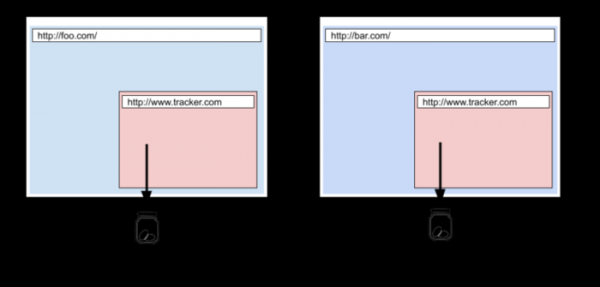
- In strict mode for blocking unwanted content, the Total Cookie Protection feature has been activated, where each site uses a separate isolated storage for cookies. The proposed isolation method prevents cookies from being used to track movement between websites, as all cookies issued from third-party blocks loaded on the site are now tied to the main site and are not transmitted when accessing these blocks from other sites. An exception has been made for the cross-site transmission of cookies for services not related to user tracking, such as those used for single sign-on. Information about blocked and allowed cross-site cookies is displayed in the menu shown when clicking the shield icon in the address bar.

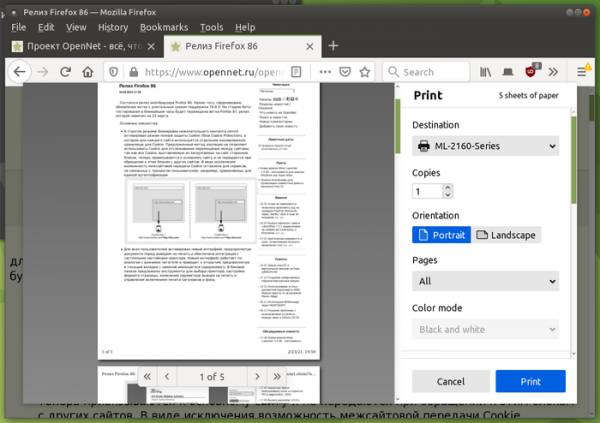
- A new document preview interface before printing has been activated for all users, along with integration with printer system settings. The new interface works similarly to reader mode, resulting in the preview opening in the current tab, replacing the existing content. The sidebar offers tools for selecting a printer, adjusting page format, changing print output settings, and controlling the inclusion of headers and backgrounds in printing.

- Rendering operations for Canvas and WebGL elements have been moved to a separate process responsible for offloading operations to the GPU. This change has significantly improved the stability and performance of sites utilizing WebGL and Canvas.
- All code related to video decoding has been moved to a new RDD process, enhancing security by isolating video handlers in a separate process.
- Linux and Android builds include protection against stack and heap overflow attacks. This protection is based on the use of the "-fstack-clash-protection" option, which causes the compiler to insert probe checks during each static or dynamic stack allocation, enabling detection of stack overflows and blocking attack methods based on stack and heap collision, related to bypassing execution flow through stack guard pages.
- The reader mode now allows viewing HTML pages saved on the local system.
- Support for the AVIF (AV1 Image Format) image format is enabled by default, which employs intra-frame compression technologies from the AV1 video encoding format. The container for distributing compressed data in AVIF is fully analogous to HEIF. AVIF supports both HDR (High Dynamic Range) images and wide-gamut color space, as well as standard dynamic range (SDR). Previously, enabling AVIF required setting the "image.avif.enabled" parameter in about:config.
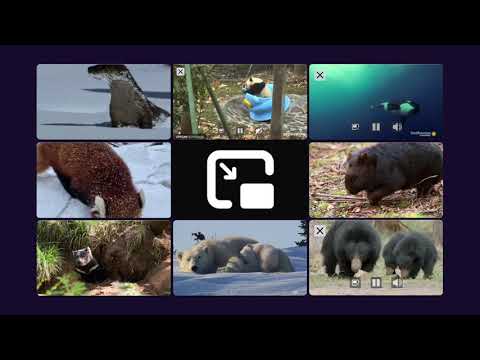
- Support for simultaneously opening multiple video windows in Picture-in-Picture mode has been enabled.

- Support for the experimental SSB (Site Specific Browser) mode has been discontinued. This mode allowed creating a separate shortcut for a site to launch without browser interface elements, with a unique icon on the taskbar, similar to full-fledged OS applications. The reasons cited for discontinuing support include unresolved issues, questionable benefits for desktop users, limited resources, and the desire to redirect them towards developing core products.
- Support for the DTLS 1.0 (Datagram Transport Layer Security) protocol, based on TLS 1.1 and used in WebRTC for transmitting audio and video, has been discontinued for WebRTC (PeerConnections). Instead of DTLS 1.0, it is recommended to use DTLS 1.2, based on TLS 1.2 (the DTLS 1.3 specification based on TLS 1.3 is not yet ready).
- The CSS function image-set() has been introduced, allowing selection of an image from a set of options with varying resolutions, that is most suitable for the current screen parameters and network bandwidth. background-image: image-set( "cat.png" 1dppx, "cat-2x.png" 2dppx, "cat-print.png" 600dpi);
- The CSS property 'list-style-image' is designed to define an image for list item markers, allowing any form of image definition through CSS.
- CSS includes the ':autofill' pseudo-class, which allows tracking automatic filling of input fields by the browser (the selector does not activate on manual filling). input:autofill { border: 3px solid blue; }
- In JavaScript, the built-in object Intl.DisplayNames is enabled by default, through which localized names for languages, countries, currencies, date elements, etc., can be obtained. let currencyNames = new Intl.DisplayNames(['en'], {type: 'currency'}); currencyNames.of('USD'); // 'US Dollar' currencyNames.of('EUR'); // 'Euro'
- In the DOM, the value of the property 'Window.name' is reset to an empty value when loading a page tab with a different URL. are set up correctly. and the old value is restored when the back button is pressed and the previous page is returned to.
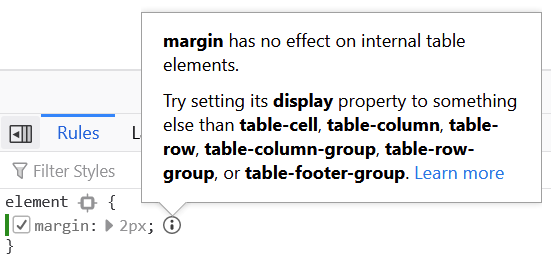
- In web development tools, a utility has been added that outputs a warning when setting margin or padding values in CSS for table inner elements.

- In the web developer toolbar, the number of errors on the current page is shown. Clicking on the red indicator with the error count directs you to the web console to view the list of errors.


In addition to new features and bug fixes in Firefox 86, 25 vulnerabilities have been addressed, of which 18 are marked as critical. 15 vulnerabilities (collected under CVE-2021-23979 and CVE-2021-23978) are caused by memory issues, such as buffer overflows and attempts to access already freed memory areas. Potentially, these problems could lead to the execution of malicious code when opening specially crafted pages.
The beta testing phase of Firefox 87 is notable for disabling the Backspace key handler by default outside of input form contexts. The removal of this handler is explained because the Backspace key is actively used while typing in forms, but when not focused on an input form, it functions as a back navigation key, which can lead to loss of typed text due to unintentional page transitions. To restore the old behavior, an option browser.backspace_action has been added in about:config. Additionally, when using the page search feature, labels are now displayed next to the scroll bar to indicate the position of found keywords. The Web Developer menu has been significantly simplified, and rarely used items have been removed from the Library menu.
Source: opennet.ru
