

Qt Company has published the release of the Qt 6.11 framework, continuing the work on stabilizing and enhancing the functionality of the Qt 6 branch. Qt 6.11 provides support for platforms including Windows 10+, macOS 13+, Linux (Ubuntu 22.04/24.04, openSUSE 15.6/16, SUSE 15 SP6, RHEL 8.10/9.6/10, Debian 11.6/12), iOS 17+, Android 9+ (API 23+), webOS, WebAssembly, INTEGRITY, VxWorks, FreeRTOS, and QNX. The source code of Qt components is available under LGPLv3 and GPLv2 licenses. Qt 6.11 has been designated as an intermediate release, with public support provided for 6 months (and an additional 6 months for commercial users).
Key changes in Qt 6.11:
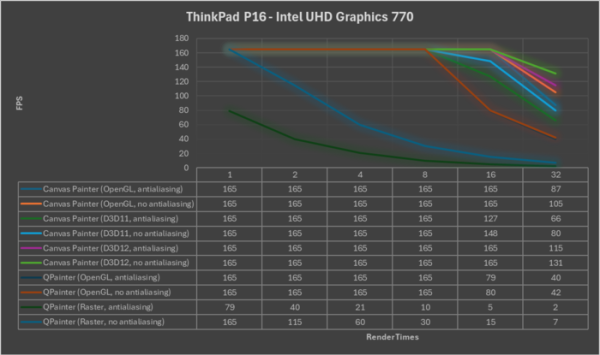
- The Qt Canvas Painter module has been added, providing an API for hardware-accelerated 2D content rendering, built with reference to the HTML specification for Canvas 2D Context. The RHI (Rendering Hardware Interface) engine is used for rendering, supporting various 3D APIs (OpenGL, Vulkan, Metal, and Direct 3D), achieving a significant performance increase. In tests, the Qt Canvas Painter was found to be twice as fast as QPainter with OpenGL backend on a typical Lenovo ThinkPad P16 Gen 2 laptop, five times faster on a budget Lenovo Tab M10 HD Android tablet, and ten times faster on a top-end Samsung Galaxy Tab S8 Android tablet.

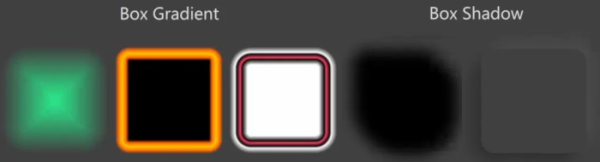
In addition to high performance, Qt Canvas Painter implements support for advanced features such as customizable antialiasing, box gradients and shadows (QCanvasBoxGradient and QCanvasBoxShadow similar to the CSS property box-shadow), grid patterns (QCanvasGridPattern), custom shader brushes, and color effects for adjusting transparency, brightness, contrast, and saturation.

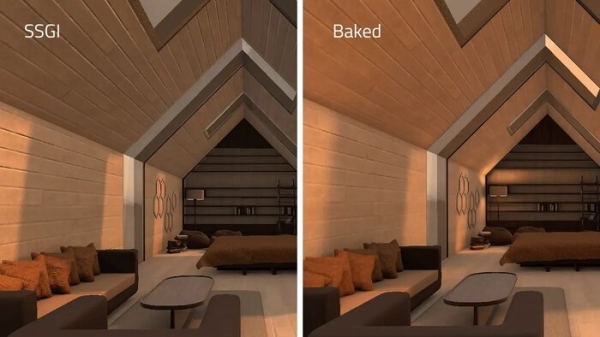
- The functionality of the Qt Quick 3D module is comparable to that of game engines. Support for SSGI (Screen Space Global Illumination) rendering technique has been added to simulate light reflection from surfaces during post-processing (an alternative to lightmap baking) and SSR (Screen Space Reflections) for realistic real-time reflections. The motion smoothing algorithm for moving objects has been improved by generating motion vectors for each object. Custom render passes can be created, which can be used directly from QML for layer masks, post-processing effects, and object color identification (color picking). New APIs for layers and tags have been added, allowing control over individual rendering passes, enabling elements at different stages of the rendering pipeline, and redirecting to target rendering buffers.

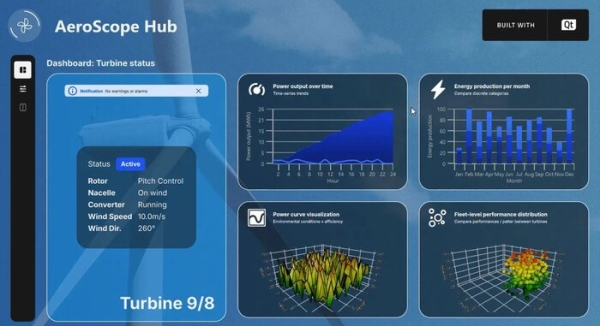
- The capabilities of the Qt Graphs module have been expanded. A CustomSeries type has been introduced, allowing the creation of custom charts where a user-defined delegate is responsible for rendering each data element. Support for multiple axis instances in 3D graphics has been implemented, for example, separate axes can be used for rowAxis, valueAxis, and columnAxis in QBar3DSeries, while in QScatter3DSeries and QSurface3DSeries, separate axes can be used for axisX, axisY, and axisZ. New properties have been added to override colors for individual axes, adjust gradients on charts, change line styles, and position labels. An example of creating custom 2D and 3D charts has been added — Wind Turbine Dashboard.

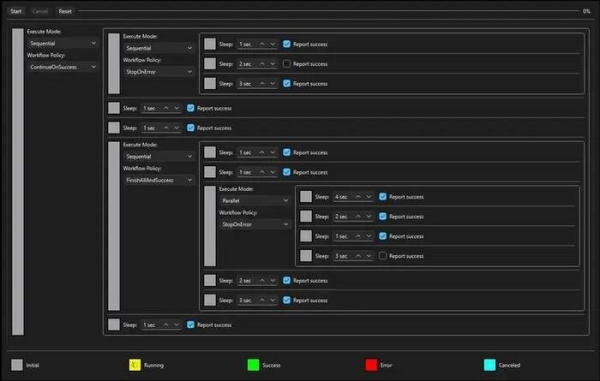
- An experimental Qt TaskTree module has been added, providing a declarative approach to creating and executing asynchronous tasks in C++. Key components of Qt TaskTree include: "recipes" — reusable objects that describe asynchronous workflows; "groups" — define policies for child tasks; "storage" for sharing data between tasks; and "iterators" for loops and task re-execution. Qt TaskTree also addresses compatibility issues across APIs by unifying various asynchronous APIs into a standard interface.

- Expanded capabilities for working with animated vector graphics created from images in SVG and Lottie formats. The Qt Quick VectorImage module and the lottietoqml tool have been stabilized. Support for morphing animation, SVG masks, SVG symbols, and matte layers (to control the visibility of another layer) has been added.
- A DoubleSpinBox component has been added to Qt Quick Controls. In the DialogButtonBox, the ability to control the processing of default buttons has been implemented. Independent control over corner radii has been added in the RectangularShadow effect.
- In Qt Widgets, an option StretchBanner has been added to QWizard; the keyboardSearchFlags parameter has been implemented in QAbstractItemView to adjust search behavior as keys are pressed; a property to control the visibility of the preview has been added to QColumnView.
- The Qt OpenAPI module has been added, allowing the generation of HTTP client code that uses Qt Networks RESTful API based on an OpenAPI specification in YAML format.
- A mechanism for managing the flow and content of requests and responses has been added to the Qt GRPC module.
- The Qt HTTP Server module has expanded its tools for managing limits and improved response handling in the working thread. QNetworkRequest now allows TCP Keep Alive settings (by default, inactive connections are automatically terminated after 2 minutes).
- In the QML Language Server, used for integration with IDEs, information about the location of the QML type definition in C++ code has been added to simplify navigation between QML and C++ from the IDE — when working with C++ code, QML objects can be found by identifiers, making it easy to traverse the QML context hierarchy.
- In addition to QRangeModel, a QRangeModelAdapter class has been implemented, providing a C++ API for modifying model data, interacting through the QAbstractItemModel protocol, which simplifies the data transfer from backend C++ code to Qt Quick or Qt Widget.
- Support for Android 16 platform has been added. Google Play Feature Delivery functionality has been implemented for splitting the application into packages (the main package is installed from Google Play immediately, while additional ones are loaded as needed). Support for launching Qt without Android dependencies for quick rendering startup has been implemented for Android Automotive.
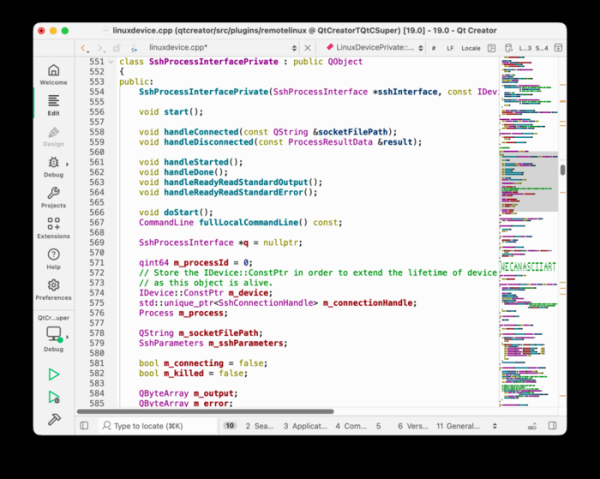
Additionally, we can note the recently published release of Qt Creator 19, an integrated development environment designed for creating cross-platform applications using the Qt library. It supports the development of classic applications in C++, as well as the use of the QML language, where JavaScript is used to define scripts and the structure and parameters of interface elements are set using CSS-like blocks. Ready-made builds are available for Linux, Windows, and macOS.
Among the new features is the minimap mode (Preferences > Text Editor > Display > Enable minimap), which displays a mini-thumbnail of all content alongside the scrollbar, allowing users to get an overview of the entire code at once. The package includes a simple MCP server for integration with AI assistants, enabling file and project opening, build launching, and debugging. The setup for building on external devices has been simplified— a Run Auto-Detection button has been added for automatically detecting the version of Qt, compiler, debugger, and CMake after registering a device. Direct access support for the file systems of connected devices, Android devices, and emulators has been implemented.
Source: opennet.ru
