

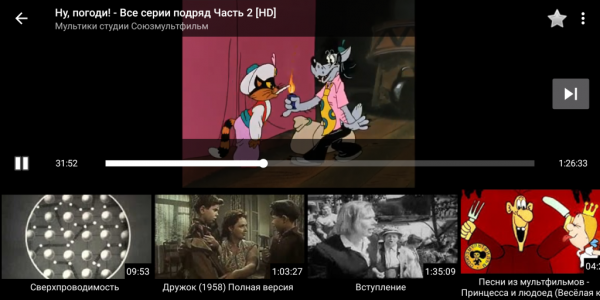
Brief Introduction: I want to talk about the YouTube online player for Android with local playlists, channels, and recommendations.
Expanded Introduction:
Some time ago, I faced exactly the same issue as the author of this wonderful app did. , and I had exactly the same attitude towards it: I want to be able to sometimes give my child a tablet or smartphone with cartoons, but I am completely dissatisfied with where the recommended list in standard YouTube client apps takes the child after 2-3 clicks.
Unfortunately, after installing the Channel Whitelist app, I discovered another more mundane but still fatal drawback — NIH seemed not very convenient to me (and, importantly, to my son), especially after getting used to the YouTube Kids player interface.
In general, after a while, I was ready to create my own implementation. After some time, it became possible to tag the first release.
Main Features:
- Add your favorite channels and playlists — they will be saved and indexed in the local database.
- Within added playlists, disable unnecessary videos if you do not need them.
- The recommendations list is generated randomly only from the channels and playlists added to the app.
The source code is open, licensed under GPLv3:
Next, an overview of the main features in more detail, plus some technical details on how to play videos from YouTube in your Android app without using Google APIs and web wrappers.
On the main screen and on the player screen: random recommendations from non-random channels.
Instant search in the local database.
=>
Add a new channel or playlist.
Search by name online or paste a known address. The list of videos from the channel or playlist is saved in the local database; icons are not cached.
Dynamic playlist — play search results.
=>
In the recommendations under the video, there will only be videos that satisfy the search query.
Similarly, if you open a video from the playlist settings, the recommendations list will only contain videos from that same playlist.
Playlists and channels can be temporarily disabled and re-enabled.
Note that videos from a disabled playlist will also disappear from search results, watch history, and favorites. However, don't worry, they will reappear there as soon as the playlist is turned back on.
Add video to the blacklist
A blocked video will not appear in recommendations, search results, will disappear from favorites and watch history. The video will still be visible in the playlist settings.
View the blacklist and re-enable items blocked by mistake:
Settings > menu in the header > Blacklist
Favorites and watch history
Favorite videos on the player screen are marked with a star in the upper right corner.
Context menus in the screen header and on long click in galleries and lists
Copy the name or address of the video or playlist in the viewing screen or in any list.
Quick start — add recommended channels and playlists
=>
The app will immediately look like it does in the screenshots above.
Unwanted channels and playlists can be turned off or deleted in the settings.
Installation
Project page:
in English:
releases:
- There are currently no applications on Google Play and there won't be for the foreseeable future (Google bans apps that scrape their site bypassing API, including the mentioned Channel Whitelist or NewPipe player)
- Build from source:
- Download apk from the releases section:
- I hope it will appear in the catalog soon (, but it hasn't progressed for almost a month), but not yet
Keep in mind that switching between different versions from different sources on one device won't work due to different apk signatures; you'll need to uninstall the installed version along with the data — the cache of playlists and watch history (or figure out how to transfer that data) before installing a version from a new source.
Technical details
Does not require a Google/YouTube account, only the internet is needed, uses libraries:
- to fetch data from the YouTube service and
- for playing videos.
Open source, free GPLv3 license.
question: Is it legal to scrape websites without permission (or with an explicit ban) from the authors? , which do not use their API and scrape their websites, as they violate their user agreement.
Answer: of course, it is legal; it's up to you which tool to use for reading publicly available information. Moreover: , but Google may have a different opinion; personally, I currently have no desire to go to an American court to convince them otherwise.
A bit of code
Library — a supporting project of the player , allows you to download a list of videos for a specified channel or playlist, download detailed information about a known video (what is visible on the webpage of the video), get the video thumbnail URL, and also get the video stream URL.
The code to download the playlist is a bit bulky, so I won't include it here; for those interested, check the source files, it mainly involves the class .
Let's see how to get the video stream URL from the public video page URL and play it in the player.
Include the library in
dependencies {
...
    // NewPipe: youtube parser
    // https://github.com/TeamNewPipe/NewPipeExtractor
    implementation "com.github.TeamNewPipe:NewPipeExtractor:v0.17.4"
...
}
Interestingly, even after this, it still won't be usable, as the examples will complain about the missing Downloader class. You can copy it into the project from the automated tests directory. — works for version 0.17.4 (it seems that in a newer version of the library this part has been restructured, but it still needs to be verified).
Get the video stream URL from the video page address on the YouTube site:
    public String extractYtStreamUrl(final String ytVidUrl) throws ExtractionException, IOException {
        // https://github.com/TeamNewPipe/NewPipeExtractor/blob/dev/extractor/src/test/java/org/schabi/newpipe/extractor/services/youtube/YoutubeStreamExtractorDefaultTest.java
        NewPipe.init(Downloader.getInstance(), new Localization("GB", "en"));
        final YoutubeStreamExtractor extractor = (YoutubeStreamExtractor) YouTube
                .getStreamExtractor(ytVidUrl);
        extractor.fetchPage();
        final String streamUrl = extractor.getVideoStreams().size() > 0 ? extractor.getVideoStreams().get(0).getUrl() : null;
//        for (final VideoStream stream : extractor.getVideoStreams()) {
//            stream.getUrl();
//        }
        return streamUrl;
    }
For the video address ytVidUrl, it can be the public address of the page of any video on the YouTube site, for example
The player will from Google itself. This is not just a web wrapper for YouTube; it is a fully-fledged embedded player capable of playing any video content. It is quite flexible and customizable. In particular, it can stream video content from YouTube if given the correct address. We just obtained the stream address, so let's see how to send it to the player.
Connect the library to the project :
dependencies {
...
    // google Exoplayer
    // https://github.com/google/ExoPlayer
    // https://exoplayer.dev/
    implementation 'com.google.android.exoplayer:exoplayer:2.10.8'
...
}
We will not cover all the nuances of placing the player component on the application screen (you can refer to the examples on the project website or in the code), but we will only look at how to start video playback from YouTube in the player using the address we obtained above:
private void playVideoStream(final String streamUrl, final long seekTo) {
    if (streamUrl == null) {
        // stop playing the current video if it has been loaded
        videoPlayerView.getPlayer().stop(true);
    } else {
        // https://exoplayer.dev/
        // https://github.com/google/ExoPlayer

        final Uri mp4VideoUri = Uri.parse(streamUrl);
        final MediaSource videoSource = new ProgressiveMediaSource.Factory(videoDataSourceFactory)
                .createMediaSource(mp4VideoUri);

        // Pause the old video while preparing the new one
        if (videoPlayerView.getPlayer().getPlaybackState() != Player.STATE_ENDED) {
            // If pausing here after the player has paused itself upon finishing the video,
            // we will get a second STATE_ENDED event here, so we need a special check.
            // The value of getPlayWhenReady() will remain true, so we are checking the state.
            // https://github.com/google/ExoPlayer/issues/2272
            videoPlayerView.getPlayer().setPlayWhenReady(false);
        }

        // Prepare the player with the source.
        ((SimpleExoPlayer) videoPlayerView.getPlayer()).prepare(videoSource);

        // Set the current position immediately upon loading the video
        // (in comments, there's mention of data sources that support or do not support
        // seeking during loading; it seems like this is nonsense - just seek right after loading)
        // Exoplayer plays new Playlist from the beginning instead of provided position
        // https://github.com/google/ExoPlayer/issues/4375
        // How to load stream in the desired position? #2197
        // https://github.com/google/ExoPlayer/issues/2197
        // at this point, normal duration is not available yet, so we don’t check it
        // if(seekTo > 0 && seekTo  0) {
            // 5 seconds earlier
            videoPlayerView.getPlayer().seekTo(seekTo - 5000 > 0 ? seekTo - 5000 : 0);
        }
        videoPlayerView.getPlayer().setPlayWhenReady(true);
    }
}
Known Issues
- Will not play videos with age restrictions that require a Google/YouTube account login
for example: ,
Tip: Add such videos to a blacklist or ask the video owner to remove the mistakenly set restriction.
- Will not play some live-stream videos for which the service returns a zero length (for such videos, the duration in lists and the gallery is noted as "[dur undef]")
for example: ,
Tip: Add such videos to the blacklist.
- Videos available only via direct links may not appear in the local playlist, even if you upload all of the user's videos.
for example:
If you encounter a public video that does not require a login, plays in the browser but does not play in the player, please send a bug report (it is quite possible that the problem has already been fixed in a new version, NewPipeExtractor and you will only need to update the build with this version, ).
The interface may lag on a slow (but not turned off) internet connection.
As a result,
The son switched from a tablet to a Samsung smart TV that cannot run Android applications. Therefore, the best parental control is still personal supervision.
But the app turned out to be convenient enough for me to start using it myself. My first impression from the early working versions was that I stepped into another world. All content is loaded from YouTube, but this is no longer YouTube; it is something else—safe and controlled, as if I had removed a centipede from my eye and placed it in a glass jar. And the key issue is indeed the recommendations.
Source: habr.com
