

I don't know what to compare provisioning with. Maybe with a cat? You can do without it, but it's a bit better with it. Especially if it works :)
Problem statement:
- I want to configure SIP phones quickly, easily, and securely. Especially when setting up a phone or reconfiguring it.
- Many vendors have their own configuration formats, their own utilities for generating configs, and their own ways to protect configs. Dealing with each one is not very appealing.
- Many provisioning solutions are a) vendor-specific or specific to one phone system, and b) quite cumbersome to implement, with a bunch of scripts, parameters, ugh…
Regarding point 3, I would like to comment that there are excellent provisioning systems , , , where there are templates available for phones from various vendors. There are also commercial solutions where you can configure the provisioning module to work with phones from different manufacturers, like Yeastar PBX.
There are also plenty of recipes on Habrahabr for configuring devices from various vendors: , . But as they say, all systems have a fatal flaw. So let's create our own solution.
our own format
As they say in xkcd, if you don't want to deal with 14 formats — . Therefore, we will use common settings for any phone and create our own JSON configuration format.
Approximately like this:
{
   "key": "sdgjdeu9443908",
   "token": "590sfdsf8u984",
   "model": "gxp1620",
   "vendor": "grandstream",
   "mac": "001565113af8",
   "timezone_offset": "GMT+03",
   "ntp_server": "pool.ntp.org",
   "status": true,
   "accounts": [
      {
         "name": "Mobilon",
         "line": 1,
         "sip_register": "sip.mobilonsip.ru",
         "sip_name": "sip102",
         "sip_user": "sip102",
         "sip_password": "4321",
         "sip_auth": "sip102"
      }
   ]
}
So, in any phone, it is essential to set the local time and SIP lines. This part is straightforward. More examples can be seen .
your provisioning server
In the manufacturer's manuals, there is usually a section that says: take a CSV, write the login-password-MAC address there, use our proprietary script to generate files, place them under the Apache web server, and it will be good.
In the next section of the manual, it usually explains that you can also encrypt the generated config file.
But this is all classic. The modern approach with smoothies and Twitter suggests creating a web server that isn't as powerful as Apache, but only does one small thing: generating and delivering configurations via a link.
Here, let's pause and remember that nearly all SIP phones can now receive configurations via http/https, so we won't consider other implementations (ftp, tftp, ftps). Moreover, each phone knows its MAC address. So, we will create two links: one personal — based on the device key, and a second general one, which works by a combination of a shared token and the MAC address.
I also won't dwell on zero-config, i.e., setting up a phone 'from scratch', meaning you plug it into the network and it just works. No, in my scenario, you plug it into the network, make preliminary settings (configure it to receive the config from the provisioning server), and then you sip on a piña colada while reconfiguring the phone as needed through provisioning. Distributing Option 66 is the DHCP server's responsibility.
By the way, I got really tired of saying 'provisioning', so the word was shortened to 'provision', please don't kick me for it.
And one more thing: our provisioning server has no UI, i.e., user interface. Maybe for now, but I'm not sure, as I don't require it. However, there is an API for saving/deleting settings, getting a list of supported vendors, models, all described according to the swagger specification.
Why API and not UI? Since I already have my own telephone system, I have a source of credentials where I just need to grab this data, compose the necessary JSON, and publish it on the provisioning server. The provisioning server will then issue the required device its config according to the rules specified in the JSON file or will not issue it if the device is incorrect or does not meet the criteria specified in this JSON.
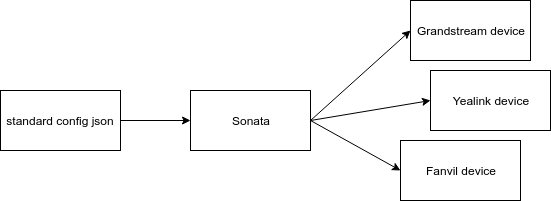
This is how the provisioning microservice turned out. It's called , the source code is available on GitHub, and there's also a , an example of using Docker .
Key features:
in any case, limited access to the config over time, by default 10 minutes. If you want to make the config available again — republish the configuration.
a single format for all vendors, all customization is handled in sonata, you send a standardized JSON and can configure any available equipment.
All configurations issued to devices are logged, and all problem areas can be viewed in the log to see errors.
It is possible to use a single shared link with a token; each phone receives its configuration by specifying its MAC address. Alternatively, a personal link can be provided using a key.
The API for management and provisioning configurations to phones is separated by ports.
Testing. It was very important for me to establish the format of the issued configuration and ensure that all typical scenarios for configuration issuance are covered by tests. This is crucial for it to work smoothly.
Cons:
Currently, encryption is not used within Sonata. You can, of course, start using HTTPS by placing, for example, Nginx in front of Sonata. However, proprietary methods have not yet been implemented. Why? The project is still young, having provisioned barely its first hundred devices. And, of course, I am gathering ideas and feedback. Going forward, to ensure everything is secure so configurations cannot be sniffed in the network, it might be worth focusing on encryption keys, TLS, and related technology, but that will be a continuation.
Lack of UI. This might be a significant drawback for the end user, but for a system administrator, a command-line utility is likely more important than a full-fledged application. Creating a command-line utility was planned, but I am not sure if it is needed.
What’s the result?
A small and simple web server for provisioning several phone models with an API for management.
Once again, how should this work?
- We install Sonata.
- We form a JSON configuration and publish it to Sonata.
- Then we get a link for provisioning from Sonata.
- We then specify this link in the telephone apparatus.
- The device fetches the configuration.
In subsequent operation, there are only two steps:
- We form a JSON configuration and publish it to Sonata.
- The device fetches the configuration.
Which phones can be provisioned?
Vendors Grandstream, Fanvil, Yealink. The configurations within the vendor are more or less similar, but may vary depending on the firmware — additional testing may be required.
What rules can be set?
By time. You can specify the time until which the configuration will be available.
By MAC address. When issuing a configuration via a personal link, the device's MAC address will also be checked.
By IP. Based on the IP address from which the request was made.
How to interact with Sonata?
Via the API, making HTTP requests. The API will be available in your installation. Since the API supports the Swagger specification, you can use it. for testing requests to the API.
Okay, great. This thing is cool; how can I try it out?
The easiest way is to deploy a Docker image based on the . The repository contains installation instructions.
А если знаю node.js?
If you have experience using JavaScript, you will quickly understand how everything is set up here.
Will there be further development of Sonata?
I have partially achieved my goals. Further development is a question of my tasks related to the automation of phone configuration. There is still the possibility to expand the configs for setting up phone buttons, add provisioning for address books, and perhaps something else; feel free to write in the comments.
Summary and acknowledgments
I welcome constructive suggestions/objections/comments and questions, as there might be things I did not explain clearly.
I also express my gratitude to all colleagues who helped, consulted, tested, and provided/gave phones for testing. Many people from whom I have communicated at work, at AsterConf, in chats and emails, contributed to the project in various ways. Thank you for the ideas and thoughts. I don't know what to compare provisioning with. Maybe with a cat? It seems you can do without it, but it’s a bit better with it.
Source: habr.com

 Russian
 Italian
 German
 Polish
 Estonian
 Albanian
 Bulgarian
 Croatian
 Czech
Czech Danish
 Dutch
Dutch English
 French
 Hungarian
 Latvian
 Portuguese
 Romanian
 Slovak
 Slovenian
 Spanish
 Swedish