

The results of testing the fresh releases of the Redis 8.0 and Valkey 8.1 databases are presented, which have announced significant performance optimizations. In all conducted tests, the community-driven fork surpassed the original project, mainly due to the implementation of a new mechanism for multi-threaded asynchronous input/output processing, provided to the project by Amazon.
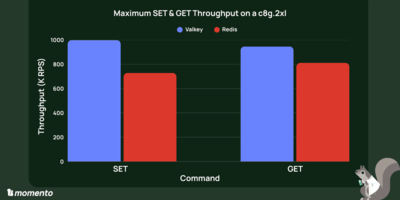
In the AWS Graviton4 test environment c8g.2xlarge with 8 VCPUs, Valkey 8.1.1 achieved a performance of 999.8 thousand SET requests per second, while Redis 8.0 reached a level of 729.4 thousand requests per second. Overall, Valkey's throughput was 37% higher than Redis for SET operations and 16% for GET. Additionally, compared to Redis, the Valkey project demonstrated a 30% reduction in latency for SET operation requests and a 60% reduction for GET operations.
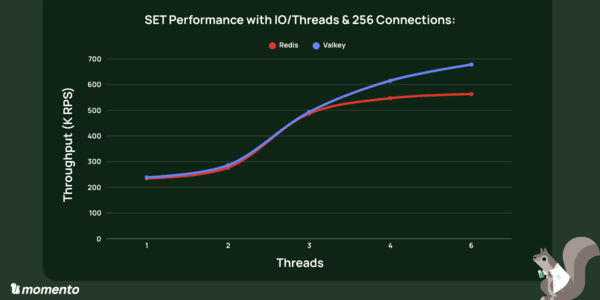
A separate analysis was conducted on the changes in throughput and latency as a function of the number of concurrently running handlers in multi-threaded input/output processing mode. Up to 3 threads, Valkey and Redis show roughly equal results, but Valkey pulls ahead. With 6 threads on a system with 8 VCPUs, Valkey's performance reached 678 thousand SET requests per second, while Redis managed 563 thousand requests per second at a limit of 256 concurrent connections. With an increase in connections to 400, Valkey's performance grew to 832 thousand SET requests per second.
After optimizing interrupt handling in the system to reduce context switching, Valkey's performance was raised to 999.8 thousand SET requests per second. The essence of the optimization was to allocate 2 VCPUs for handling interrupts and bind the remaining 6 VCPUs to the input/output processing threads of Valkey and Redis to eliminate handler migration between CPUs. sudo ethtool -L ens34 combined 2 # limit the number of IRQ handlers to 2 grep ens34 /proc/interrupts # check which handlers are active (99 and 100) echo 1 | sudo tee /proc/irq/99/smp_affinity # bind handler 99 to core 1 echo 2 | sudo tee /proc/irq/100/smp_affinity # bind handler 100 to core 2 # Run the database (for Redis, change valkey/valkey:8.1.1 to redis:8.0) binding the container to CPU cores 2-7 docker run --network="host" --rm \ --cpuset-cpus="2-7" valkey/valkey:8.1.1 \ --save "" --appendonly no --io-threads 6 \ --protected-mode no --maxmemory 10gb
To test performance, the following command was used: docker run --network="host" --rm --cpuset-cpus="2-7" \ valkey/valkey:8.0.1 valkey-benchmark \ -h 172.31.4.92 -p 6379 -t SET,GET -n 100000000 -c 256 \ -r 3000000 --threads 6 -d 1024
Source: opennet.ru
