

(Control Maps)
(Dedicated to the International Year of the Periodic Table of Chemical Elements)
(The latest updates were made on April 8, 2019. The list of updates is just below the cut)
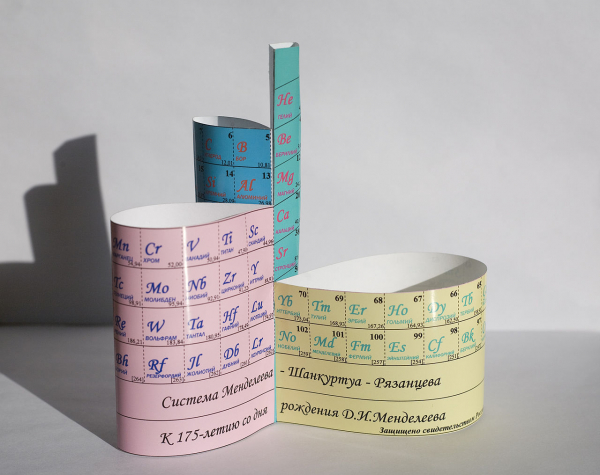
(, )
I remember we studied the duck. It was three lessons at once: geography, natural science, and Russian. In natural science class, the duck was studied as a duck—what its wings are like, what its feet are like, how it swims, and so on. In geography, the same duck was studied as a resident of the globe: we had to show on the map where it lives and where it doesn't. In Russian, Serafima Petrovna taught us to write "u-t-k-a" and read something about ducks from Brehm. Casually, she informed us that the duck is called this in German and that in French. It seems this was called the "integrated method" then. In general, everything was done "casually."
Veniamin Kaverin, The Two Captains
In the cited quote, Veniamin Kaverin skillfully demonstrated the shortcomings of the integrated teaching method; however, in some (perhaps rather rare) cases, elements of this method can be justified. One such case is the Periodic Table of D.I. Mendeleev in school informatics classes. The task of programmatically automating typical actions with the Mendeleev table is evident for students beginning to study chemistry, broken down into many typical chemistry tasks. At the same time, within the framework of informatics, this task allows for a straightforward demonstration of the method of control maps, which can be related to graphical programming understood in the broadest sense as programming using graphical elements.
(Updates made on April 8, 2019:
Let's start with a basic task. In the simplest case, the Periodic Table should be displayed on the screen in a form window, where each cell will show the chemical symbol of the element: H - hydrogen, He - helium, etc. If the mouse cursor points to a cell, the symbol of the element and its number will be displayed in a special field on our form. If the user clicks the left mouse button, the symbol and number of this selected element will be indicated in another field of the form.
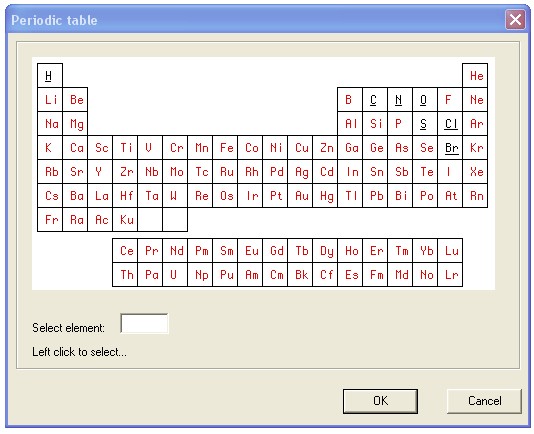
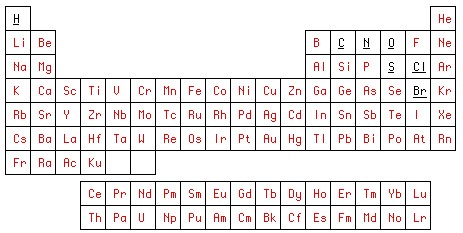
The task can be solved with any universal programming language. We'll take the simple old Delphi-7, which is understandable to almost everyone. But before programming in this language, let's draw two pictures, for example, in Photoshop. First, we'll draw the Periodic Table in the way we want to see it in the program. We will save the result in a graphic file. table01.bmp.
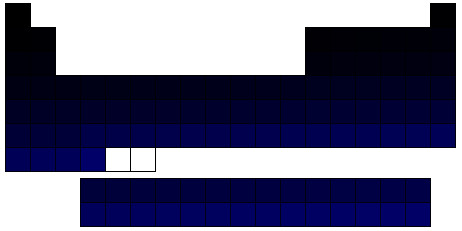
For the second drawing, we will use the first one. We will sequentially fill the cells of the table, cleared of any graphics, with unique colors in the RGB color model. R and G will always be 0, while B=1 for hydrogen, 2 for helium, and so on. This drawing will be our control map, which we will save in a file named table2.bmp.
The first stage of graphic programming in Photoshop is complete. Now we move on to graphic programming the GUI in Delphi-7 IDE. For this, we open a new project, where we place a button to call the dialog (tableDlg), which will handle the table. Next, we work with the form. tableDlg.
We place a component of the class TImage. We get Image1. Note that in general, for larger projects, automatically generated names like ImageN, where N can reach several dozen or more — which is not the best programming style, and it's better to give them more meaningful names. But in our small project, where N will not exceed 2, we can leave it as generated.
In the property Image1.Picture we load the file table01.bmp. We create Image2 and upload our control map there. table2.bmpHere, we make the file small and invisible to the user, as shown in the lower left corner of the form. We add additional control elements whose purpose is obvious. The second stage of graphic programming the GUI in Delphi-7 IDE is complete.
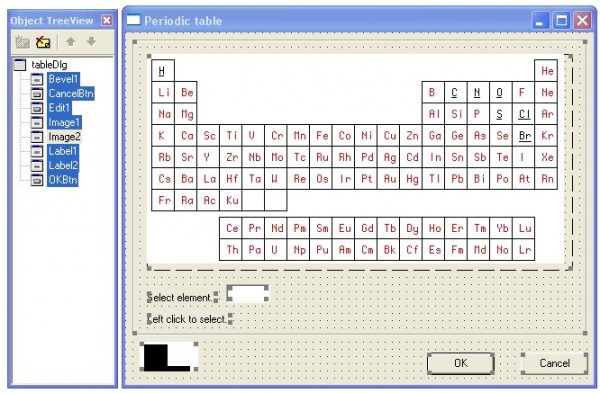
We move on to the third stage — writing the code in Delphi-7 IDE. The module consists of just five event handlers: form creation (FormCreate), cursor movement over Image1 (Image1MouseMove), left mouse click on the cell (Image1Click) and exit from the dialog with the OK (OKBtnClick) or Cancel (CancelBtnClick) buttons. The headers of these handlers are generated in the standard way using the IDE.
The source code of the module:
unit tableUnit;
// Periodic table of chemical elements by D.I. Mendeleev
//
// third112
// https://habr.com/ru/users/third112/
//
// Table of contents
// 1) creating the form
// 2) working with the table: specifying and selecting
// 3) exiting the dialog

interface

uses Windows, SysUtils, Classes, Graphics, Forms, Controls, StdCtrls,
  Buttons, ExtCtrls;

const
 size = 104; // number of elements

type
 TtableDlg = class(TForm)
    OKBtn: TButton;
    CancelBtn: TButton;
    Bevel1: TBevel;
    Image1: TImage;  // periodic table of elements
    Label1: TLabel;
    Image2: TImage;  // control map
    Label2: TLabel;
    Edit1: TEdit;
    procedure FormCreate(Sender: TObject); // creating the form
    procedure Image1MouseMove(Sender: TObject; Shift: TShiftState; X,
      Y: Integer);                        // specifying the cell
    procedure Image1Click(Sender: TObject); // selecting the cell
    procedure OKBtnClick(Sender: TObject);  // OK
    procedure CancelBtnClick(Sender: TObject); // Cancel
  private
    { Private declarations }
    TableSymbols : array [1..size] of string [2]; // array of element symbols
  public
    { Public declarations }
    selectedElement : string; // selected element
    currNo : integer;         // current element number
  end;

var
  tableDlg: TtableDlg;

implementation

{$R *.dfm}

const
PeriodicTableStr1=
'HHeLiBeBCNOFNeNaMgAlSiPSClArKCaScTiVCrMnFeCoNiCuZnGaGeAsSeBrKrRbSrYZrNbMoTcRuRhPdAgCdInSnSbTeIXeCsBaLa';
PeriodicTableStr2='CePrNdPmSmEuGdTbDyHoErTmYbLu';
PeriodicTableStr3='HfTaWReOsIrPtAuHgTlPbBiPoAtRnFrRaAc';
PeriodicTableStr4='ThPaUNpPuAmCmBkCfEsFmMdNoLrKu ';

// creating the form  ==================================================

procedure TtableDlg.FormCreate(Sender: TObject);
// creating the form
var
  s : string;
  i,j : integer;
begin
  currNo := 0;
// initializing the array of element symbols:
  s := PeriodicTableStr1+ PeriodicTableStr2+PeriodicTableStr3+PeriodicTableStr4;
  j := 1;
  for i :=1 to size do
   begin
     TableSymbols [i] := s[j];
     inc (j);
     if s [j] in ['a'..'z'] then
      begin
        TableSymbols [i] := TableSymbols [i]+ s [j];
        inc (j);
      end; // if s [j] in
   end; // for i :=1
end; // FormCreate ____________________________________________________

// working with the table: specifying and selecting =========================================

procedure TtableDlg.Image1MouseMove(Sender: TObject; Shift: TShiftState;
  X, Y: Integer);
// specifying the cell
var
  sl : integer;
begin
  sl := GetBValue(Image2.Canvas.Pixels [x,y]);
  if sl in [1..size] then
   begin
    Label1.Caption := intToStr (sl)+ ' '+TableSymbols [sl];
    currNo := sl;
   end
  else
    Label1.Caption := 'Select element:';
end; // Image1MouseMove   ____________________________________________________

procedure TtableDlg.Image1Click(Sender: TObject);
begin
  if currNo  0 then
   begin
    selectedElement := TableSymbols [currNo];
    Label2.Caption := intToStr (currNo)+ ' '+selectedElement+ ' selected';
    Edit1.Text := selectedElement;
   end;
end; // Image1Click  ____________________________________________________

// exiting the dialog  ==================================================

procedure TtableDlg.OKBtnClick(Sender: TObject);
begin
    selectedElement := Edit1.Text;
    hide;
end;  // OKBtnClick ____________________________________________________

procedure TtableDlg.CancelBtnClick(Sender: TObject);
begin
  hide;
end;  // CancelBtnClick ____________________________________________________

end.
In our version, we took a table with 104 elements (constant size). Obviously, this size can be increased. The element designations (chemical symbols) are recorded in the array TableSymbols. However, for the sake of compactness of the source code, it seems reasonable to write this sequence of designations as string constants PeriodicTableStr1,…, PeriodicTableStr4, so that when the form is created, the program distributes these designations across the array elements. Each element designation consists of one or two Latin letters, with the first letter being uppercase and the second (if present) lowercase. This simple rule is implemented when loading the array. Thus, the designation sequence can be recorded in a compressed form without spaces. The division of the sequence into four parts (constants PeriodicTableStr1,…, PeriodicTableStr4) is due to the convenience of reading the source code, as a line that is too long may not fit entirely on the screen.
When the mouse cursor moves over Image1 the event handler Image1MouseMove for this event determines the value of the blue component of the pixel color of the control map Image2 for the current cursor coordinates. By construction, Image2 this value equals the element number if the cursor is inside the cell; zero if on the border, and 255 in other cases. The other actions performed by the program are trivial and do not require explanations.
In addition to the stylistic techniques of programming mentioned above, it is worth noting the style of comments. Strictly speaking, the code examined is so small and simple that comments do not seem particularly necessary. However, they were added also for methodological reasons — short code allows for clearer illustrations of certain general conclusions. In the presented code, one class is declared (TtableDlg). The methods of this class can be rearranged, and this will not affect the functioning of the program, but it may impact its readability. For example, let’s imagine the sequence:
OKBtnClick, Image1MouseMove, FormCreate, Image1Click, CancelBtnClick.
It may not be very noticeable, but reading and understanding will become a bit more complicated. If there are not five methods, but several dozen and in the section implementation They have a completely different order of sequence than in class descriptions, so the chaos will only increase. Therefore, although it is difficult to prove strictly and may even be impossible, one can hope that establishing additional order will improve code readability. This additional order is facilitated by the logical grouping of several methods that perform similar tasks. Each group should have a title, for example:
// работа с таблицей: указание и выбор
These titles should be copied to the beginning of the module and formatted as a table of contents. In the case of sufficiently long modules, such tables of contents provide additional navigation options. Similarly, in the long body of a single method, procedure, or function, one should first mark the end of this body:
end; // FormCreateand, secondly, in branching statements with program brackets begin - end, mark the statement to which the closing bracket pertains:
      end; // if s[j] in
   end; // for i :=1
end; // FormCreate
To highlight the headers of groups and the ends of method bodies, one can add lines that exceed the length of most statements and consist, for example, of the characters "=" and "_" respectively.
Again, it should be noted: we have too simple an example. When the code of a method does not fit on one screen, understanding the six successive end statements to make code changes can be challenging. In some older compilers, such as Pascal 8000 for OS IBM 360/370, a service column of the form was printed on the left in the listing:
B5
…
E5
This meant that the closing program bracket on line E5 corresponds to the opening bracket on line B5.
Certainly, programming style is a very ambiguous topic, so the ideas expressed here should be taken as mere food for thought. Two experienced programmers who have developed and become accustomed to different styles over many years often find it very difficult to agree. On the other hand, for a student learning to program, who hasn't yet had the time to establish their own style, it’s a different matter. I believe that, in this case, the teacher should at least convey to their students the simple yet not obvious idea that the success of a program largely depends on the style in which its source code is written. A student may not follow the recommended style, but let them at least ponder the necessity of 'extra' efforts to enhance the presentation of their source code.
Returning to our foundational task with the Periodic Table: further development can proceed in various directions. One direction could be reference-oriented: when hovering the mouse cursor over a cell in the table, an info window appears containing additional information about the specified element. Another direction could involve filters. For example, the info window could present only the most important physical and chemical information, the history of its discovery, information about its natural occurrence, a list of significant compounds (in which the element is included), physiological properties, foreign language names, etc. Recalling Kaverin's 'duck' that this article begins with, it can be said that with such program development, we would achieve a complete educational complex in the natural sciences: besides computer science, physics, and chemistry— biology, economic geography, history of science, and even foreign languages.
But a local database is not the limit. The program naturally connects to the Internet. When selecting an element, a link activates, and an article about that element appears in the web browser. As we know, Wikipedia is not an authoritative source. It is possible to reference authoritative sources, such as a chemistry encyclopedia, the Great Soviet Encyclopedia, review journals, and to perform queries in search engines about that element, etc. Thus, students will be able to carry out simple yet meaningful assignments on the topics of DBMS and the Internet.
In addition to queries for individual elements, functionality can be created that will highlight, for example, cells in a table with different colors corresponding to certain criteria, such as metals and nonmetals. Or cells that a local chemical plant discharges into water bodies.
Functions of a notebook-organizer can also be implemented. For example, highlight in the table the elements that are part of the exam. Then highlight the elements studied/reviewed by the student while preparing for the exam.
Here is an example of a typical school chemistry problem:
Given 10 g of chalk. How much hydrochloric acid is needed to dissolve all this chalk?
To solve this problem, you need to write the chemical reaction and balance it, calculate the molecular weights of calcium carbonate and hydrogen chloride, and then set up and solve a proportion. A calculator based on our basic program can handle the calculations. However, it’s also necessary to ensure that the acid is taken in a reasonable excess and at a reasonable concentration, but that is chemistry, not computer science.
Update 1: How the Chemical Calculator WorksLet's analyze the calculator's operation using the chalk and hydrochloric acid problem as an example. We start with the reaction:
CaCO3 + 2HCl = CaCl2 + H2O
From this, we see that we will need the atomic weights of the following elements: calcium (Ca), carbon (C), oxygen (O), hydrogen (H), and chlorine (Cl). In the simplest case, we can record these weights in a one-dimensional array defined as
AtomicMass : array [1..size] of real;where the array index corresponds to the element number. In the remaining space of the form tableDlg we place two fields. In the first field, it initially states: "First reagent given", and in the second — "Find second reagent x". Let's designate the fields reagent1, reagent2 respectively. Other additions to the program will be clear from the next example of the calculator’s operation.
We type on the computer keyboard: 10 g. The text in the field reagent1 changes: "First reagent given 10 g". Now we input the formula of this reagent, and the calculator will calculate and show its molecular weight as it is entered.
We click on the cell in the table with the symbol Ca. The text in the field reagent1 changes: "First reagent Ca 40.078 given 10 g".
We click on the cell in the table with the symbol C. The text in the field reagent1 changes: "First reagent CaC 52.089 given 10 g". That is, the calculator added the atomic weights of calcium and carbon.
Click with the left mouse button on the cell in the table with the symbol O. The text in the field reagent1 changes to: “First reagent CaCO 68.088 given 10 g”. The calculator added the atomic weight of oxygen to the sum.
Click with the left mouse button on the cell in the table with the symbol O. The text in the field reagent1 changes to: “First reagent CaCO2 84.087 given 10 g”. The calculator added the atomic weight of oxygen to the sum again.
Click with the left mouse button on the cell in the table with the symbol O. The text in the field reagent1 changes to: “First reagent CaCO3 100.086 given 10 g”. The calculator added the atomic weight of oxygen to the sum once more.
Press Enter on the computer keyboard. The input for the first reagent is complete, and it switches to the field reagent2. Note that in this example, we present the minimal version. If desired, it's easy to organize multipliers for atoms of the same type, so you don't have to click on the oxygen cell seven times in a row when entering the formula for chromic acid (K2Cr2O7).
Click with the left mouse button on the cell in the table with the symbol H. The text in the field reagent2 changes to: “Second reagent H 1.008 find x”.
Click with the left mouse button on the cell in the table with the symbol Cl. The text in the field reagent2 changes to: “Second reagent HCl 36.458 find x”. The calculator added the atomic weights of hydrogen and chlorine. In the above reaction equation, the coefficient 2 stands in front of hydrochloric acid. Therefore, click with the left mouse button on the field reagent2. The molecular weight is doubled (with double-clicking, it is tripled, etc.). The text in the field reagent2 changes to: “Second reagent 2HCl 72.916 find x”.
Press Enter on the computer keyboard. The input for the second reagent is complete, and the calculator finds x from the proportion

Which is what was required to find.
Note 1. The meaning of the proportion obtained: to dissolve 100.086 of chalk, 72.916 Da of acid is needed, and to dissolve 10 g of chalk, x acid is needed.
Note 2. Collections of similar problems:
Khomenko I.G., Problem and Exercise Collection in Chemistry 2009 (grades 8-11).
Khomenko G.P., Khomenko I.G., Collection of Chemistry Problems for University Entrants, 2019.
Note 3. To simplify the problem, the initial version can simplify the formula input and simply append the element symbol to the end of the formula string. Then the formula for calcium carbonate would appear as:
CaCOOO
But such a notation is unlikely to please the chemistry teacher. Making the correct notation is not difficult — for this, you need to add an array:
formula : array [1..size] of integer;where the index is the atomic number and the value at that index is the number of atoms (initially all elements of the array are set to zero). The order of atoms in the formula, as accepted in chemistry, should be taken into account. For example, O3CaC is unlikely to be popular. Let's shift the responsibility to the user. We create an array:
formulaOrder : array [1..size] of integer; // can be shorterwhere we record the atomic number based on its index in the formula. Adding an atom currNo to the formula:
if formula [currNo]=0 then // this atom has appeared for the first time
 begin
 orderIndex := orderIndex+1; // at the beginning of formula input orderIndex=0
 formulaOrder [orderIndex] :=  currNo;
 end;
formula [currNo]:=formula [currNo]+1;
Recording the formula into a string:
s := ''; // empty string for the formula
for i:=1 to  orderIndex do // for all chemical symbols in the formula
 begin
 s:=s+TableSymbols [ formulaOrder[i]]; // add chemical symbol
 if formula [formulaOrder[i]]1 then // add the number of atoms
  s:=s+ intToStr(formula [formulaOrder[i]]);
 end;
Note 4. It makes sense to provide the ability to alternatively input the reagent formula via the keyboard. In this case, a simple parser will need to be implemented.
It is worth noting that:
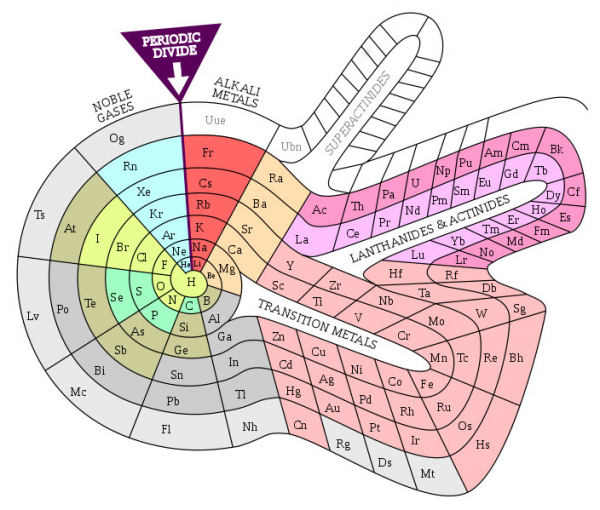
Today there are several hundred variants of the table, and scientists are proposing new ones all the time. ()
Students can demonstrate creativity in this area by implementing one of the already proposed variants or by trying to create their own original one. It may seem that this is the least useful direction for computer science lessons. However, in the form of the Periodic Table presented in this article, some students may not recognize the particular advantages of control cards over an alternative solution using standard buttons TButton. A spiral form of the table (where cells are of different shapes) will more clearly demonstrate the advantages of the solution presented here.
(, )
It should also be noted that a number of existing computer programs for the Periodic Table have been discussed in a recently published article on Habr .
Addition 2: examples of problems for filtersUsing filters, you can solve tasks such as:
1) Highlight all elements in the table known in the Middle Ages.
2) Highlight all elements known by the time the Periodic Law was discovered.
3) Identify seven elements that alchemists considered metals.
4) Identify all elements that are in a gaseous state under standard conditions (s.c.).
5) Identify all elements that are in a liquid state under s.c.
6) Identify all elements that are in a solid state under s.c.
7) Identify all elements that can remain in the air for a long time without noticeable changes under s.c.
8) Identify all metals that dissolve in hydrochloric acid.
9) Identify all metals that dissolve in sulfuric acid under s.c.
10) Identify all metals that dissolve in sulfuric acid upon heating.
11) Identify all metals that dissolve in nitric acid.
12) Identify all metals that react vigorously with water under s.c.
13) Identify all metals.
14) Identify elements that are widely found in nature.
15) Identify elements that occur naturally in free state.
16) Identify elements that play a crucial role in the human and animal body.
17) Identify elements that are widely used in everyday life (in free form or in compounds).
18) Identify elements whose work is most dangerous and requires special measures and protective means.
19) Identify elements that pose the greatest threat to the environment in free form or in the form of compounds.
20) Identify precious metals.
21) Identify elements that are worth more than precious metals.
Notes
1) It makes sense to ensure the operation of several filters. For example, if you enable a filter for solving task 1 (all elements known in the Middle Ages) and 20 (precious metals), then cells with precious metals known in the Middle Ages will be highlighted (for instance, palladium, discovered in 1803, will not be highlighted).
2) It makes sense to ensure that several filters operate in such a way that each filter highlights cells in its own color, but does not completely remove the highlighting of another filter (part of the cell in one color, part in another). In the case of the previous example, the elements of intersection of the sets of items known in the Middle Ages and precious metals will be visible, as well as elements belonging only to the first and only to the second sets. That is, precious metals that were unknown in the Middle Ages, and elements known in the Middle Ages but that are not precious metals.
3) It makes sense to provide the option for further operations with the obtained results after applying the filter. For example, highlighting elements known in the Middle Ages, the user clicks with the left mouse button on the highlighted element and is taken to the Wikipedia article about that element.
4) It makes sense to allow the user to remove highlighting by clicking the left mouse button on the highlighted cell of the table. For example, to eliminate already viewed items.
5) It makes sense to ensure the saving of the list of highlighted cells to a file and the loading of such a file with automatic highlighting of cells. This will give the user the opportunity to take a break in work.
We used a pre-defined static control map, but there are many important tasks where dynamic control maps can be used, changing during the operation of the program. An example can be a graph editor, where the user specifies the positions of the vertices with the mouse in the window and draws edges between them. To remove a vertex or edge, the user must point to it. But while it is easy to point to a vertex marked with a circle, it will be more difficult to point to an edge drawn with a thin line. Here a control map will help, where the vertices and edges occupy a surrounding area larger than what is seen in the visible drawing.
An interesting side question related to the discussed method of comprehensive learning is: can this method be useful in training AI?
Source: habr.com
