Translator's note: for the readers' convenience, dates are given in Moscow time
Recently, we missed the expiration date of one of the certificates used to sign add-ons. This led to the disabling of add-ons for users. Now that the issue is mostly resolved, I would like to share the details of what happened and the work carried out.
Background: Add-ons and Signing
Installed add-ons must have a digital signature, which protects users from malicious add-ons, and requires minimal verification of add-ons by Mozilla staff. We introduced this requirement in 2015 as we faced serious issues with malicious add-ons.
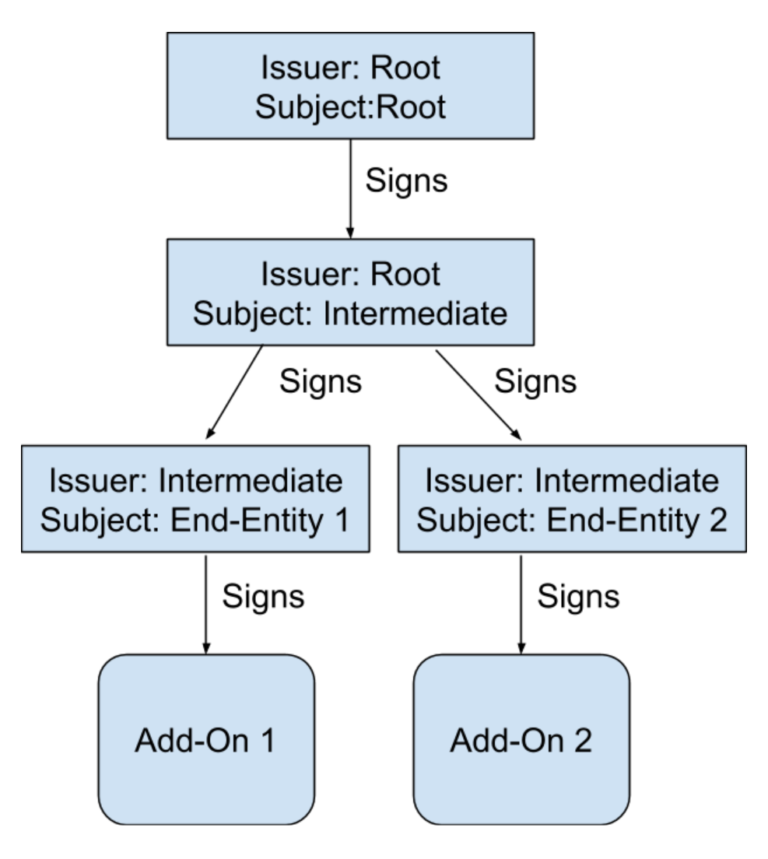
How it works: each copy of Firefox contains a 'root certificate'. The key to this 'root' is stored in a hardware security module (HSM), which has no network access. Every few years, this key is used to sign a new 'intermediate certificate', which is used for signing add-ons. When a developer submits an add-on, we create a temporary 'end certificate' and sign it using the intermediate certificate. Then the end certificate signs the add-on itself. Schematically, it looks like this.
Note: each certificate has a 'subject' (to whom the certificate is issued) and an 'issuer' (who issued the certificate). In the case of the root certificate, 'subject' = 'issuer', but for other certificates, the issuer of the certificate is the subject of the higher-level certificate that signed it.
An important point: each add-on is signed with a unique end certificate, but almost always these end certificates are signed by the same intermediate certificate.
Author's note: the exception is very old add-ons. At that time, various intermediate certificates were used.
This intermediate certificate caused issues: each certificate is valid for a certain period. Before or after this period, the certificate is invalid, and the browser will not use extensions signed by that certificate. Unfortunately, the validity of the intermediate certificate expired on May 4 at 4 AM.
The consequences did not manifest immediately. Firefox checks the signatures of installed extensions not constantly, but approximately every 24 hours, with the check time being individual for each user. As a result, some people experienced issues right away, while others much later. We first learned about the problem around the time the certificate expired and immediately began searching for a solution.
Minimizing damage
Once we understood what happened, we tried to prevent the situation from worsening.
Firstly, we stopped accepting and signing new extensions. There was no point in using an expired certificate for that. Looking back, I would say that it might have been better to leave everything as it was. The acceptance of extensions has now resumed.
Secondly, we immediately sent out a fix that prevented the daily signature checks. Thus, we saved those users whose browsers had not yet checked the extensions in the last 24 hours. This fix has now been revoked, as it is no longer needed.
Parallel operation
Theoretically, the solution to the problem looks simple: we create a new valid intermediate certificate and re-sign each extension. Unfortunately, this won't work:
- we cannot quickly re-sign 15,000 extensions at once; the system is not designed for such a load
- after signing the extensions, the updated versions need to be delivered to the users. Most extensions are installed from Mozilla servers, so within the next day, Firefox will find updates, but some developers distribute signed extensions through third-party channels, meaning users would have to manually update those extensions
Instead, we tried to develop a fix that would reach all users, requiring (or almost requiring) no actions on their part.
We quickly arrived at two main strategies that we used concurrently:
- Update Firefox to change the certificate validity period. This will magically make existing extensions work again but will require the release and delivery of a new version of Firefox.
- Create a valid certificate and somehow convince Firefox to accept it instead of the existing one that has expired.
We decided to first use the first option, which seemed quite workable. By the end of the day, we released the second fix (the new certificate), which we will discuss next.
Certificate replacement
As I mentioned earlier, it was necessary to:
- create a new valid certificate
- remotely install it in Firefox
To understand why this will work, let's take a closer look at the extension verification process. The extension itself is delivered as a set of files, including the chain of certificates used for signing. As a result, the extension can be verified if the browser is aware of the root certificate, which is embedded in Firefox during compilation. However, as we already know, the intermediate certificate is expired, which makes it impossible to verify the extension.
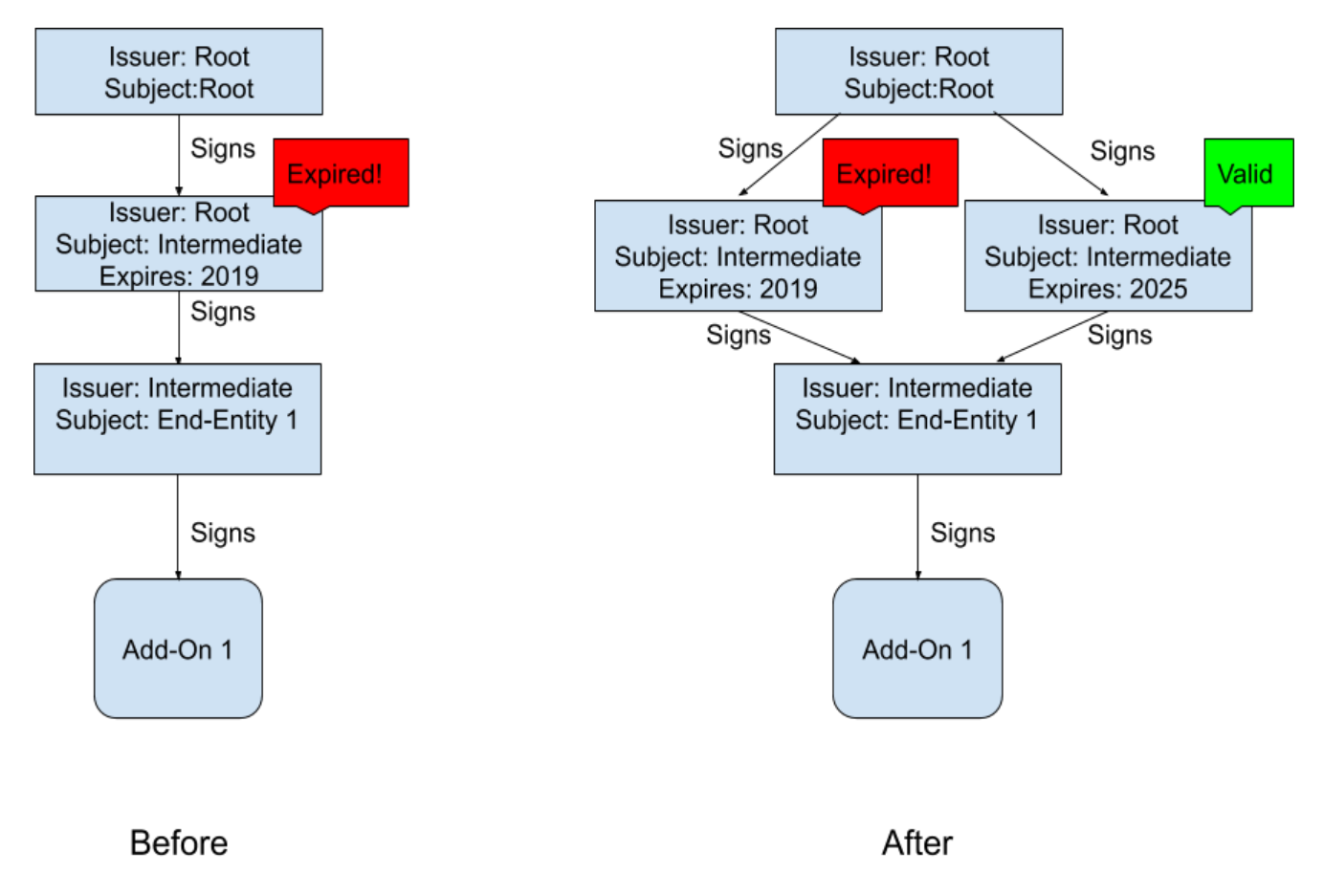
When Firefox attempts to verify the extension, it does not limit itself to using the certificates contained within the extension. Instead, the browser tries to build a valid certificate chain starting from the end certificate and continues until it reaches the root. At the first level, we start with the end certificate and then look for the certificate whose subject is the issuer of the end certificate (i.e., the intermediate certificate). Usually, this intermediate certificate is provided with the extension, but any certificate from the browser's store can also play this role. If we can remotely add a new valid certificate to the certificate store, Firefox will attempt to use it. The situation before and after installing the new certificate.
After installing the new certificate, Firefox will have two options when checking the certificate chain: it can use the old invalid certificate (which will not work) or the new valid one (which will work). It is important that the new certificate contains the same subject name and public key as the old certificate, so its signature on the end certificate will be valid. Firefox is smart enough to try both options until it finds a working one, so the extensions will be verified again. Note that this is the same logic we use to verify TLS certificates.
Author's note: readers familiar with WebPKI will notice that cross-certificates work exactly the same way.
The most remarkable thing about this fix is that it does not require re-signing the existing extensions. Once the browser receives the new certificate, all extensions will start working again. The challenge remains to deliver the new certificate to users (automatically and remotely) and to make Firefox re-check the disabled extensions.
Normandy and the research system
Ironically, this problem is resolved by a special extension called 'system'. To conduct research, we developed a system called Normandy, which delivers surveys to users. These surveys run automatically in the browser and have enhanced access to Firefox's internal APIs. The surveys can add new certificates to the certificate store.
Author's note: we do not add the certificate with any special privileges; it is signed by a root certificate, so Firefox trusts it. We simply add it to the pool of certificates that can be used by the browser.
Thus, the solution is to create a survey that:
- installs the new certificate we created for users
- forces the browser to re-check the disabled extensions to get them working again
"But wait," you might say, "the extensions aren't working, how do we launch the system extension?" Let's sign it with the new certificate!
Putting it all together... why is it taking so long?
So, the plan: release a new certificate to replace the old one, create a system add-on, and deploy it to users through Normandy. The issues, as I mentioned, started on May 4 at 4:00 AM, and by 12:44 PM the same day, less than 9 hours later, we sent a fix to Normandy. It took another 6-12 hours for it to reach all users. That's not bad, but users on Twitter are asking why we couldn't act faster.
First of all, it took time to issue a new intermediate certificate. As I mentioned earlier, the root certificate's key is stored offline in a hardware security module. This is good from a security standpoint since the root is used very rarely and must be securely protected, but it’s somewhat inconvenient when there’s an urgent need to sign a new certificate. One of our engineers had to travel to the HSM storage. Then there were failed attempts to issue the correct certificate, and each attempt cost one to two hours spent on testing.
Secondly, it took some time to develop the system add-on. Conceptually, it is quite simple, but even simple programs require attention. We wanted to ensure that we wouldn’t make the situation worse. The add-on needs to be tested before being sent to users. Additionally, the add-on needs to be signed, but our add-on signing system was offline, so we had to look for a workaround.
Finally, after we prepared the research for deployment, it took time for it to roll out. The browser checks for Normandy updates every 6 hours. Not all computers are constantly on and connected to the internet, so it takes time for the fix to spread among users.
Final steps
The research should fix the issue for most users, but it’s not available to everyone. Some users require special handling:
- users who have disabled research or telemetry
- users of the Android version (Fennec), where research is not supported at all
- users of custom builds of Firefox ESR in enterprises, where telemetry cannot be enabled
- Users sitting behind MitM proxies, as our extension installation system uses key pinning, which doesn't work with such proxies.
- Users of outdated versions of Firefox that do not support the research.
There's nothing we can do about the last category of users—they should definitely upgrade to a new version of Firefox because the outdated versions have serious unpatched vulnerabilities. We know that some people stick to old versions of Firefox because they want to run legacy extensions, but many of the old extensions have already been ported to new versions of the browser. For others, we've developed a patch that will install a new certificate. It was released as a bug fix release (Translator's note: Firefox 66.0.5), so users will receive it—most likely have already received it—through the usual update channel. If you are using a custom build of Firefox ESR, please contact your maintainer.
We acknowledge that all of this is not ideal. In some cases, users lost extension data (for example, the data of the extension Multi-Account Containers).
This side effect could not be avoided, but we believe that in the short term we chose the best solution for the majority of users. In the long term, we will look for other, more sophisticated architectural approaches.
Lessons
First of all, our team did a fantastic job creating and sending the fix less than 12 hours after the problem was discovered. As someone who attended the meetings, I can say that in this challenging situation, people worked very hard and little time was wasted.
Clearly, none of this should have happened in the first place. It’s definitely worth adjusting our processes to reduce the likelihood of similar incidents and facilitate the rectification of the consequences.
Next week, we will publish an official post-mortem and a list of changes we intend to make. For now, let me share my thoughts. First, there must be a better way to track the state of what is a potential ticking time bomb. We need to be sure we do not find ourselves in a situation where one of them suddenly goes off. We are still working out the details, but at a minimum, an inventory of all such issues is required.
Secondly, we need a mechanism for rapidly delivering updates to users, even when — especially when — everything else is down. It was great that we were able to use the "surveys" system, but it's an imperfect tool and has some undesirable side effects. Specifically, we know many users have automatic updates turned on, but they would prefer not to participate in surveys (I confess, I have them disabled too!). At the same time, we need a way to send updates to users, but whatever the internal technical implementation, users must be able to opt-in for updates (including urgent fixes) while opting out of everything else. Moreover, the update channel needs to be more responsive than it is now. Even on May 6th, there were still users who had not received either the fix or the new version. We have already worked on this issue, but what happened showed how critical it is.
Finally, we will take a look at the security architecture of the add-ons to ensure that it provides the necessary level of security with minimal risk of breaking something.
Next week, we will review the results of a more thorough analysis of what happened, but for now, I would be happy to answer questions via email: ekr-blog@mozilla.com
Source: linux.org.ru