

Hello everyone! Today we want to present our product to the IT community — an IDE for working with APIs. Some of you may already know about us from . However, there hasn't been a comprehensive review of the tool, so we're addressing this unfortunate gap.
Motivation
I'd like to start with how we came to create our own tool for advanced API work. Let's begin with a list of functionalities that a product, which can truly be described as an 'IDE for working with APIs,' should possess:
- Creating and executing requests and scripts (sequences of requests)
- Writing various types of tests
- Generating tests
- Working with API descriptions, including importing from formats like Swagger, OpenAPI, WADL, etc.
- Mocking requests
- Strong support for one or more programming languages for script writing, including integration with popular libraries
- etc.
The list can be expanded as needed. It's also important to create not only the IDE itself but also a certain infrastructure, such as cloud synchronization, command line tools, online monitoring services, etc. After all, the trends of recent years dictate that we need not only powerful functionality but also a user-friendly interface.
Who needs such a tool? Obviously, everyone involved in API development and testing — developers and testers =). While for developers, executing single requests and simple scripts is often sufficient, for testers, this is one of the main tools that should also include a robust test-writing mechanism with the ability to run them in CI.
So, following these guidelines, we began creating our product. Let's see what we have achieved at this stage.
Quick Start
Let's start with an initial look at the application. You can download it . Currently, it supports all three major platforms — Windows, Linux, MacOS. Download it, install it, and run it. Upon first launch, you will see the following window:
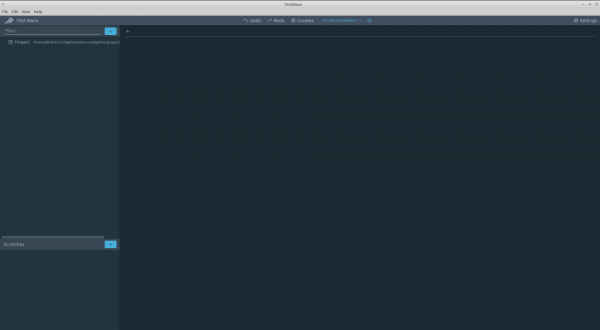
Click the plus sign at the top of the content area to create your first request. The request tab looks as follows:
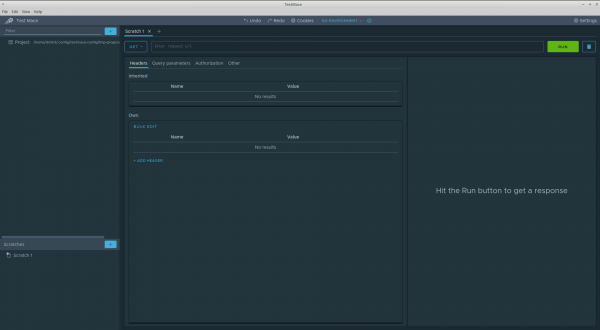
Let's take a closer look at it. The request interface is very similar to the interfaces of popular REST clients, which makes migration from such tools easier. Let's make our first request to the URL.
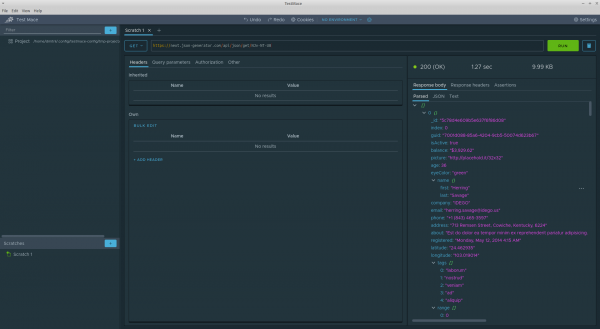
At first glance, the response panel does not present any surprises. However, I would like to draw your attention to some points:
- The response body is represented as a tree, which firstly adds informativeness and secondly allows the addition of some interesting features discussed below.
- There is an Assertions tab that displays the list of tests for this request.
As you can see, our tool can be used as a convenient REST client. However, we wouldn't be here if its capabilities were limited to just sending requests. Next, I will outline the key concepts and functionalities of TestMace.
Key Concepts and Features
— is a virtual representation of some
The functionality of TestMace is divided into different types of nodes. In the example above, we demonstrated the work of the RequestStep node. However, the application currently also supports the following types of nodes:
- RequestStep. This node allows you to create a request. It can only have one child node, which is the Assertion node.
- Assertion. This node is used for writing tests. It can only be a child node of the RequestStep node.
- Folder. Allows you to group Folder and RequestStep nodes within itself.
- Project. This is the root node, created automatically when a project is created. Otherwise, it replicates the functionalities of the Folder node.
- Link. A link to a Folder or RequestStep node. It allows for the reuse of requests and scenarios.
- etc.
Nodes are located in scratches (the panel on the bottom left, used for quickly creating "one-off" requests) and in project (the panel on the top left), which we will discuss in more detail.
Project
When you launched the application, you might have noticed a lone Project string in the upper left corner. This is the root of the project tree. When a project is launched, a temporary project is created, and its path depends on your operating system. At any time, you can move the project to a more convenient location.
The main purpose of the project is to save your work to the file system and further synchronize through version control systems, run scenarios in CI, review changes, etc.
Variables
Variables are one of the key mechanisms of the application. Those of you who work with tools like TestMace may already understand what this is about. So, variables are a way to store common data and communicate between nodes. An example would be environment variables in Postman or Insomnia. However, we went further and developed the topic. In TestMace, variables can be set at the node level. Any node. There is also a mechanism for inheriting variables from ancestors and overriding variables in descendants. In addition, there are a number of built-in variables, the names of built-in variables start with $. Here are some of them:
$prevStep— a reference to the variables of the previous node$nextStep— a reference to the variables of the next node$parent— the same, but for the ancestor$response— the response from the server$env— the current environment variables$dynamicVar— dynamic variables created during the execution of a scenario or request
$env — these are essentially regular Project-level node variables; however, the set of environment variables changes depending on the selected environment.
Accessing a variable is done through ${variable_name}
As the value of a variable, another variable or even an entire expression can be used. For example, for a variable url, there can be an expression like
http://${host}:${port}/${endpoint}.
It is worth noting the possibility of assigning variables during the execution of a script. For example, there is often a need to store authorization data (token or entire header) that comes from the server after a successful login. TestMace allows saving such data in dynamic variables of one of the ancestors. To avoid collisions with already existing 'static' variables, dynamic variables are placed in a separate object. $dynamicVar.
Scenarios
Using all the aforementioned capabilities, you can execute entire request scenarios. For example, create an entity -> request the entity -> delete the entity. In this case, you can use a Folder node to group several RequestStep nodes.
Autocomplete and expression value highlighting
For convenient work with variables (and more), autocomplete is essential. And of course, highlighting the value of the expression makes it easier to clarify what a particular variable equals. This is definitely one of those cases where it's better to see something once than to hear about it a hundred times:
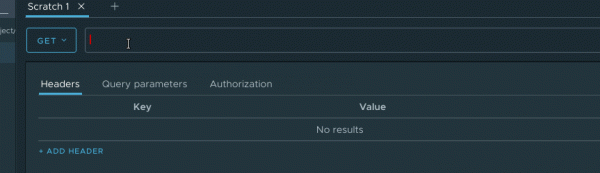
It is worth noting that autocomplete is implemented not only for variables but also, for example, for headers, specific header values (like autocomplete for the Content-Type header), protocols, and much more. The list is constantly being updated as the application grows.
Undo/redo
Undo/redo functionality is very convenient, yet it seems to be implemented in few places (and tools for working with APIs are no exception). But we are not like that!) Undo/redo is implemented throughout the entire project, allowing not only the editing of a specific node to be undone, but also its creation, deletion, movement, etc. The most critical operations require confirmation.
Creating tests
The creation of tests is handled by the Assertion node. One of the main features is the ability to create tests without programming, using built-in editors.
The Assertion node consists of a set of assertions. Each assertion has its type; currently, there are several types of assertions.
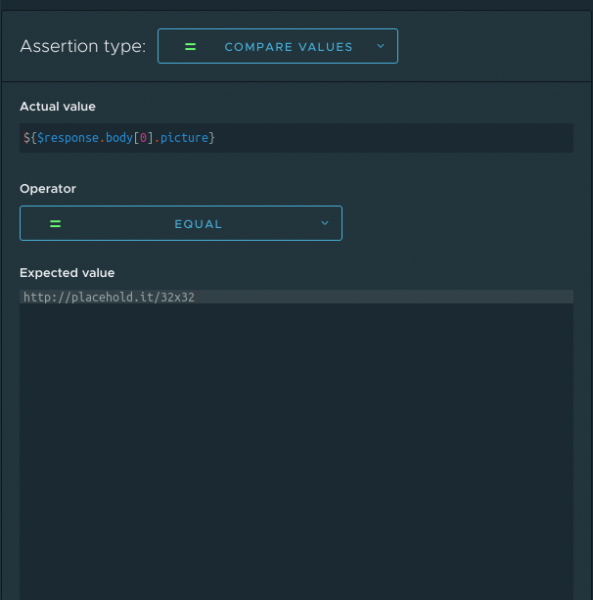
Compare values — simply compares two values. There are several comparison operators: 'equals', 'not equals', 'greater than', 'greater than or equal to', 'less than', 'less than or equal to'.
Contains value — checks for the inclusion of a substring in a string.
XPath — checks that a particular value matches the selector in XML.
JavaScript assertion — an arbitrary script in the JavaScript language that returns true on success and false on failure.
I should note that only the last one requires the user to have programming skills; the other three assertions are created using a graphical interface. Here is what the dialog for creating a compare values assertion looks like:
The cherry on top is the quick creation of assertions from the response; just look at this!
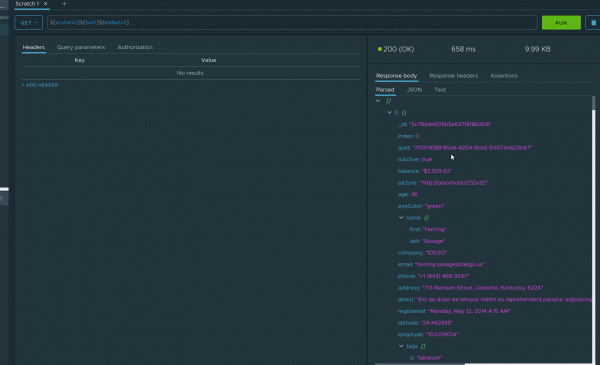
However, such assertions have obvious limitations, and when faced with these, you can utilize the JavaScript assertion. And here, TestMace also provides a comfortable environment with autocomplete, syntax highlighting, and even a static analyzer.
API description
TestMace not only allows the use of an API but also documents it. The description itself has a hierarchical structure and seamlessly integrates into the rest of the project. Additionally, it currently supports importing API descriptions from Swagger 2.0 / OpenAPI 3.0 formats. The description is not merely static; it is tightly integrated with the project's other parts, notably providing autocomplete for URLs, HTTP headers, query parameters, and more. In the future, we plan to add compliance tests for API responses.
Node Sharing
Use Case: You might want to share a problematic request or even a whole scenario with a colleague or simply attach it to a bug. TestMace covers this use case as well: the application allows you to serialize any node and even a subtree into a URL. A simple copy-paste and you can easily transfer the request to another machine or project.
Human-Readable Project Storage Format
Currently, each node is stored in a separate file with the .yml extension (as in the case of the Assertion node) or in a folder named after the node, containing an index.yml file.
Here’s an example of what the request file looks like, which we created in the overview above:
index.yml
children: []
variables: {}
type: RequestStep
assignVariables: []
requestData:
  request:
    method: GET
    url: 'https://next.json-generator.com/api/json/get/NJv-NT-U8'
  headers: []
  disabledInheritedHeaders: []
  params: []
  body:
    type: Json
    jsonBody: ''
    xmlBody: ''
    textBody: ''
    formData: []
    file: ''
    formURLEncoded: []
  strictSSL: Inherit
authData:
  type: inherit
name: Scratch 1
As you can see, everything is perfectly clear. If desired, this format can be comfortably edited manually.
The folder hierarchy in the file system completely mirrors the node hierarchy in the project. For example, a scenario of the type:
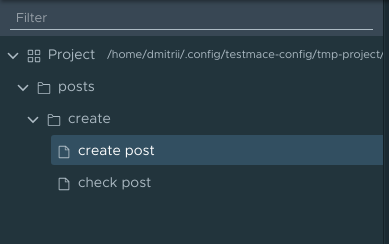
Maps in the file system to the following structure (only the folder hierarchy is shown, but the essence is clear).
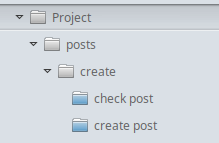
This facilitates the project review process.
Import from Postman
After reading all the above, some users may want to try (right?) the new product or (who knows!) fully utilize it in their project. However, migration may be hindered by a significant amount of work already done in Postman. For such cases, TestMace supports the import of collections from Postman. Currently, imports without tests are supported, but we do not rule out their support in the future.
Plans
I hope many of you who have read this far are interested in our product. However, that's not all! Development is in full swing, and here are some features we plan to add soon.
Cloud Synchronization
One of the most requested features. Currently, we offer version control systems for synchronization, making the format more compatible with this type of storage. However, this workflow doesn't suit everyone, so we plan to add a familiar synchronization mechanism through our servers.
CLI
As mentioned above, IDE-level products require various integrations with existing applications or workflows. CLI is essential for integrating tests written in TestMace into the continuous integration process. Work on the CLI is in full swing, with earlier versions set to run the project with a simple console report. In the future, we plan to add report output in JUnit format.
Plugin System
Despite the power of our tool, the set of cases requiring solutions is endless. After all, there are tasks specific to individual projects. That's why we plan to provide an SDK for plugin development, allowing any developer to add functionality as they see fit.
Expansion of Node Type Variety
This set of nodes does not cover all use cases needed by users. Nodes planned for addition include:
- Script Node — transforms and positions data using JS and the corresponding API. With this type of node, you can create things like pre-request and post-request scripts in Postman.
- GraphQL Node — support for GraphQL.
- Custom Assertion Node — will allow you to extend the set of existing assertions in the project.
Naturally, this is not a final list and will be continually updated, in part based on your feedback.
FAQ
How do you differ from Postman?
- The concept of nodes that allows for virtually infinite scalability of project functionality.
- A human-readable format for the project saved in the file system, simplifying work with version control systems.
- The ability to create tests without programming skills and more advanced JS support in the test editor (autocompletion, static analyzer).
- Advanced autocomplete and highlighting of current variable values
Is this an open-source product?
No, at the moment the source code is closed, but we are considering the possibility of opening it in the future.
How do you monetize your product?)
Alongside the free version, we plan to release a paid version of the product. This will primarily include features that require a server-side component, such as synchronization.
Conclusion
Our project is progressing rapidly towards a stable release. However, the product is already usable, and the positive feedback from our early users confirms this. We are actively collecting feedback because building a good tool is impossible without close collaboration with the community. You can find us here:
We look forward to your wishes and suggestions!
Source: habr.com
