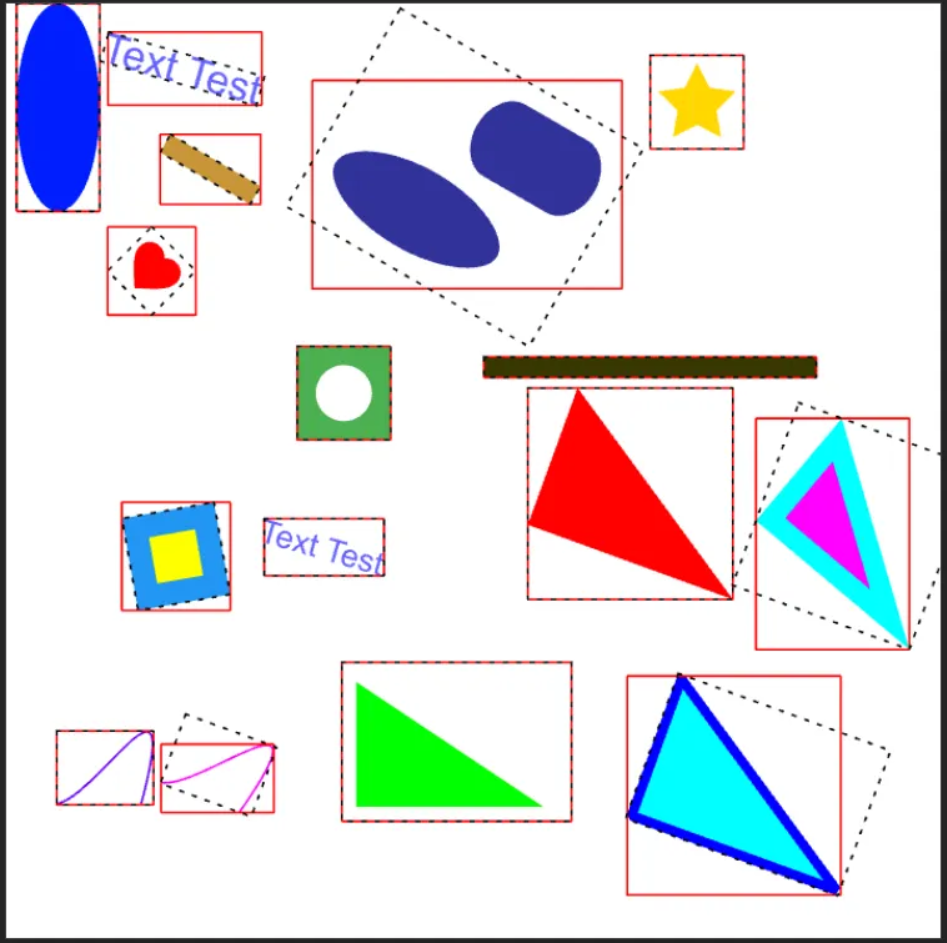
On January 31, after a year and a half of continuous development, the release of version 1.0 of the lightweight and portable cross-platform vector graphics library took place. ThorVG, designed for visualizing vector scenes and animations. It supports loading files in the formats Lottie and SVG Tiny 1.2 (a list of implemented capabilities of SVG Tiny in the project's Wiki.).
The library provides convenient APIs for importing, creating, and displaying vector graphics, as well as for exporting them to various graphic formats, making it versatile for use across different software platforms and applications for visualizing graphic content. It also includes console utilities lottie2gif and svg2png.
ThorVG is used for rendering vector graphics in projects such as Tizen OS, Godot Engine, LVGL and players dotLottie.
The project is written in C++ (C++14 standard) and is distributed under the MIT license.
This is not just an update—it's a rebuilt foundation for high-performance, scalable, and portable 2D vector graphics across all platforms and devices. During the development of ThorVG, it evolved into a mature, production-ready graphics engine, demonstrating proven quality and performance in real applications.
ThorVG quickly gained popularity and attracted growing interest from the community, reflecting its evolution from an early-stage project to a widely recognized and practically used vector graphics engine ready for real cross-platform use.
Change log:
- Enhanced text rendering capabilities, rich visual effects, and support for precise overlaying for improved graphic expression.
- Support for horizontal and vertical alignment, allowing precise control over the text positioning in various user interface contexts.
- Automatic line breaking with mode selection: by characters, by words, intelligent breaking, and ellipsis handling for overflow.
- Support for manual line breaks, allowing developers to explicitly control line breaks using newline characters such as \n. This enables precise formatting of multiline text blocks, especially in dynamic layouts or text animations.
- Support for customizable letter spacing, enabling fine-tuning to improve readability or achieve specific typographic styles.
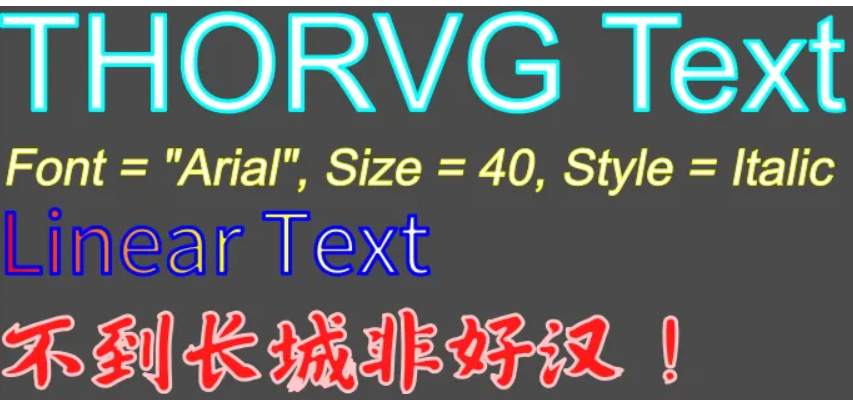
- Text outlining support, allowing for stylistic effects and enhancing contrast against various backgrounds (screenshot 1).
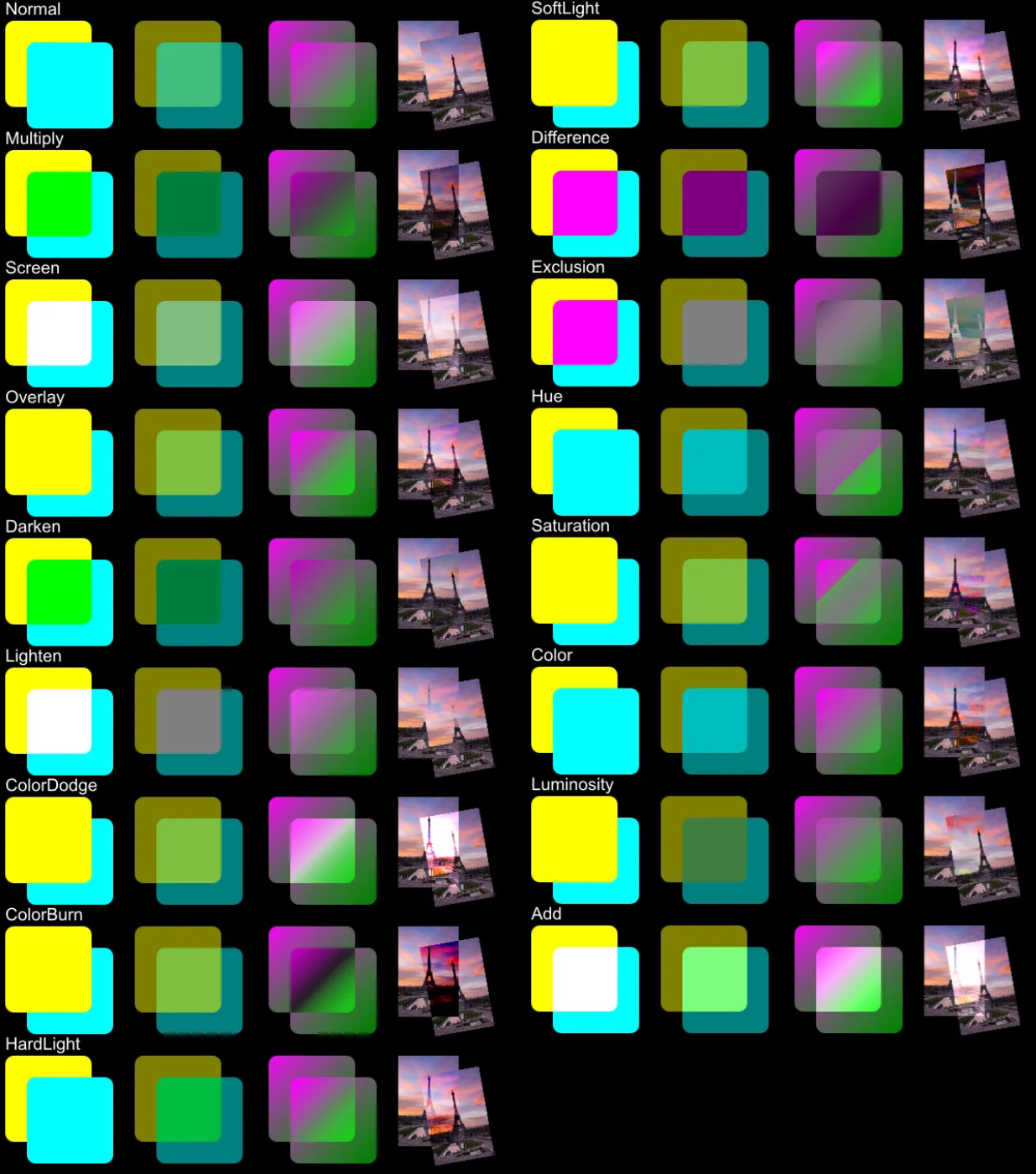
- A more comprehensive and cohesive overlay modes system has been introduced, significantly improving overlay behavior and aligning composition formulas and logic with industry standards such as Lottie, SVG, and the W3C 'Compositing and Blending' specification. These enhancements ensure greater visual consistency and cross-platform compatibility, especially in web and animation workflows.
- The following overlay modes are implemented and supported: 'Hue', 'Saturation', 'Color', and 'Brightness' using HSL color space compositing. These modes improve compatibility with Lottie layer effects and future SVG blending support (screenshot 2).
- Significant improvements and extensions in visual effects at the scene level, making vector graphics more expressive and visually rich:
- Shadow effect with Gaussian blur filter (video demonstration).
- Color replacement methods that modify the appearance of graphics by overriding how colors are applied, blended, or matched based on hue (video demonstration).
- New utility functions have been added to enhance interactive capabilities. These include support for spatial information queries (demonstration) and hit detection on displayed objects (video demonstration).
- Enhanced Lottie animation capabilities for cross-platform playback, including modular Web Player presets optimized for size, performance, and rendering mode (CPU/GPU)
- Significant improvements in Lottie animation support with enhanced compatibility, flexibility, and interactivity across all platforms. Not only has the range of supported Lottie features and expressions been expanded, but tools have also been provided for developers to dynamically control animation behavior during runtime, making ThorVG one of the most powerful Lottie playback libraries available in the market. List of implemented capabilities in the project Wiki.
- As of today, the .lot file extension is the new official IANA standard for Lottie files. ThorVG now officially supports .lot as the standard Lottie file format in addition to the traditional .json extension.
- Tweening
- Support for interpolation between non-linearly adjacent keyframes has been added, providing smoother transitions and more precise timing control. This improvement is particularly effective when used with state-based animation playback (also known as marker-based playback) in Lottie. In many cases, animations are designed to transition between states in complex, nonlinear ways. Traditional Lottie, with its strictly sequential timeline structure, struggles to handle such scenarios, often resulting in abrupt snaps or awkward jumps when transitioning between non-sequential keyframes: video demonstration 1, video demonstration 2.
- With tweening, developers can now perform interpolation directly between two distinct keyframes, even if they are not linearly adjacent on the timeline. This allows for more natural and smooth visual effects during transitions between states, significantly enhancing the flexibility and realism of interactive animations: video demonstration 1, video demonstration 2.
- Now (as an experimental feature), rewriting expression variable values during runtime is supported, allowing dynamic script logic execution based on user input. This makes it a particularly powerful tool for creating interactive animations using Lottie resources, enabling customized variations that go beyond the original design.video demonstration).
- A customizable Asset Resolver mechanism has been added, providing greater flexibility when loading external resources (such as images) referenced by Lottie animations.
- Enhanced support for the Lottie LayerEffect feature, allowing rich visual enhancements directly on animation layers with the effects described above.
- Since some effects can be resource-intensive, an option has been provided to configure the quality and performance for rendering effects, ideal for optimizing on CPU-limited platforms. This allows developers to control rendering accuracy and optimize performance based on the target platform.
- Expression support has been expanded with the addition of the following key features and properties:
- wiggle, temporalWiggle: applies random movement based on time.
- pointOnPath: calculates position along a path.
- propertyIndex, groupIndex: references the index of a property or group.
- value, property, effect: access to property values and external effects.
- More accurate compliance with specifications:
- TextFollowPath – a new specification that allows text to follow arbitrary vector paths (video demonstration).
- Text alignment parameters – more precise rendering of text layers based on their horizontal and vertical alignment settings (video demonstration).
- Mask expansion – a new feature that allows for more precise control over the influence of the mask shape on the visual composition (video demonstration).
- SVG
- ThorVG now allows access to individual SVG elements and modification via unique id attributes defined in the source SVG file. This feature enables developers to directly select and manipulate specific vector shapes in the imported SVG scene, perfect for interactive or dynamic use cases (e.g., themed decoration, highlighting).
- Support Gaussian blur effect.
- Intelligent rendering
- The ThorVG engine now supports intelligent partial rendering, which ensures more efficient rendering workflows by updating only the parts of the vector scene that have changed. Through internal tracking of modified areas, it minimizes unnecessary redraws and optimizes overall performance. This feature provides significant advantages in scenarios such as user interface rendering, design tools, or applications where most of the scene remains static and only small elements are updated between frames. In such cases, forgoing full scene rendering can greatly reduce computational load and improve energy efficiency, which is particularly valuable for mobile and embedded systems.
- To achieve this goal, ThorVG 1.0 employs a combination of algorithmic methods specifically designed for partial rendering. Below are the main strategies that underpin this system:
- Linear pass algorithm: shapes are sorted by x coordinates, and a linear pass strategy is applied to reduce unnecessary checks of 'dirty' areas. This reduces complexity from O(N × M) to O(N + M + K + N log N), where N is the number of shapes, M is the number of 'dirty' areas, and K is the number of actual overlaps.
- Separation and conditional merging: fine-grained separation of subregions is balanced with intelligent merging to avoid fragmentation. Horizontal merging is prioritized to achieve more efficient memory cache utilization.
- Spatial partitioning (default 4×4 grid): the rendering surface is divided into 16 areas, allowing checks to focus only on the relevant 'dirty' areas of shapes, significantly cutting overhead in complex user interface updates.
- When combined, these techniques ensure smoother and faster rendering, especially in embedded systems or real-time systems where partial updates occur frequently. More detailed information will be published in a separate post. a blog.
- Note that in cases of high-dynamic content, such as dynamic games or fullscreen animations, where almost all objects change in every frame, partial rendering offers little or no performance benefits and may even introduce slight overhead. In such cases, it is usually better to choose full scene rendering. For this reason, ThorVG supports both partial and full rendering configurations, allowing you to select the optimal approach for your use case. You can analyze the performance of your product and make an informed decision using the Meson -Dpartial=[true/false] option and the EngineOption::Smart option of the SwCanvas class.
auto canvas = SwCanvas::gen(EngineOption::Smart);
- A new era of integrating web technologies with WebGL, WebGPU, and lightweight WebCanvas for seamless rendering in the browser.
- The WebGL and WebGPU backends are now officially production-ready. These GPU-based renderers now offer full functional compatibility with the traditional CPU backend, supporting all features of ThorVG Canvas with the same image quality and stability. Compared to version 0.15, GPU rendering performance has increased by over 150%, providing a significant improvement in real-time web vector graphics rendering.
- Significant performance boosts in CPU/GPU power-constrained environments and embedded settings.
- ThorVG 1.0 offers improved performance compared to version 0.15, with noticeable gains for both CPU and GPU.
- Key optimizations:
- Improved rendering pipeline efficiency.
- Reduced overhead for frame buffer allocation.
- Optimized Lottie composition analysis.
- Enhanced batch rendering and GPU caching.
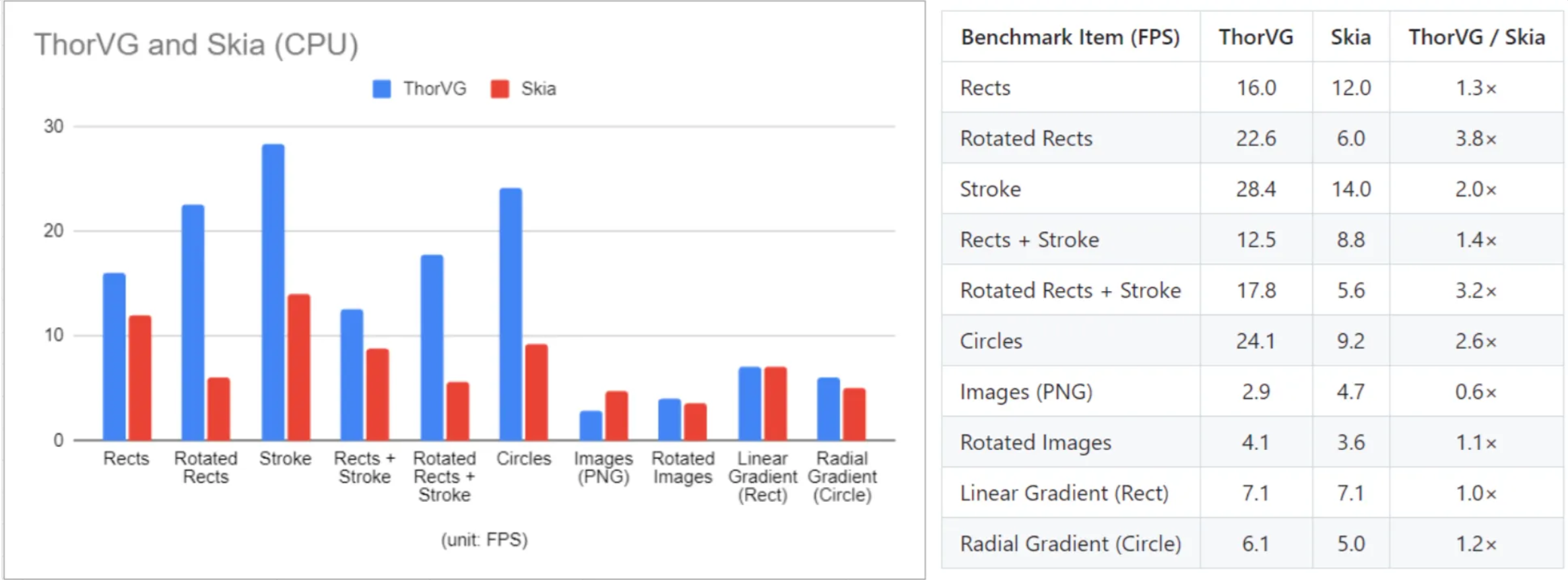
- ThorVG is optimized for CPU-based rasterization, focusing on vector visualization in environments where GPU resources are limited, unavailable, or intentionally not used. In typical CPU tests, ThorVG demonstrates an average performance that is 1.8 times higher than the widely used vector graphics engine Skia when performing typical vector visualization tasks. The advantage is particularly evident in scenarios with intensive geometry usage, such as visualizing rectangles, strokes, rotations, and circles (screenshot 3).
- ThorVG Janitor
- The actual performance demonstration of ThorVG can be seen in the project ThorVG Janitor – an interactive game developed to showcase CPU rendering performance under high graphic loads. The scene includes hundreds of enemies created using particle-based graphics, multi-layered starry sky backgrounds with full-sized raster images, real-time visual effects such as DropShadow and Blur, and up to 25,000 objects rendered simultaneously. Even under peak load at 2K resolution (2048×1152), the project demonstrates stable performance above 120 FPS, highlighting ThorVG's efficiency and suitability for complex environments with many effects (video demonstration, screenshot).
- Other significant changes
- Example of integrating ThorVG into Godot. In this video demonstration ThorVG is integrated with Godot in a web environment for rendering hundreds of Lottie animation objects at over 120 frames per second. This demonstration shows ThorVG's potential in the web environment for smooth and high-quality animations during runtime.
- Added tutorial example using ThorVG WebCanvas.
- An interactive ThorVG Playground.
- A ThorVG wrapper has been added for the Swift language: https://github.com/thorvg/thorvg.swift.
- Examples of using ThorVG have been transferred to a separate repository https://github.com/thorvg/thorvg.example.
- An extension has been published thorvg.vscode for VSCode for creating, editing, and previewing ThorVG resources directly within the Visual Studio Code environment.
- In version 1.0, a significant restructuring of the API was carried out to improve performance, usability, consistency, and compatibility with C.
- Support for the TVG Picture (TVG) format has been removed. This decision was made in preparation for the new ThorVG Picture format, designed with animation as the core concept.
- Numerous bug fixes and stability improvements for production use.
Source: linux.org.ru