

The Picture-in-Picture feature appeared in Chromium browsers last month. Now, Google is actively enhancing it. The latest improvement includes support for 'silent videos' in this mode. In other words, it allows you to mute the sound in a video displayed in a separate window.
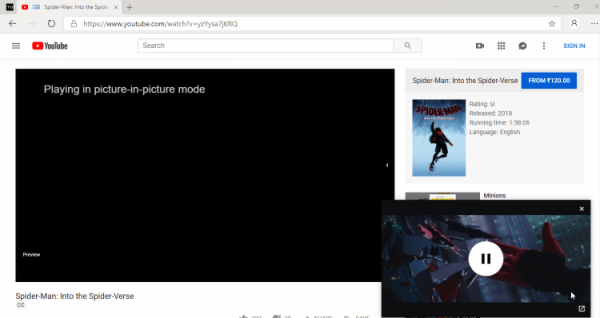
The new feature that allows muting the video sound when using Picture-in-Picture is finally ready for testing. It's supported not only in Google Chrome, but also in Microsoft Edge. Of course, this currently works only in test builds on the Dev channel.
To enable this feature, you need to follow a few steps:
- Make sure you are using the Dev or Canary versions of Chrome or Edge browsers respectively;
- Go to the page about:flags or edge://flags depending on the browser.
- Find and enable the flag Experimental Web Platform features.
- Restart the browser.
- Visit YouTube or another video streaming platform that supports Picture-in-Picture, then start any video.
- Right-click on the video twice and select the Picture-in-Picture option.
- Hover your mouse over the PiP window to see the mute button in the lower left corner, click it to mute the video sound, click again to unmute.
It is worth noting that the aforementioned step-by-step guide works in both Google Chrome and Microsoft Edge. It is also available in other browsers based on earlier versions of Chrome.
It is not yet specified when the new feature will be released. Most likely, it will be in version 74 or 75. You can read more about testing the new Microsoft Edge in our detailed material.
Source: 3dnews.ru
