

The release of Windows 10 May 2019 Update is just around the corner. This version is expected to introduce several changes, particularly concerning the Start Menu. It has been reported that one of the new features will simplify the creation of a new user account during the initial setup. Additionally, the Start Menu will receive a lighter and more straightforward design, with fewer tiles and other elements.
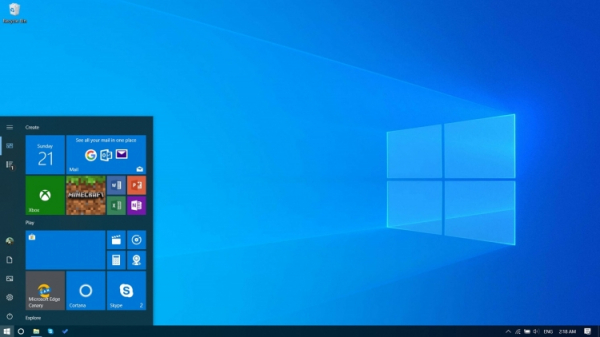
However, the visual changes will not be the only focus. There are several other important improvements that the Windows 10 May 2019 Update will bring to the Start Menu, including performance enhancements. To achieve this, the Start Menu will be moved to a separate process named StartMenuExperienceHost.
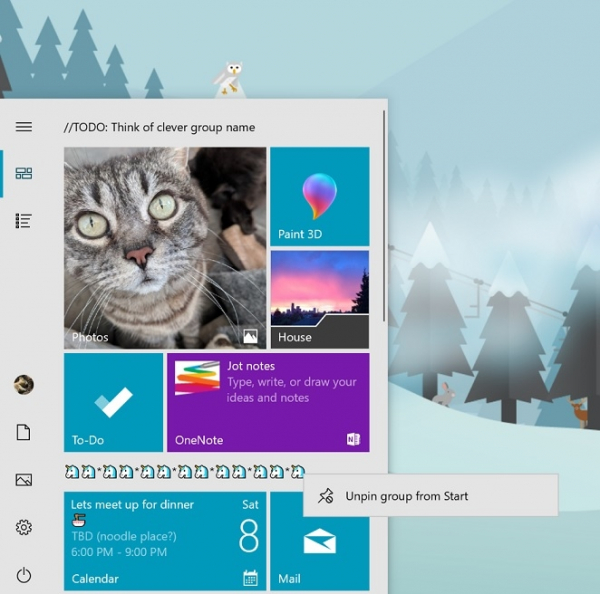
Moreover, users will now have the option to unpin a folder or a group of tiles and move them to a new location. This will save time for managing multiple tiles. It has been noted that the Windows 10 May 2019 Update will address this issue by allowing users to perform group actions with tiles.
Additionally, in the Windows 10 May 2019 Update, Microsoft has doubled the number of pre-installed applications that can be removed. This means that users can open the Start Menu, navigate to the list of all applications, right-click on a pre-installed app, and uninstall it.
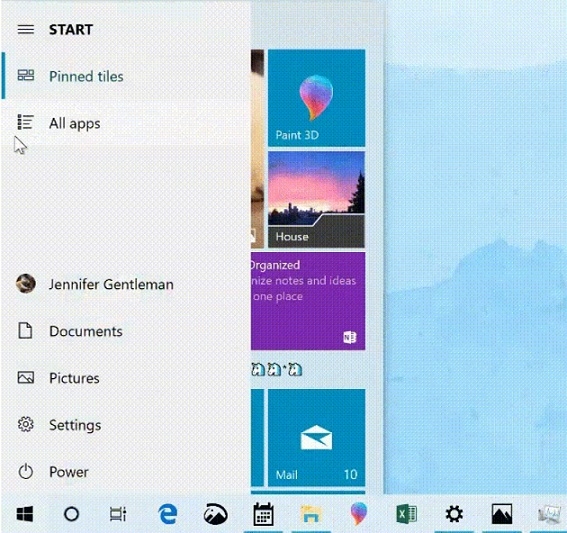
Finally, the Windows 10 May 2019 Update will introduce Fluent Design elements, which will also affect the Start Menu. Now, after downloading the update, an orange indicator will appear to signal that a restart is required to install the update. The navigation panel will also expand when hovering the mouse cursor over shortcut icons, simplifying users' understanding of the functionalities of various icons.
The new system build is expected to be released by the end of May.
Source: 3dnews.ru
