

Microsoft released an update about a month ago for Windows 10 Build 18970 for insiders. The main feature of this build is the ability to install the operating system from the cloud. However, it was only recently that the company provided additional information on the topic.
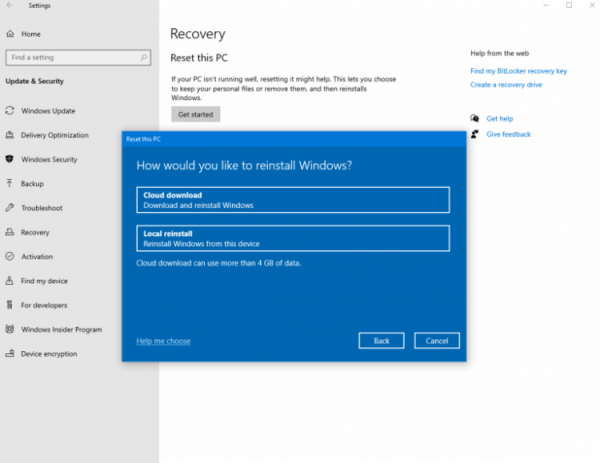
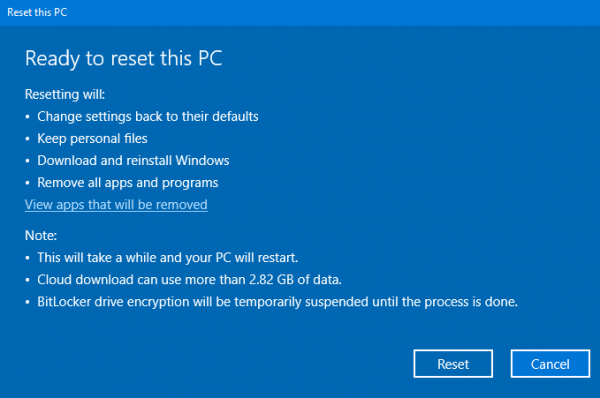
The Cloud Download feature, as noted, allows users to directly download a fresh image from the server via Windows Update, thus installing it without the hassle of USB drives and discs. Essentially, this is an evolution of the idea introduced in earlier versions of the system. Back then, similar functionality was implemented using a recovery partition or an 'emergency' DVD that had to be created during installation. However, cloud downloading is undoubtedly more convenient.
To use the feature, you need to navigate to Settings -> Update & Security -> Recovery, after which the system will start downloading the image from the internet. It is important to note that a clean reinstallation (with the removal of user files and applications) is supported, as well as recovery.
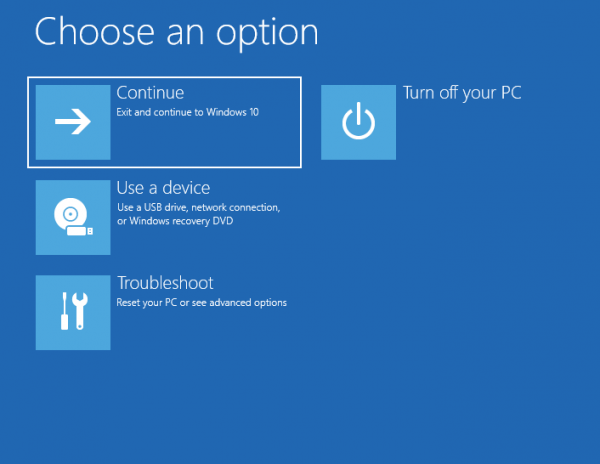
Additionally, the feature is available in the recovery environment, so if the system doesn't boot, it can also be 'rolled back' this way. Currently, this capability exists only in 'insider' builds, and the official release is not expected until at least next spring, when 20H1 will be released.
It is worth noting that a similar feature has long existed in macOS. This makes the system extremely user-friendly and speeds up the recovery process of a malfunctioning operating system. However, the download speed depends on the bandwidth of the connection and the load on the company’s servers. Moreover, downloading the image can be an expensive endeavor on limited bandwidth channels.
Source: 3dnews.ru
