

Google has introduced the second beta version of the open mobile platform Android 12. The official release of Android 12 is expected in the third quarter of 2021. To evaluate the new capabilities of the platform, a beta testing program has been proposed. Firmware builds have been prepared for Pixel 3 / 3 XL, Pixel 3a / 3a XL, Pixel 4 / 4 XL, Pixel 4a / 4a 5G, and Pixel 5 devices. An OTA update is available for those who installed the first beta release.
Key innovations in Android 12:
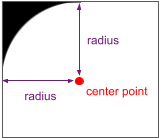
- The ability to adapt interface elements to devices with rounded screens has been added. Developers can now obtain information about screen curvature and adjust interface elements that fall into invisible corner areas. Through the new RoundedCorner API, parameters such as radius and center of rounding can be identified, and with Display.getRoundedCorner() and WindowInsets.getRoundedCorner(), the coordinates of each rounded corner of the screen can be determined.

- The picture-in-picture (PIP) mode has been enhanced with smoother transition effects. If automatic switching to PIP is enabled with the up-to-home gesture (swiping the bottom of the screen up), the app now transitions to PIP mode immediately without waiting for the animation to finish. Resizing PIP windows with content different from video has improved. There's now the option to hide the PIP window by dragging it to the left or right edge of the screen. The behavior of touching the PIP window has changed — a single touch now shows control buttons, while a double touch resizes the window.
- A new API, CompanionDeviceService, has been added, enabling apps to control companion devices such as smart speakers and fitness trackers. The API addresses the issue of launching and connecting necessary apps when a companion device is nearby. The system activates the service when the device is close and sends a notification upon disconnection or when the device enters or exits the visibility range. Apps can also utilize a new companion device profile to simplify the authentication settings for connecting to the device.
- The bandwidth forecasting system has been improved. Applications can now request information about the expected overall bandwidth related to the operator, specific wireless networks (Wi-Fi SSID), network type, and signal level.
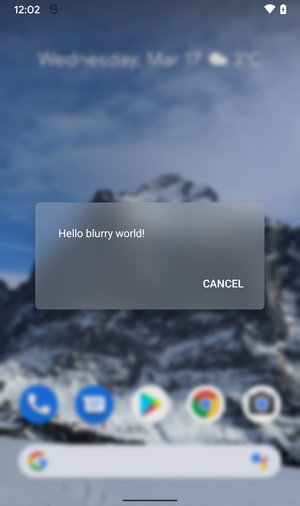
- The application of standard visual effects, such as blurring and color distortion, has been simplified, allowing them to be applied using the RenderEffect API to any RenderNode object or the entire visible area, even in conjunction with other effects. For example, this capability allows for blurring an image displayed through ImageView without explicitly copying, processing, and replacing the bitmap, offloading these actions to the platform. Additionally, the API Window.setBackgroundBlurRadius() has been introduced, which can blur the window's background with a frosted glass effect and highlight depth by blurring the space surrounding the window.

- Integrated tools for transcoding multimedia streams are provided, which can be used in environments with camera applications that save video in HEVC format, ensuring compatibility with applications that do not support this format. For such applications, an automatic transcoding function to the more common AVC format has been added.
- Support for the AVIF image format (AV1 Image Format) has been added, which utilizes intra-frame compression technologies from the AV1 video encoding format. The container for distributing compressed data in AVIF is fully analogous to HEIF. AVIF supports images in HDR (High Dynamic Range) and wide-gamut color space, as well as in standard dynamic range (SDR).
- To prevent potential performance issues, applications are prohibited from starting foreground services while running in the background, except for a few special cases. It is recommended to use WorkManager for running tasks in the background. A new type of task has been proposed in JobScheduler, which runs immediately, has a higher priority, and has network access.
- A unified API OnReceiveContentListener has been proposed for inserting and transferring between applications extended types of content (formatted text, images, videos, sound files, etc.) using various data input sources, including the clipboard, keyboard, and drag-and-drop interface.
- A haptic feedback effect implementable through the built-in vibration motor of phones has been added, with the frequency and intensity of the vibration depending on the parameters of the sound currently being played. This new effect allows for a physical sensation of sound and can be used to add extra realism to games and audio applications.
- In immersive mode, where the program displays full screen while hiding the menus, navigation is simplified using gesture controls. For instance, in applications for reading books, watching videos, and managing photos, you can now navigate with a single swipe gesture.
- The notification interface has been revamped, making it simpler and more functional. Animations and transition effects have also been updated and smoothed out. Notifications' appearance has been aligned with the content specified by the application.
- Responsiveness and reaction speed when handling notifications have been improved. For example, touching a notification now results in an instant transition to the associated application. The use of intermediate notification handlers (notification trampoline) is limited within applications.
- IPC calls in Binder have been optimized. Thanks to a new caching strategy and elimination of conflicts during locks, delays have been significantly reduced. In general, the performance of Binder calls has increased by approximately two times, but in some areas, even greater improvements have been made. For example, the refContentProvider() call is now 47 times faster, releaseWakeLock() is 15 times faster, and JobScheduler.schedule() is 7.9 times faster.
- As part of the Mainline project, which allows for updating individual system components without requiring a full platform update, new updatable system modules have been prepared in addition to the 22 modules available in Android 11. The updates affect hardware-independent components that are delivered through Google Play separately from OTA firmware updates from manufacturers. Among the new modules that can be updated through Google Play without updating the firmware are ART (Android Runtime) and the video re-encoding module.
- Security and Privacy.
- Application developers are now able to disable warning pop-ups that obscure content. Previously, the ability to show overlay windows was controlled via permissions granted during the installation of applications that displayed such windows. There were no tools to influence content overlap from applications whose windows were being obstructed. With the call to Window#setHideOverlayWindows(), all windows obstructing content will now be automatically hidden. For example, hiding may be triggered when displaying critically important information, such as transaction confirmations.
- Applications have been provided with additional settings for restricting notification operations during screen lock. Previously, only visibility control for notifications during screen lock was available, but now mandatory authentication can be required for any actions involving notifications while the screen is locked. For instance, a messaging application may require authentication before deleting a message or marking it as read.
- An API PackageManager.requestChecksums() has been added for requesting and verifying the checksum of an installed application. Supported algorithms include SHA256, SHA512, and Merkle Root.
- The WebView web engine has implemented the option to use the SameSite attribute to manage cookie handling. The value 'SameSite=Lax' limits the sending of cookies for cross-site subrequests, such as image requests or content loading via iframe from another site. In 'SameSite=Strict' mode, cookies are not sent for any type of cross-site requests, including all incoming links from external sites.
- Work continues on randomizing MAC addresses to prevent the tracking of devices when connecting to wireless networks. For non-privileged applications, access to the device's MAC address has been restricted, and when calling the getHardwareAddress() function, an empty value is now returned.
Source: opennet.ru
