

Igor Pavlov has released a new version of the archiver 7-Zip 26.00. The project continues to develop its own archive format 7z, based on LZMA and LZMA2 compression algorithms. Additionally, it supports packing and unpacking archives in the formats XZ, BZIP2, GZIP, TAR, ZIP, and WIM, as well as unpacking over 30 archive formats, packages, virtual machine images, and file systems (ISO, NTFS, EXT*, UDF, UEFI, VDI, VHD, VMDK, CAB, RPM, SquashFS, QCOW2, etc.). For ZIP and GZIP formats, a 2-10% higher compression level is achieved compared to PKZip and WinZip. The project code is written in C++ and is distributed under the LGPL license. Ready-to-use builds for Windows, macOS, and Linux (i686, x86-64, ARM, ARM64) are available for download.
The new version improves the code for supporting ZIP, CPIO, RAR, UFD, QCOW, and Compound formats. In 7-Zip File Manager, the sorting order of the file list has been improved (the file name is now used as a secondary key during sorting). The performance testing toolkit has been expanded to support systems with more than 64 CPU threads. TAR archive extraction, containing files with gaps, has been streamlined.
After the release, users noticed that the default antivirus package in Windows flagged the installer file as malicious. This behavior turned out to be a false positive, and Microsoft published an antivirus database update within the day, after which Windows Defender stopped issuing alerts (you can install the Windows Defender database update by running the command Update-MpSignature).
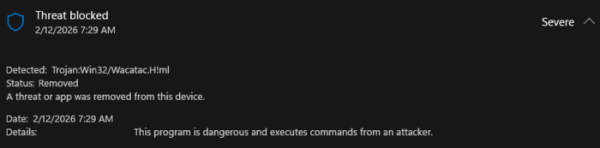
Additionally, it was noted that attackers created the site 7zip.com, designed to mimic the official project site 7-zip.org, but offered a modified installer 7zipInstall.exe for download, containing malicious code. The modified installer was signed with a certificate issued to Jozeal Network Technology. When searched with the keyword 7zip, the site 7zip.com appeared in 4th place in Google search results with the title 'Secure and Fast Download for Windows — Get 7-Zip'. The site was also advertised through YouTube videos with installation instructions for 7-zip.
The attached malware installed components in the user's system that allowed the computer to be used as a proxy for covering tracks during attacks, circumventing blocks, facilitating malware downloads, and sending discovered malware credentials. The malware installer was provided for the Windows platform and, upon execution, placed components in the 'C:\Windows\SysWOW64\hero\' directory, configured auto-start for the included files uphero.exe (update loader) and hero.exe (proxy), and also added rules to the firewall for allowing the specified executable files to install and accept network connections through the netsh utility.
Source: opennet.ru
