

After a year of development, the Endless OS 4.0 distribution has been released, aimed at creating an easy-to-use system where users can quickly find applications to their liking. Applications are distributed as self-sufficient packages in Flatpak format. The size of the offered boot images ranges from 3.3 to 17 GB.
The distribution does not use traditional package managers; instead, it offers a minimal, atomically updatable base system that operates in read-only mode, created using the OSTree toolset (the system image is atomically updated from a Git-like repository). Recent attempts to replicate similar concepts to Endless OS have been made by Fedora developers through the Silverblue project, which aims to create an atomically updatable variant of Fedora Workstation. The installer and update system of Endless OS, as planned, are now utilized in GNOME OS.
Endless OS is among the distributions promoting innovation within user-oriented Linux systems. The working environment in Endless OS is based on a significantly redesigned fork of GNOME. Meanwhile, the developers of Endless actively participate in upstream projects and contribute their findings. For example, in the release of GTK+ 3.22, about 9.8% of all changes were prepared by Endless developers, and the overseeing company Endless Mobile is part of the advisory board of the GNOME Foundation, alongside FSF, Debian, Google, Linux Foundation, Red Hat, and SUSE.
Endless OS 4 is marked as a long-term support release, with updates scheduled to be provided over several years. This includes support for the distribution for some time after the release of Endless OS 5, which is expected in 2-3 years and will be based on Debian 12 (the release timeline for Endless OS 5 depends on the formation schedule of Debian 12).
In the new release:
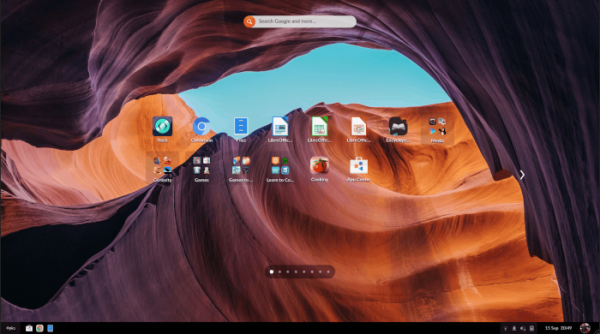
- To simplify navigation through the list of installed applications, which may span several pages, arrows for moving to the next and previous pages have been added beside the icon block. A visual indicator of the total number of pages has been included at the bottom of the list, with each page corresponding to a point.

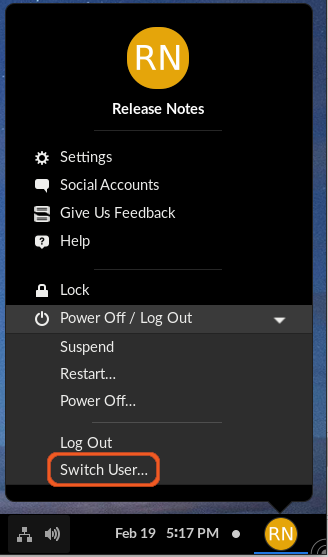
- The ability to quickly switch to another user without ending the current session has been introduced. The user switch interface is accessible through the menu or on the lock screen.

- The printing system has been upgraded. There is no longer a need to install separate drivers to work with printers, and printing and detection of printers connected directly or available on the local network now use the IPP Everywhere protocol.
- The components of the distribution are synchronized with the Debian 11 branch (Endless OS 3.x was based on Debian 10). The Linux kernel package has been updated to version 5.11. The versions of the NVIDIA drivers (460.91.03), OSTree 2020.8, and flatpak 1.10.2 have been updated.
- The build process for the distribution has been changed; instead of rebuilding the source texts of Debian packages on its side, Endless OS 4 now directly downloads shared binary packages from the Debian repositories when forming the distribution. The number of Endless OS-specific packages with modifications has been reduced to 120.
- Support has been added for Raspberry Pi 4B boards with 8GB of RAM (models with 2GB and 4GB of RAM were previously supported). Graphics and WiFi performance has been improved for all Raspberry Pi 4B models. Support for ARM64 platform remains experimental.
- Support added VPN L2TP and OpenConnect with support for Cisco AnyConnect, Array Networks AG SSL VPN, Juniper SSL VPN, Pulse Connect Secure, Palo Alto Networks GlobalProtect SSL VPN, F5 Big-IP SSL VPN, and Fortinet Fortigate SSL VPN protocols.
- To configure system clocks and synchronize accurate time, the systemd-timesyncd service has replaced fake-hwclock and ntpd.
- The bootloader has been updated to support the SBAT (UEFI Secure Boot Advanced Targeting) mechanism, addressing issues with certificate revocation for UEFI Secure Boot.
- The remote desktop management application vinagre has been discontinued, as it is no longer maintained by its authors. Users are encouraged to use Connections (RDP, VNC), Remmina (RDP, VNC, NX, Spice, SSH), or Thincast (RDP) as alternatives.
- Web shortcuts for quickly opening Duolingo, Facebook, Gmail, Twitter, WhatsApp, and YouTube have been removed from the desktop.
- The 'Word of the Day' and 'Quote of the Day' applications have been removed, as they lost their relevance after the removal of the Discovery Feed feature in the last release.
- Chromium is now offered as the default browser, replacing the previous placeholder that automatically installed Google Chrome upon first connection to the internet.
- The music player Rhythmbox and the webcam application Cheese have been transitioned to installation using Flatpak packages (previously Rhythmbox and Cheese were part of the base installation and could not be uninstalled or disabled through parental control tools). After the update, users will need to transfer their playlists from the directory '~/.local/share/rhythmbox/' to '~/.var/app/org.gnome.Rhythmbox3/data/rhythmbox/'.
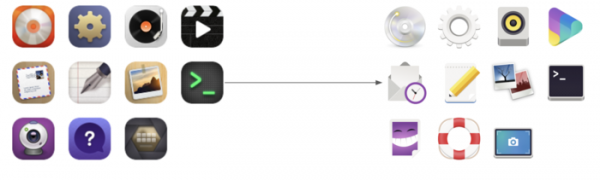
- The icons used in the distribution have been replaced with the standard GNOME icons, which are better suited for high pixel density screens.

- Operating system components and applications in Flatpak format are now separated and stored in different repositories (previously they were handled in a single OSTree repository on disk). This change has improved the stability and performance of package installations.
- The method for optional participation in telemetry data transmission and crash report submission has been modified (enabling the transfer of anonymized statistics can now be done by the user during installation or via the configurator 'Settings → Privacy → Metrics'). Unlike previous releases, the data transmitted is now associated with the installed distribution's build identifier rather than tied to a specific computer. Additionally, the number of metrics sent with the statistics has been reduced.
- Users are now given the ability to customize the contents of the installation image. For example, they can create their own variant of the installation image that includes a different set of default applications and other desktop settings.
Source: opennet.ru
