

The GNOME Project has released version 1.5 of the Libadwaita library, which includes a set of components for styling user interfaces in accordance with GNOME HIG (Human Interface Guidelines). The library includes ready-made widgets and objects for building applications that align with the overall GNOME style, with interfaces that can adapt to screens of any size. The library code is written in C and is distributed under the LGPL 2.1+ license.
The libadwaita library is used in conjunction with GTK4 and includes components from the Adwaita theme used in GNOME, which have been extracted from GTK into a separate library. Extracting GNOME's visual styling elements into a separate library enables the necessary changes for GNOME to be developed independently of GTK, allowing GTK developers to focus on foundational aspects while GNOME developers can more rapidly and flexibly implement the styling changes they require without impacting GTK itself.
The library includes standard widgets that cover various interface elements such as lists, panels, editing blocks, buttons, tabs, search forms, dialog windows, etc. The proposed widgets allow for the creation of versatile interfaces that function seamlessly on both large PC and laptop screens and small touchscreens of smartphones. The user interface of applications dynamically adapts based on the screen size and available input devices. The library also includes a set of Adwaita styles that align appearances with GNOME guidelines, eliminating the need for manual adaptation.
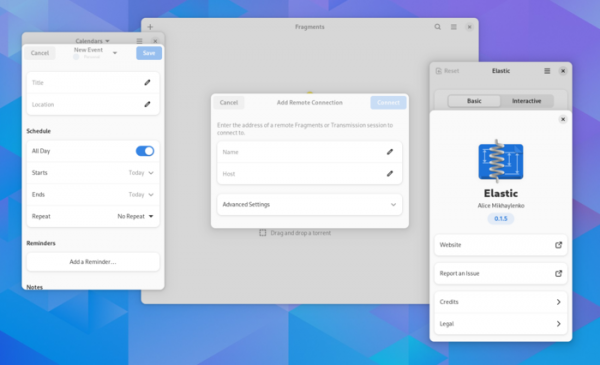
The main change in libadwaita 1.5 is the redesign of adaptive widgets for creating dialog windows that adjust to the size of the visible area. Unlike traditional dialogs that are placed in separate windows, the new dialogs are formed on the client side, rendered within existing windows, and cannot extend beyond the parent window. This approach simplifies the creation of versatile dialogs that work across mobile and desktop interfaces and provides enhanced control over dialogs (for example, there's no need to track overflow, behavior regarding close buttons can be chosen, automatic full-screen expansion is enabled in mobile app versions, and the style of the current window, rather than the system, is taken into account when dimming the dialog).
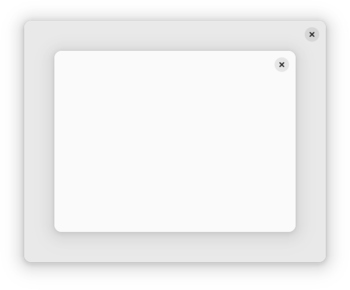
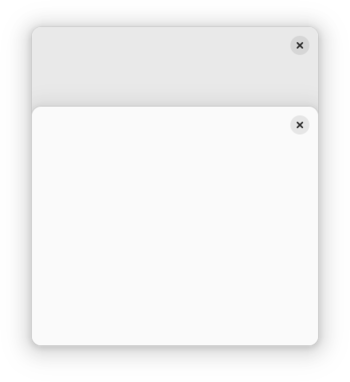
There are plans to implement another version of such dialogs that are attached not to windows but to tabs within a window, which may be useful in applications like browsers, so that tab-related dialogs do not overlap the main window when switching between tabs.
For mobile devices, support has been implemented for placing dialogs in the form of bottom sheets, secured at the bottom of the screen, rather than centered. Bottom-attached dialogs eliminate user confusion about closing windows — in such dialogs, part of the parent window remains visible, and the close buttons for both the parent window and the dialog are clearly separated, making them difficult to confuse.
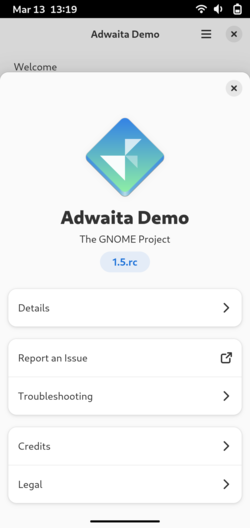
Management of new dialogs is handled using the AdwDialog class, which in most situations resembles the GtkWindow class, with differences mainly in display operations and closing. For instance, the property ':transient-for' has been replaced with a parameter in the adw_dialog_present() function, a new signal '::close-attempt' has been added, and the handling of the ':can-close' parameter has changed. Instead of the AdwPreferencesWindow, AdwAboutWindow, and AdwMessageDialog classes, it is recommended to use AdwPreferencesDialog, AdwAboutDialog, and AdwAlertDialog for the new dialogs.
Dialogs that do not have a parent window will still be handled as separate windows. Dialogs whose parent windows cannot be used for dialog placement, for example, if they do not allow resizing or are missing the AdwWindow and AdwApplicationWindow classes, will also function as windows.
Changes in Libadwaita 1.5 not related to dialog overhauls:
- The AdwEntryRow class has had the ':text-length' property added to limit the size of text in the input field.
- The remove_response() method has been added to the AdwMessageDialog class.
- The AdwBreakpointBin class, which allows for arbitrary user interface modifications depending on window size, now includes the capability to programmatically remove breakpoints.
- The AdwSwipeTracker class has added the ':allow-window-handle' flag, allowing for scrolling over the top panel (used in sheets attached to the bottom edge).
- The brightness of colors used for window shading in dark mode has been increased.
Source: opennet.ru
