

Google has released version 144 of the Chrome web browser. At the same time, a stable version of the open-source project Chromium, which forms the basis of Chrome, is also available. The Chrome browser differs from Chromium by using Google logos, having a crash notification system, modules for playing protected video content (DRM), an automatic update installation system, continuous Sandbox isolation, the delivery of keys for Google API, and the transmission of RLZ parameters during searches. For those who need more time to update, an Extended Stable branch is maintained separately, with support lasting 8 weeks. The next release, Chrome 145, is scheduled for February 10.
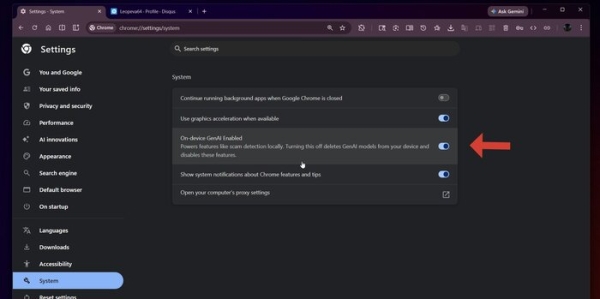
Notably, the test branch Chrome Canary now includes settings to disable AI capabilities in the browser, which are tied to the execution of AI models on the user's local system, in preparation for the upcoming Chrome 147 release. In the configurator under the 'System' section, there is now an 'On-device GenAI Enabled' option, which allows for the removal of all locally executed generative models and the disabling of related features, such as detecting harmful content in enhanced protection mode.
Chrome Canary also adds support for the JPEG XL image format, the return of which Google representatives mentioned back in November. The jxl-rs library, which implements JPEG-XL in Rust, is used for decoding JPEG XL. To enable JPEG XL, the parameter 'chrome://flags/#enable-jxl-image-format' has been added.
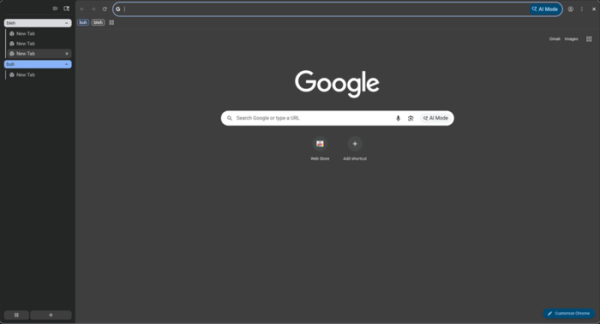
The Chrome Beta branch, which will become the basis for the upcoming Chrome 145 release, now features a vertical tab display mode. To replace the top horizontal tab bar with a side panel of vertical tabs, an option 'chrome://flags/#vertical-tabs' has been suggested. After activating this option, a 'Show tabs on the side' button will appear in the context menu when right-clicking on an empty area in the tab bar.
Key changes in Chrome 144:
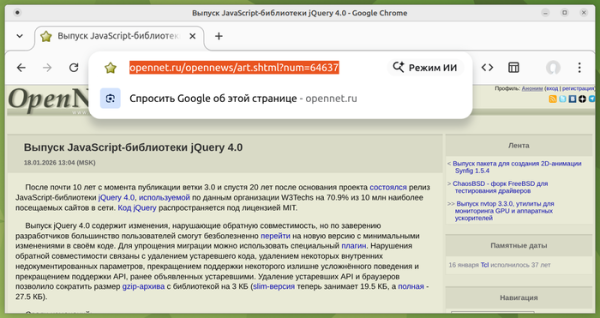
- The development of the AI mode has continued, allowing interaction with the AI agent from the address bar or from the page displayed when opening a new tab. The AI mode enables users to ask complex questions in natural language and receive answers based on information aggregated from the most relevant pages on a given topic. If necessary, the user can clarify information with follow-up questions. The mode also allows users to ask questions about the content of a page directly from the address bar.
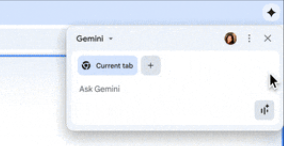
In Chrome 144, the capabilities of the integrated chat bot Gemini have been expanded, which now includes support for uploading images to Gemini (via the context menu) and generating new images based on them. The AI mode can now be applied in the context of multiple tabs — AI can answer questions about the content of selected tabs, compare contents, summarize, and search for information.

Previously, the AI mode was only available on macOS and Windows platforms, but now the "AI Mode" button and activation using the Tab key before entering text in the address bar have also appeared in builds for Linux (seemingly not yet for all users). On the "chrome://flags" page, you can manage the activation of AI through the options for "ai-mode".

- For some users, a new simplified layout has been activated for the page displayed when opening a new tab. The new version eliminates visual clutter and provides more settings for managing the appearance. The support for hiding individual content blocks with the "Dismiss" button has been removed, and instead, users can now disable entire categories (for example, instead of hiding a specific recipe, users can hide all recipes).
- In configurations based on Windows OS, where centralized management of Chrome is applied, protection against unauthorized changes to important settings has been implemented, such as changes made by malware to the search engine. When unauthorized changes to settings by third-party software are detected, such settings are now automatically reset to their default state.
- The third version of the Happy Eyeballs algorithm has been implemented, which is used to choose the optimal protocol when connecting to hosts available at both IPv4 and IPv6 addresses. When using the Happy Eyeballs algorithm, the client resolves both IPv4 and IPv6 addresses for the host simultaneously and sends a connection request over IPv6. It then attempts to connect to other associated host addresses in parallel without waiting for the results of previous connection attempts. The connection that is established first remains active, while the others are closed. The third version of the protocol additionally analyzes DNS records SVCB (Service Binding) and HTTPS for determining support for HTTP/3 and HTTPS alongside the DNS records A (IPv4) and AAAA (IPv6). In cases of availability, QUIC protocol and the TLS ECH extension are considered higher priority.
- The Direct Sockets API, which allows direct TCP and UDP connections to external systems, as well as creating listening sockets for accepting connections, has added support for multicast transmission. Isolated Web Applications (IWA) can now subscribe to multicast groups and receive multicast UDP packets sent to them.
- The interfaces and technologies developed under the Privacy Sandbox initiative have been declared deprecated and are scheduled for removal in Chrome 150: API Topics (which replaced API FLoC), API Protected Audience, API Shared Storage, API Attribution Reporting, Private Aggregation, API Related Website Sets, and requestStorageAccessFor. For more details, see Google's announcement regarding Privacy Sandbox plans.
- A new pseudo-element ‘::search-text’ has been added to CSS, allowing the modification of color, background, and decorative elements of text highlighted as a result of local search on the page, similar to the previously available pseudo-elements ‘::highlight’, ‘::spelling-error’, and ‘::grammar-error’, which allow changing the style of text highlighting and error indications.
- A new CSS property ‘caret-shape’ has been added, enabling customization of the cursor appearance in editable fields.
- A new event ‘clipboardchange’ has been added, which is generated when the content of the clipboard changes, allowing developers to avoid resource-intensive periodic polling for changes using JavaScript.
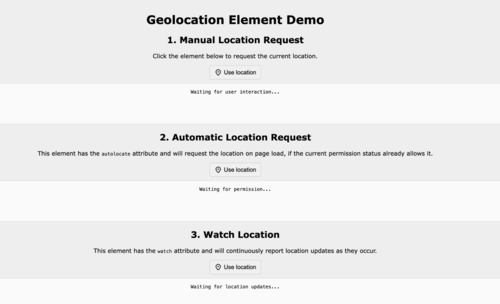
- A new HTML element has been added, intended for embedding buttons and links on a page to call the interface for confirming access to the user's location information provided by the corresponding JavaScript API.

- A new JavaScript object, Temporal, has been introduced, implementing an alternative set of methods for working with dates and times. The new API allows manipulation of dates both in terms of and without considering time zones, converting time, formatting output, and performing arithmetic operations with time. Time can be specified in a time zone-independent representation (Temporal.PlainDate, Temporal.PlainTime, Temporal.PlainDateTime), a time zone-bound representation (Temporal.ZonedDateTime), and epoch representation (Temporal.Instant — the number of nanoseconds since January 1, 1970).
- Improvements have been made to the tools for web developers. An option to launch remote debugging without requiring a browser restart has been added to the content inspection page (chrome://inspect) (previously, a similar server could only be started via the command-line option). In the Styles panel, editing of the CSS rules ‘@font-face’ and ‘@font-feature-values’ is now allowed. In the network inspection interface, the ‘Request blocking’ panel has been renamed to ‘Request conditions’ and now allows not only blocking but also throttling of individual network requests. server In addition to new features and bug fixes, the new version addresses 10 vulnerabilities. Many of the vulnerabilities were identified as a result of automated testing with tools such as AddressSanitizer, MemorySanitizer, Control Flow Integrity, LibFuzzer, and AFL. No critical issues that would allow bypassing all security levels of the browser and executing code outside the sandbox environment were discovered. As part of the vulnerability reward program for the current release, Google has established 10 bounties and paid out $18,500 (including one bounty of $8,000, $4,000, $3,000, $2,000, $1,000, and $500). The amount for 4 of the rewards is yet to be determined.
Google has released version 144 of the Chrome web browser. At the same time, a stable release of the free project Chromium, which serves as the foundation for Chrome, is also available.
Source: opennet.ru
