

Google has released version 146 of the Chrome web browser. At the same time, a stable release of the open-source project Chromium, which serves as the foundation for Chrome, is available. The Chrome browser differs from Chromium by using Google logos, having a crash notification system, modules for playing copy-protected video content (DRM), an automatic update installation system, always-on sandbox isolation, providing keys to the Google API, and transmitting RLZ parameters during searches. For those who need more time to update, a separate Extended Stable branch is supported, accompanied by an 8-week period. The next release of Chrome, version 147, is scheduled for April 7.
Additionally, Google announced the upcoming official builds of Chrome for Linux systems based on the ARM64 architecture. Linux builds for ARM64 will begin to be generated in the second quarter of 2026 and will be available in deb and rpm packages. Previously, official Chrome builds for Linux were only published for the x86_64 architecture, while ARM64 architecture had only third-party Chromium builds offered by distributions. The official version of Chrome features support for connecting to a Google account, integration with Google services, data synchronization across devices, simplified installation of extensions from the Chrome Web Store, and the ability to enable an enhanced protection mode.
Key changes in Chrome 146:
- For some users, a selective permission intervention mechanism has been enabled, which blocks advertised JavaScript scripts from accessing capabilities that affect privacy, such as access to location information, microphone, clipboard, Bluetooth, USB, serial port, and screen capture. The idea is that if a user granted a page access to such capabilities, these permissions will not apply to third-party scripts hosted on that page and loaded from other sites (either through an iframe tag or directly through a script tag).
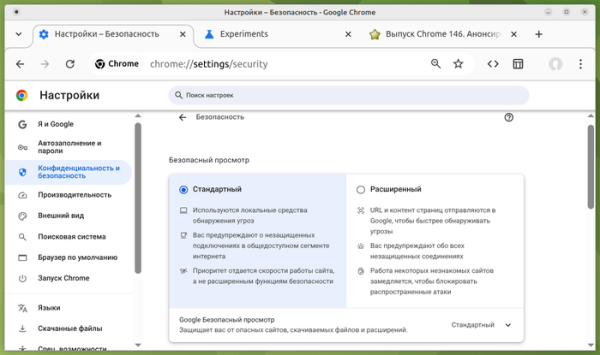
- The structure of security-related settings has been changed. To simplify the process, users are provided with the option to choose between standard and enhanced protection levels, allowing them to achieve the desired level of security without needing to understand the details and advanced options. When selecting enhanced mode, URL and content checks are additionally performed on servers Google, warnings are displayed for unsecured connections, and the performance of unusual websites for the user is slowed down to block attacks. If desired, users can return to the old scheme of separate configuration for each setting. To manage the activation of the new security settings layout, the parameter 'chrome://flags/#bundled-security-settings' is suggested.

- The development of AI mode continues, allowing interaction with the AI agent from the address bar or from the page shown when opening a new tab. AI mode enables users to ask complex questions in natural language and receive answers based on aggregating information from the most relevant pages on the given topic. If needed, users can clarify information with follow-up questions. The mode also allows users to ask questions about the content of the page directly from the address bar. In Chrome 146, the ability to use files from Google Drive storage as context for the AI agent has been implemented.
- In the automatic form filling mode, additional types of data that were previously only available when the enhanced autofill mode was enabled can now be used.
- The gradual activation of protection against accessing the local system when interacting with public websites has begun for users. Requests from websites to IP addresses the local network (intranet or internal addresses) or the loopback interface (127.0.0.0/8) will require user confirmation for the operation. Protection measures cover attempts to load resources, fetch() requests, and iframe insertions. Protection is not currently applied to connections over WebSockets, WebTransport, and WebRTC, but it will be added for them in the next release.
Internal resource access is exploited by attackers for indirect identification and carrying out CSRF attacks on routers, access points, printers, corporate web interfaces, and other devices and services that accept requests only from the local network. To manage the inclusion of subnets in the internal or public category, the setting LocalNetworkAccessIpAddressSpaceOverrides is proposed, and for automatically granting access to child iframes based on the parent iframe's permissions, the setting LocalNetworkAccessPermissionsPolicyDefaultEnabled has been added.
- CSS properties 'animation-trigger' and 'trigger-scope' have been added to control animations based on page scroll position. For example, you can start, stop, or restart an animation upon reaching a specific scroll position, relying solely on declarative CSS without using JavaScript code.
- Support for a custom elements registry has been implemented to separate the scope of custom HTML elements, which may be necessary when using multiple different custom HTML elements with the same name on a single page. In cases where multiple libraries define an element with the same name on the page, the JavaScript object CustomElementRegistry allows you to associate elements from each library with specific parts of the DOM hierarchy. For instance, if two libraries define different elements with the same name , you can use the element from the first library in one part of the page and from the second in another.
- An API Sanitizer has been added, which can be useful for cleaning incoming external data and stripping HTML tags that could be used for XSS attacks. The API provides methods for manipulating HTML and removing HTML elements that affect rendering and execution. To safely insert HTML content, the method element.setHTML() is proposed, similar to element.innerHTML but protecting against cross-site scripting (XSS). For safe parsing of HTML, the method document.parseHTML() has been implemented. const unsanitizedString = 'abc alert(1) def'; const sanitizer1 = new Sanitizer({ elements: ['div', 'p', 'button', 'script'], }); const target = document.getElementById('target'); target.setHTML(unsanitizedString, { sanitizer: sanitizer1 });
- The element has been implemented with a parameter named (for example, <meta name="text-scale" content="scale">), which includes automatic font size scaling on the page according to the browser and operating system settings, provided that relative units (rem and em) are used on the page.
- An optional compatibility mode has been added to the WebGPU API, providing a subset of functions that can work on systems with legacy graphics APIs such as OpenGL and Direct3D11.
- The ability to combine multiple iterators into one using the Iterator.concat() method has been added to JavaScript.
- The WebNN API has been implemented in the 'Origin trials' mode, allowing the use of operating system services for machine learning and the associated hardware capabilities.
- The CPU Performance API has been implemented in the 'Origin trials' mode to obtain information about the performance level and characteristics of the CPU (number of cores, type, architecture, model, frequency, etc.).
- The 'focusgroup' attribute has been added in the 'Origin trials' mode, allowing the use of cursor control keys instead of tabbing to navigate between buttons or other focus-related elements.
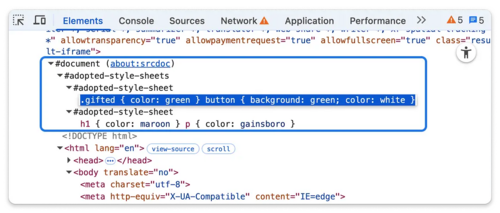
- Improvements have been made to tools for web developers. In the web console, command editing results are preserved when navigating through the operation history. In the Elements panel, CSS styles added programmatically to the Shadow DOM are displayed through a separate node ‘#adopted-style-sheets’ in the DOM tree, similar to viewing and editing styles defined through the <style> tag.

In addition to new features and bug fixes, the new version resolved 29 vulnerabilities. Many of the vulnerabilities were identified through automated testing using tools like AddressSanitizer, MemorySanitizer, Control Flow Integrity, LibFuzzer, and AFL. One issue (buffer overflow in WebML) has been assigned a critical severity level, indicating that the vulnerability allows bypassing all browser security levels and executing code in the system outside of the sandbox environment. As part of the bug bounty program for this release, Google has awarded 29 prizes and paid out $211,000, setting a record for the highest payout for a single release (two prizes of $43,000, one prize each of $36,000, $33,000, $11,000, and $7,000, two prizes of $10,000 and $3,000, and four prizes of $2,000 and $1,000). The amounts for 12 of the rewards have yet to be determined.
Source: opennet.ru
