

The release of Chrome OS 100 is now available, based on the Linux kernel, the upstart system manager, ebuild/portage build tools, open components, and the Chrome 100 web browser. The user environment of Chrome OS is limited to the web browser, utilizing web applications instead of standard software. However, Chrome OS features a full multi-window interface, desktop, and taskbar. The Chrome OS 100 build is available for most current models of Chromebooks. The source code is distributed under the Apache 2.0 license. Additionally, testing continues for Chrome OS Flex, a version of Chrome OS for use on regular computers. Enthusiasts are also creating unofficial builds for standard computers with x86, x86_64, and ARM processors.
The main changes in Chrome OS 100:
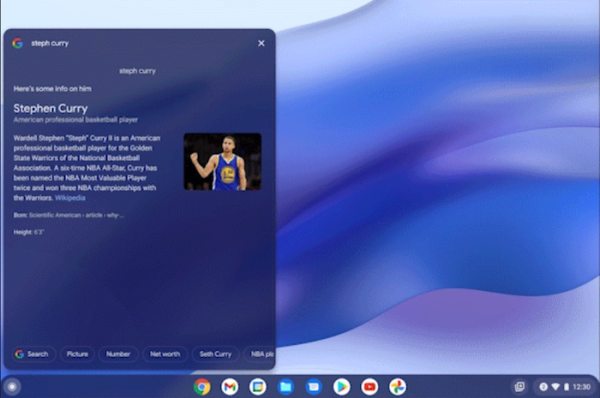
- A new implementation of the app launcher has been proposed, featuring an updated design and enhanced search capabilities. The app list panel is now displayed on the side of the screen, providing more space for open windows. The ability to group applications arbitrarily is now available. The presentation of search results for arbitrary questions has been redesigned — in addition to previewing results from the search engine, informational blocks are now displayed, allowing users to obtain necessary information without switching to the browser. In addition to searching for applications and files from the Launcher, users can also search for keyboard shortcuts and include open tabs and windows in the browser in their search.

- The camera app has added tools for creating animated GIFs. When the 'GIF' toggle is activated in video recording mode, a 5-second clip will automatically be recorded and transformed into a GIF format. This clip can be immediately sent via email, shared with another application, or transferred to an Android smartphone using the Nearby Share service.
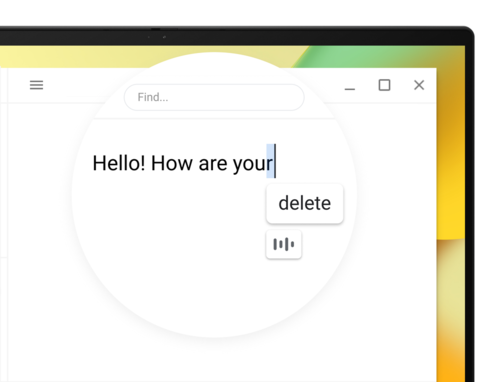
- The voice input function has been enhanced with the ability to edit content. During editing, voice commands such as 'delete' for removing the last letter, 'go to next/previous character' for changing the cursor position, 'undo' for reverting changes, and 'select all' for highlighting text are recognized. In the future, the number of voice commands will be expanded. To enable voice input, you can use the keyboard shortcut 'Search + d' or adjust settings in the 'Settings > Accessibility > Keyboard and text input' section.

- The number of devices on which Chrome OS Flex can be installed has been expanded, allowing the use of Chrome OS on standard computers. This is useful for extending the lifespan of older PCs and laptops, reducing costs (no need to pay for the OS and additional software like antivirus), or enhancing infrastructure security. Since the initial announcement, compatibility with over one hundred devices has been confirmed.
- Users can assign their own icons and titles for websites suggested for use in managed sessions with a limited set of available sites (Managed Session).
- A new report summarizing devices requiring attention has been added to the Google Admin console, particularly due to performance issues. A new API for Chrome Management Telemetry has been proposed for transmitting enhanced information about device status when centralized management is enabled.
Source: opennet.ru
