

The release of Chrome OS 102 is available, based on the Linux kernel, using the upstart system manager, the ebuild/portage build tools, open components, and the Chrome browser version 102. The user environment in Chrome OS is limited to the web browser, and instead of standard applications, web apps are utilized; however, Chrome OS includes a full multi-window interface, desktop, and taskbar. Chrome OS 102 is available for most current Chromebook models. The source code is distributed under the Apache 2.0 open license. Additionally, testing of Chrome OS Flex continues, a version of Chrome OS for use on regular computers. Enthusiasts are also creating unofficial builds for regular computers with x86, x86_64, and ARM processors.
Key changes in Chrome OS 102:
- The Chrome OS 102 branch has been declared LTS (Long-term support) and will be maintained under an extended support cycle until March 2023. Support for the previous LTS branch, Chrome OS 96, will continue until September 2022. There is also a separate LTC (Long-term candidate) branch that is distinguished from LTS by an earlier upgrade to the extended support branch (devices connected to the LTC update delivery channel will be upgraded to Chrome OS 102 immediately, while those connected to the LTS channel will transition in September).
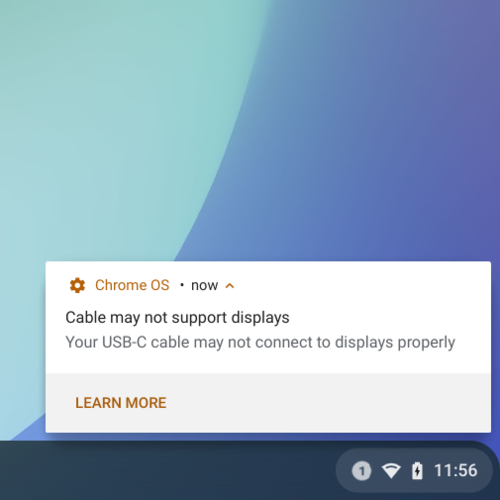
- A warning has been added about cable issues when connecting external devices to a Chromebook via the USB Type-C port if the cable used affects the device's performance and functionality (for example, when the cable does not support certain Type-C capabilities, such as display connection, or does not provide high data transfer modes when used in a Chromebook with USB4/Thunderbolt 3).

- The interface for configuring camera application settings has been improved. The left sidebar has simplified access to options and clearly shows which modes and features are currently activated or inactive. The settings tab has enhanced readability of options and made searching easier.
- The modernization of the app launcher that began in Chrome OS 100 has continued. The new version of the Launcher now includes the ability to search for tabs open in the browser. It considers both the URL and the title of the page within the tab during searches. In the search results list, the category containing found browser tabs, like other categories, is ranked based on how frequently users click on specific types of results. Tabs playing sound or those used recently are prioritized. Clicking on a found tab opens it in the browser.
- The file manager now supports extracting data from ZIP archives. An 'Extract All' option has been added to the context menu for this purpose.
- A VPN-client with IKEv2 protocol support has been integrated into the operating system. Configuration is done through the built-in configurator, similar to the previously available VPN clients L2TP/IPsec and OpenVPN.
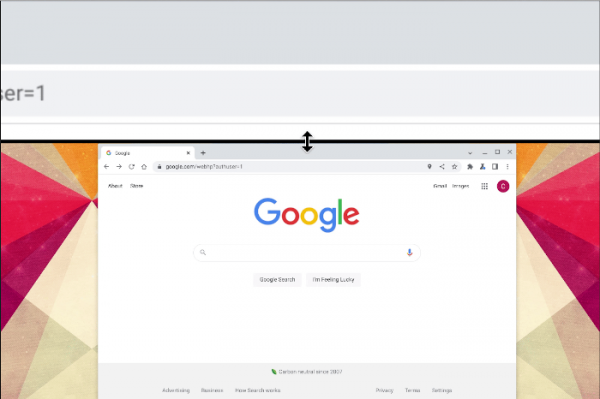
- The interface for magnifying specific areas of the screen has been improved. The magnification mode has been expanded, dividing the screen into sections, with the lower half displaying the original content and the upper half showing the magnified version. In the new version, users can freely adjust the size of the upper and lower sections, allocating more space to either the content or the results of the magnification.

- Support for continuous panning of content has been added — as the cursor moves, the rest of the screen shifts along. Panning can also be controlled using the key combination ctrl + alt + arrow keys.
- The package includes the Cursive app for taking handwritten notes, structuring ideas, and creating simple drawings. Notes and drawings can be grouped together, combining them into projects that can be shared with users, sent to other applications, and exported to PDF. This app was previously tested with select users and is now included by default on all devices that support the stylus.


Source: opennet.ru
