

The release of Chrome OS 123, based on the Linux kernel, the upstart system manager, the ebuild/portage build tools, open components, and the Chrome 123 web browser, is now available. The user environment of Chrome OS is limited to the web browser, and standard programs are replaced with web applications; however, Chrome OS includes a full multi-window interface, desktop, and taskbar. Display output is handled by the Freon graphical stack (work is underway to transition to using Wayland) and the Aura window manager. The source code is distributed under the Apache 2.0 license. The Chrome OS 123 build is available for most current models of Chromebooks. A Chrome OS Flex edition is offered for use on regular computers.
Key changes in Chrome OS 123:
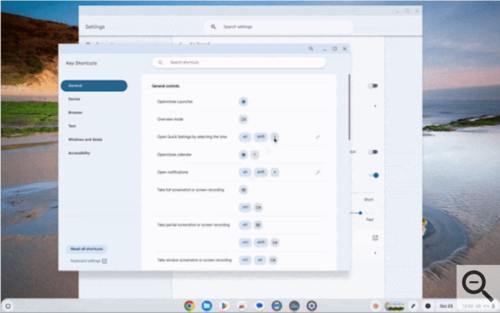
- An experimental feature has been introduced that allows users to assign their own keyboard shortcuts instead of the default ones. To activate this interface, the setting 'chrome://flags/#enable-shortcut-customization' must be enabled.

- The ability to bind actions to additional mouse buttons has been added. For example, actions such as taking a screenshot, toggling sound on/off, and calling up the emoji insertion interface can be bound, as well as any actions that can be invoked through keyboard shortcuts.
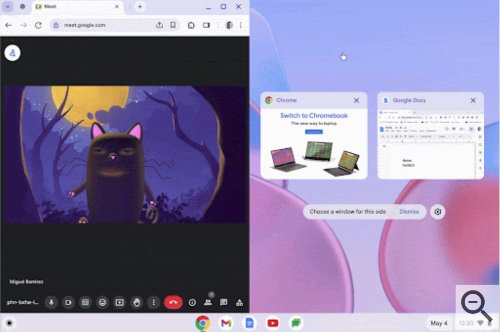
- A quick switch feature to split-screen mode has been provided, allowing windows of two different applications to be placed side by side. After selecting the properties of a window in split-screen mode, an overview of other open windows is immediately displayed, which can be selected to show in the second half.

- The ability to operate in hotspot mode has been added, allowing nearby devices to connect to the network (useful when the Chromebook is connected via a cellular operator).
- The ability to set language preferences tied to individual applications has been introduced. The language for a selected application can be changed through the settings interface 'Settings > Apps > Manage your apps > App language'.
- A new interface has been added in the privacy settings to view the list of applications requesting access to the camera or microphone, allowing you to selectively grant or block access to these resources without navigating to the application settings.
- A new set of naturally sounding voices for speech synthesis has been introduced for 31 languages, which can be used in offline mode.
- The new Floss Bluetooth stack has been enabled, based on the Fluoride stack ported from the Android platform, and continues the development of the Broadcom BlueDroid stack. If issues arise with the new Bluetooth stack, the system can revert to the old BlueZ stack using the parameter 'chrome://flags/#bluetooth-use-floss'.
Source: opennet.ru
