

operating system release , based on the Linux kernel, upstart init system, ebuild/portage build tools, open components, and web browser . The user environment of Chrome OS is limited to the web browser, and instead of standard applications, web applications are used; nevertheless, Chrome OS a full-fledged multi-window interface, desktop, and task panel. Chrome OS 80 is available for most of Chromebook. Enthusiasts have created unofficial builds for regular computers with x86, x86_64, and ARM processors. texts are under the open Apache 2.0 license.
Initially, the release was on February 11, but was due to the presence of a blocking release , which disrupted the display of the parent window when processing certain styled nested iframe blocks loaded from third-party sites.
downward API support (simultaneously with this in :
- Support for automatic screen rotation has been implemented when connecting an external input device to the tablet (if the device was in portrait mode when connecting the mouse, there is no need to manually rotate the screen now).
- The environment for running Linux applications has been updated to Debian 10 (Buster). Previously, Debian 9 was used in the Linux container. Existing container contents will be upgraded to Debian 10 upon transitioning to Chrome OS 80. For enthusiasts of other distributions, guides have been prepared on usage , , or . Users , that when upgrading to Chrome OS 80, the previously installed environments with alternative distributions may stop working. Plans for the future include support for nested Linux environment launches and the ability to pass USB devices into the Linux environment.
- On tablets with touch screens, instead of a full virtual keyboard on the login and system lock screens, there is a default option to display a compact numeric pad (which can be useful in environments using only numeric passwords).
- Support for Ambient EQ technology has been implemented, allowing automatic adjustment of white balance and screen color temperature, making the picture more natural and less straining on the eyes. Screen parameters adapt based on external conditions, providing comfortable work both in bright sunlight and in darkness. The first device with Ambient EQ support will be , which will go on sale in April.
- The ARC++ (App Runtime for Chrome, a layer for running Android applications on Chrome OS) environment has been improved. the ability to install APK packages using the 'adb' utility (adb connect 192.68.1.12:5555; adb install app.apk) without switching Chrome OS to developer mode, which is useful for testing your own applications. When installed in this way, a warning about the presence of unverified applications in the system is displayed during screen lock.
For the Netflix app installed in the Android environment from Google Play, a "picture-in-picture" mode has been implemented, allowing users to continue working with websites or apps while simultaneously watching videos.
- An unobtrusive notification interface for websites and web applications requesting permissions has been activated, which does not require an immediate user response but instead displays an informational tip with a warning that then collapses into an indicator showing a crossed-out bell. Clicking on the indicator allows users to grant or deny the requested permission at their convenience.
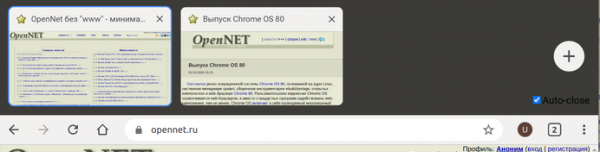
- An experimental horizontal tab navigation mode has been added, working in the style of Chrome for Android, displaying not only the titles but also large thumbnails of pages related to the tabs. The display of thumbnails can be toggled on and off with a special button located near the address bar and user avatar. This mode is turned off by default and can be activated through "chrome://flags/#webui-tab-strip", "chrome://flags/#new-tabstrip-animation" and "chrome://flags/#scrollable-tabstrip".

- an experimental gesture control mode (chrome://flags/#shelf-hotseat), allowing easy interaction with the interface on touchscreen devices. For example, similar to Android, users can bring up and hide the panel and list of available apps by swiping from the bottom edge of the screen, view the window list with a sliding motion across the screen, and close windows by swiping from the edge of the screen, or pin windows in a mosaic mode with a long touch.
Source: opennet.ru
