

The release of Chrome OS 96, based on the Linux kernel, the upstart system manager, ebuild/portage build tools, open components, and web browser Chrome 96, has been published. The user environment of Chrome OS is limited to the web browser, with web applications used instead of standard programs; however, Chrome OS includes a full multi-window interface, desktop, and taskbar. The Chrome OS 96 build is available for most current models of Chromebook. Enthusiasts have created unofficial builds for regular computers with x86, x86_64, and ARM processors. The source code is distributed under the Apache 2.0 open-source license.
Key changes in Chrome OS 96:
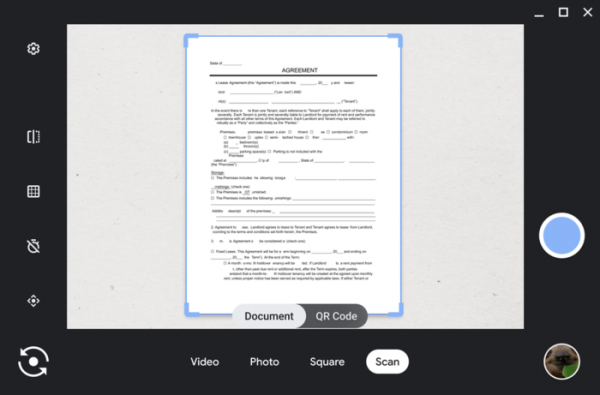
- The camera application has significantly enhanced capabilities. A separate mode has been integrated for document scanning, allowing the use of the front or rear camera instead of a scanner. During scanning, the program automatically detects the boundaries of the document to crop out excess background. The resulting document can be saved in PDF or JPEG format, shared on social media or Gmail, or sent to a smartphone using the Nearby Share feature.

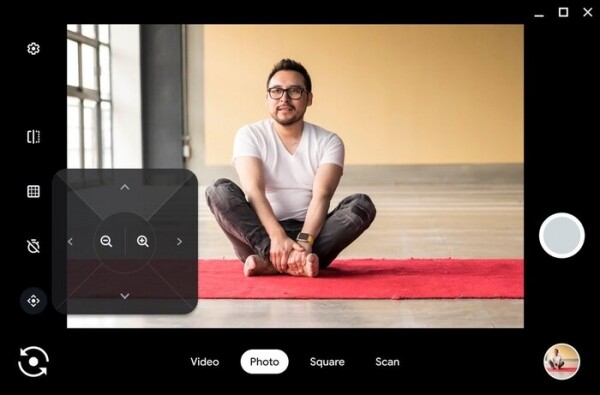
When connecting an external camera to a Chromebook, support for adjusting tilt and zoom using the "Pan-Tilt-Zoom" settings block has been added to select the visible area of the shot.
The camera application has also introduced a "video" mode for quick video recording, the option to take a snapshot with a timer, and a QR code scanning mode. All photos and videos are automatically saved in the "Camera" directory and accessible from the file manager. Next year, there are plans to add the ability to create animated GIFs and implement voice control of the camera through Google Assistant (for example, simply saying 'take a photo' will suffice to capture an image).
- A new sidebar has been proposed, simplifying the matching of data in the browser with pages from different websites. For example, when using the search engine, you can open an interesting page without closing the list of search results — if the information does not meet expectations, you can immediately open another page without going back, thus not losing the search results.
- The Nearby Share feature from ARC++ (App Runtime for Chrome), a layer for running Android apps on Chrome OS, has been enabled. Nearby Share allows for quick and secure file transfers to nearby devices running the Chrome browser. Previously, Nearby Share could only be used from the file manager, web apps, and system apps on Chrome OS. Now, it is also available for Android applications.
- A setting has been added that allows applications to be used as default handlers for various types of links. For instance, you can set the PWA application Zoom to handle links to zoom.us.
- The on-screen keyboard now displays a suggestion for pasting data that has been copied in the last two minutes. If you copy data and then open the virtual keyboard, the copied data will be shown in the top row, and you can paste it into text with just one click.
- The interface for setting desktop wallpapers has been improved.
- A separate section for notification output settings has been added to the configurator (previously, notifications could only be configured through the Quick Settings menu).
- The Chrome OS 96 branch will be supported for 8 weeks as part of the LTS (Long-term support) cycle.
Source: opennet.ru
