

The release of Deepin 20.3 has taken place, based on the Debian 10 package base, but developing its own Deepin Desktop Environment (DDE) and around 40 user applications, including the music player DMusic, video player DMovie, messaging system DTalk, installer, and program installation center Deepin Software Center. The project is based by a team of developers from China, but has transformed into an international project. The distribution supports the Russian language. All developments are distributed under the GPLv3 license. The size of the bootable ISO image is 3 GB (amd64).
Desktop components and applications are developed using C/C++ (Qt5) and Go. A key feature of the Deepin desktop is the panel, which supports several operating modes. In the classic mode, there is a more explicit separation of open windows and suggested applications to launch, and the system tray area is displayed. The efficient mode somewhat resembles Unity, mixing indicators of running programs, favorite applications, and control applets (volume/brightness settings, connected drives, clock, network status, etc.). The program launcher interface is fullscreen and provides two modes — viewing favorite applications and navigating through the catalog of installed programs.
Key innovations:
- The Linux kernel has been updated to version 5.15 with support for 12th generation Intel processors and a new NTFS driver.
- In the Album photo manager, image selection has been improved in bulk mode, new buttons for quick image processing have been added, preview, import, and video search have been implemented, and the status bar now shows separate counters for images and videos.
- The screenshot utility has introduced the ability to record long images covering scrolling areas within a window. An OCR capability has been integrated for extracting text from images.
- The DDE desktop has implemented a shortcut to invoke the global search function, which also now supports searching for files with markdown formatting.
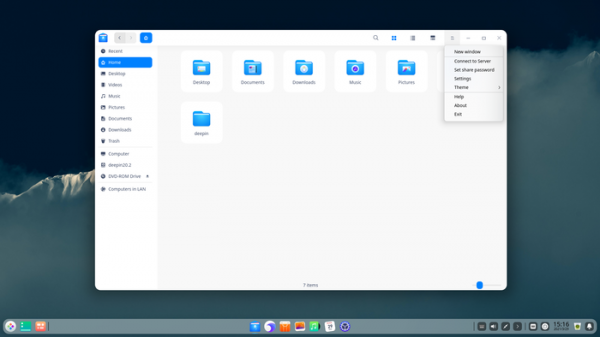
- In the file manager's list view mode, the option to rearrange columns has been added to change the display order. An option has been provided to specify the color of the active tab. Constant display of mounted Samba sections in the sidebar has been implemented. Quick navigation to the summary page is ensured by pressing the Backspace key.
- The Movie video player has received an interface with video information, decoding settings have been added, and hardware acceleration support in ffmpeg has been implemented on systems with NVIDIA graphics cards.
- Extended input method settings and the ability to group input methods by languages have been added.
- Printing features have been added to the document viewer.
- Voice notes now allow customization of the order of notes and have added advanced text editing capabilities.
- The set includes the games Lianliankan and Gomoku.
- Support for hardware video decoding at 2K resolution on systems with AMD Oland GPUs has been added.
Source: opennet.ru
