

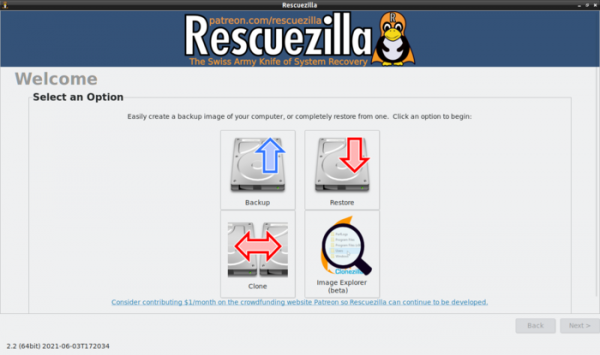
The new version of the Rescuezilla 2.2 distribution is available, designed for backup, system recovery after failures, and diagnosis of various hardware issues. The distribution is built on the Ubuntu package base and continues the development of the 'Redo Backup & Rescue' project, which was discontinued in 2012. Live builds for 64-bit x86 systems (805MB) are available for download.
Rescuezilla supports the backup and recovery of accidentally deleted files on Linux, macOS, and Windows partitions. It automatically searches for and connects to network shares that can be used for backup storage. The graphical interface is based on the LXDE shell. The format of the created backups is fully compatible with the Clonezilla distribution. When restoring, it supports working with images from Clonezilla, Redo Rescue, Foxclone, and FSArchiver.
Key Changes:
- The switch to the Ubuntu 21.04 package base has been made. In addition to the main build, an alternative version based on the LTS release of Ubuntu 20.04 has also been created, which boots more reliably on some devices.
- A cloning feature has been added, allowing for direct transfer of partitions from one device to another.
- The ability to restore and analyze images has been added. of virtual machinesIt supports all formats that qemu-nbd works with (VirtualBox VDI, VMWare VMDK, Qemu QCOW2, HyperV VHDx, raw .dd/.img, etc.).
- Support for recovering and examining the contents of images with backups created in Redo Rescue, Foxclone, FSArchiver, Redo v0.9.2, and partially in FOG Project has been added.
- Support for configuring the format and compression level (gzip, zstandard, no compression) has been provided.
- The missing logic for restoring Clonezilla images has been implemented, taking into account features such as expanding the filesystem size to write to a larger partition, verification of restoration accuracy, clearing the dirty flag for NTFS, removing MAC address records in udev, reinstalling boot loaders (syslinux, GRUB), updating initramfs, restoring LVM VG metadata, and updating EFI NVRAM for the boot device.
- A mode has been added to shut down or restart the computer after the operation is completed.
- Support for connecting to external storage via NFS and SSH (SFTP) has been added.
- The ability to attach a description to backups has been added.
- Screenshot creation support has been added through the Print Screen key.
- Files with a translation into Russian are included.
Source: opennet.ru
