

The release of the Lutris gaming platform 0.5.20 has been published, providing tools to simplify the installation, configuration, and management of games on Linux. The project code is written in Python and is distributed under the GPLv3 license. Ready-made builds are available in flatpak format.
The project supports a catalog for quick searching and installation of gaming applications, allowing users to launch games on Linux with a single click through a unified interface, without worrying about dependency installations and settings. The runtime components required for game execution are provided by the project and are not tied to the distribution used. The runtime is a distribution-independent set of libraries, including components from SteamOS and Ubuntu, as well as various additional libraries.
It allows for the installation of games distributed through services like GOG, Steam, Epic Games Store, Battle.net, Amazon Games, Origin, and Uplay. Lutris itself acts only as an intermediary and does not sell games, so for commercial titles, users must purchase the game from the respective service (free games can be launched with one click from the Lutris graphical interface).
Each game in Lutris is associated with a loading script and handler describing the environment for launching the game. Ready-made profiles with optimal settings for running games under Wine are also provided. In addition to Wine, games can be launched using console emulators such as RetroArch, Dosbox, FS-UAE, ScummVM, MESS/MAME, and Dolphin.
Among the changes in the new version:
- For running Windows games using UMU (Unified Launcher), Proton-GE is used by default, an enhanced version of the Proton package that features a more recent version of Wine, utilizes FFmpeg in FAudio, and includes additional patches that resolve issues in various gaming applications.
- With the use of Proton, the installation of VKD3D, D3D Extras, and DXVK-NVAPI has been discontinued, as they are already provided within Proton.
- The ability to pass the 'Enable Esync' and 'Enable Fsync' settings into Proton has been ensured.
- The DXVK layer for translating Direct3D 8 to the Vulkan API has been included.
- An option has been added to the Wine startup script to use the winewayland.drv driver for environments based on the Wayland protocol.
- Buttons for selecting covers, banners, and icons in the game settings have been added.
- The settings now include an option to specify the file path to the BIOS for the emulator used in libretro.
- It is now possible to retrieve release information through GOG and Itch.io services. When working with Itch.io, API access keys are used instead of credentials. Managing collections on Itch.io has been simplified — if there is no collection named 'Lutris', all games are displayed.
- In the MAME platform settings, a search field has been implemented for selecting the type of emulated device instead of a large dropdown list.
- Added a script to launch games through the Azahar emulator.
- Implemented sources for downloading games from 'ZOOM Platform' and 'Steam Family'.
- Scripts for launching games using TIC-80, EasyRPG, mGBA, Rosalie’s Mupen GUI, Ruffle, and 86Box have been updated.
- Support for importing BIOS from Commodore 64 computers has been added.
- Support for ICD (Installable Client Driver) for Intel Xe GPUs has been introduced.
- The 'Add Games' menu has been removed, replaced by a '+' button.
- A button to create a Steam launch shortcut in Big Picture mode has been added to the context menu.
- A file association for launching the lutris installer with a double click has been added.
- Compatibility with Python 3.14 has been established.
Simultaneously, version 0.62 of the Bottles project has been released, which simplifies the installation, configuration, and launching of Windows applications on Linux using Wine or Proton. The program provides an interface for managing prefixes that define the Wine environment and launch parameters for applications, as well as tools for installing dependencies necessary for the normal operation of the launched programs. The project code is written in Python and is distributed under the GPLv3 license. The program is available in Flatpak format and in packages for Arch Linux.
To install additional libraries in Bottles, a full dependency management system is used in place of the Winetricks script, which functions similarly to dependency management in package managers of distributions. A list of dependencies (DLL libraries, fonts, runtime, etc.) that need to be downloaded and installed for proper operation is defined for the launched Windows application, with the caveat that each dependency may have its own dependencies.
Bottles provides a repository with information about dependencies for various programs and libraries, as well as tools for centralized dependency management. All installed dependencies are tracked, so when removing a program, related dependencies can also be removed if they are not used to run other applications. This approach eliminates the need to install a separate version of Wine for each application and allows for the use of a single Wine environment to run as many applications as possible.
For working with Windows prefixes in Bottles, the concept of environments is used, providing ready-made settings, libraries, and dependencies for a specific class of applications. Basic environments are offered: Gaming — for games, Software — for application programs, and Custom — a clean environment for conducting personal experiments. The gaming environment includes DXVK, VKD3D, Esync, on systems with hybrid graphics, the discrete graphics card is activated, and PulseAudio includes settings to improve sound quality. The application environment includes settings suitable for both multimedia and office applications.
If necessary, multiple different versions of wine, proton, and dxvk can be installed, allowing for on-the-fly switching between them. Environments can be imported from other Wine managers, such as Lutris and PlayOnLinux. Environments are launched using sandbox isolation, separated from the main system, and only have access to the necessary data in the home directory. Version control support is provided, automatically saving the state before installing each new dependency and allowing for a rollback to a previous state in case of problems.
Among the changes in Bottles 0.62:
- Support for the XDG portal Dynamic Launcher has been added, allowing isolated applications to install '.desktop' files without manual permission grants.
- The activation of FSR (FidelityFX Super Resolution) supersampling technology has been moved to the composite settings page. server Gamescope.
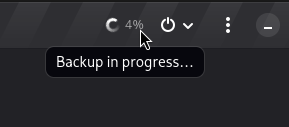
- The implementation of a progress indicator for backup creation has been realized.

Source: opennet.ru
