

Google has released the open mobile platform Android 14. The source code related to the new release is available in the project's Git repository (branch android-14.0.0_r1). Firmware updates have been prepared for Pixel series devices. Updates for smartphones from Samsung Galaxy, iQOO, Nothing, OnePlus, Oppo, Realme, Sharp, Sony, Tecno, vivo, and Xiaomi will be prepared later. Additionally, generic system images (GSIs) suitable for various devices based on ARM64 and x86_64 architectures have been created.
Key innovations:
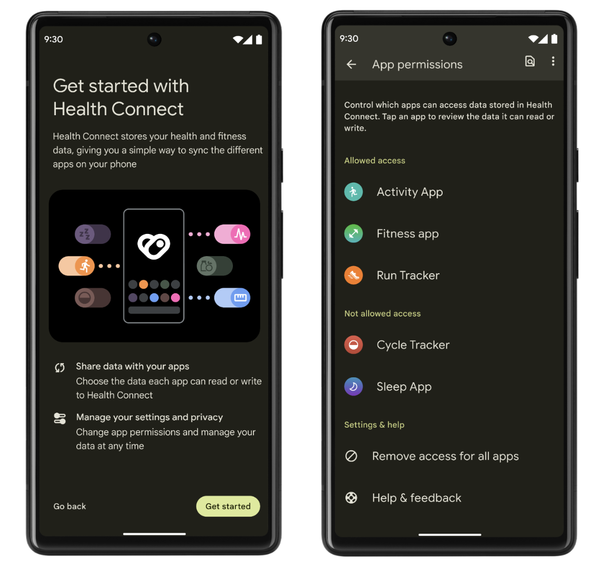
- The platform now includes the Health Connect storage, previously supplied as a separate package via Google Play. Health Connect provides centralized storage for data from fitness trackers and other health-related devices, enabling different applications to share access to health data. Access to Health Connect settings will now be provided through the platform's native configurator, allowing users to manage which specific health data certain applications can access through privacy settings. Furthermore, Health Connect has added support for saving information about the route taken during workouts (users can specify the duration for which a list of waypoints will be saved). The route can be visualized on a map and, if desired, shared with other applications for processing after explicit user confirmation.

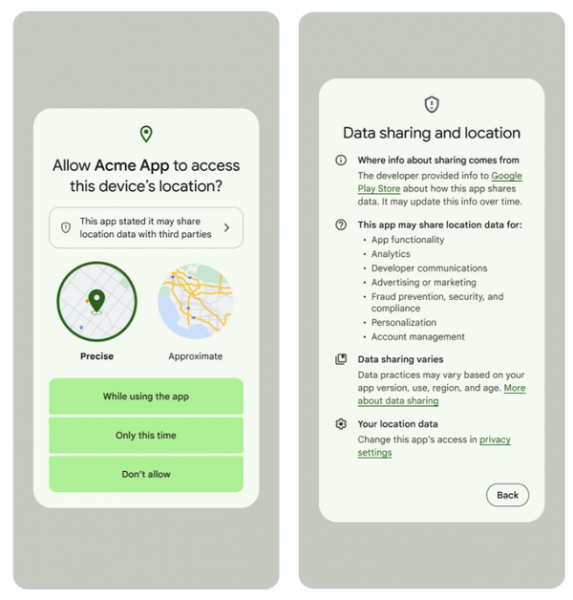
- The tools for confirming access to location information have been expanded. A new section has been added to the dialog requesting location access, providing information on when the application is transmitting location data (access denied, allow once, and always allow) and details on where to find additional information regarding access to transmitted data.

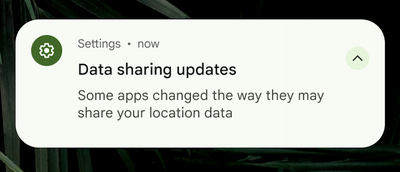
- A monthly notification has been implemented to alert users about changes in applications that have been granted access to location data regarding their data-sharing methods with third parties (for example, a notification appears when an application starts using location data for advertising purposes).

- When working with applications, a more noticeable back arrow hint has been implemented to simplify understanding of the screen gesture for going back.

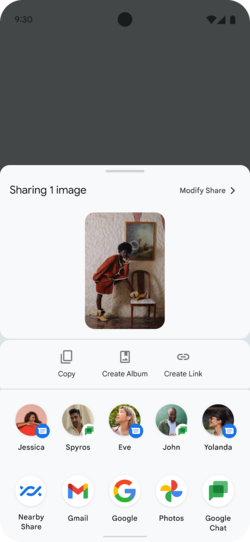
- In the Sharesheet mechanism, used for sending data (such as images or links) outside the application or to another user, the ability to add custom actions has been implemented. For example, you can define your own list of ChooserAction handlers that show applications and users to whom sharing is possible. Additionally, the range of signals used for ranking targets for direct data sharing has been expanded.

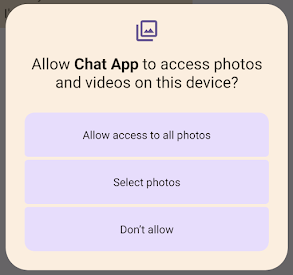
- Partial authority grants for access to only the user-selected photos and videos (READ_MEDIA_VISUAL_USER_SELECTED) are now available, with files accessed selected by the user through the Photo picker interface during the permission request dialog. After the application is sent to the background or terminated, the provided user permission is automatically revoked. In the permission confirmation dialog, the ability to grant access only to selected photos or videos has been added.

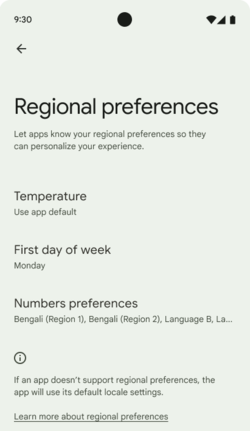
- A section for overriding regional preference settings has been added to the configurator, such as temperature measurement units, the first day of the week, and counting systems. For example, a European living in the USA can set it to display temperature in degrees Celsius instead of Fahrenheit and count Monday as the start of the week instead of Sunday.

- Font scaling capabilities have been expanded, with the maximum font scaling level increased from 130% to 200%. To ensure that text does not appear too large at high zoom levels, a nonlinear scaling adjustment is now automatically applied (larger text is scaled less than smaller text), allowing for optimal text readability for people with impaired vision without risking interface layout distortions.

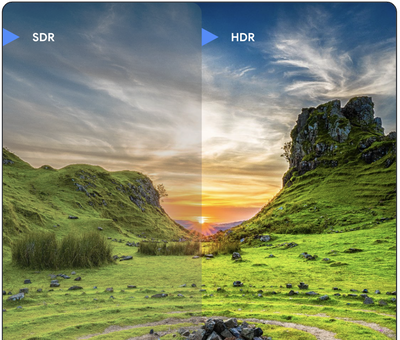
- The support for high dynamic range (HDR) video recording introduced in the previous release has been expanded with the capability to capture additional camera information, allowing images to be saved in the 'Ultra HDR' format, which uses 10 bits per channel for color encoding. The Ultra HDR format is fully compatible with JPEG, enabling applications to work with HDR images without any changes, while also allowing them to display in standard dynamic range if necessary. HDR output is automatically handled by the platform when HDR support is activated in the application manifest or when Window.setColorMode is called. For separate rendering of Ultra HDR using OpenGL or Vulkan, the Gainmap class can be utilized.

- The types of applications that are permitted to display fullscreen notifications when the screen is locked are limited. Such notifications are intended to attract attention to information requiring immediate responses, such as incoming calls or alarm alerts, so the authority to display such notifications will now be restricted to calling and alert applications.
- Animation management has been improved for indicating transitions between different screens (tabs) in the application during swipe gestures that shift the content. New components have been added for animating the transition of bottom and side screens, as well as for invoking search. An API for creating custom transition effects within the application has also been introduced.
- The camera extensions set has been updated, providing the ability to use longer-running algorithms that require intensive computation for image processing, such as enhancing the quality of low-light photos. Features have been added to predict processing delays, obtain progress information for processing, and quickly receive a draft version of the image before the final image is prepared. A more optimized and energy-efficient mode for previewing with SurfaceView has been implemented. While using the extensions, touch support for focusing and zooming has been provided.
- Support has been provided for using the built-in camera capabilities for scaling and cropping transmitted RAW images.
- For wired headphones connected via USB, the ability to use lossless audio formats has been added. The API now includes the AudioMixerAttributes class, which allows sound to be sent directly to the device without mixing, adjusting volume, or processing effects.
- The graphics API has implemented the Mesh class, which allows the creation of custom polygonal mesh variations with vertex and fragment shaders written in AGSL.
- The ability for hardware-accelerated rendering to a buffer has been added, implemented through the HardwareBufferRenderer class.
- The Path class, which allows the creation of vector graphics based on composite geometric outlines, has been expanded to support interpolation between outlines with similar structures to create a morphing effect, and the PathIterator iterator has been introduced for sequentially iterating through all segments of the outline.
- The ability to bind individual language settings to different applications has been expanded. There is now the option to specify a list of languages that will be displayed in the Android configurator when selecting a language for a specific application.
- The areas in which the system shows privacy-related information defined by the developer in the Play Console Form have been expanded, such as policies regarding data sharing with third parties. For example, such information is now displayed in the authorization request dialog.
- In applications using background service handlers, specifying the type of background service is now mandatory. During operation, the system checks the correspondence between the specified service type, requested permissions, and the API being used. For example, if the application has specified the background service type FOREGROUND_SERVICE_TYPE_LOCATION, it is implied that permissions for ACCESS_COARSE_LOCATION or ACCESS_FINE_LOCATION may be requested.
- Changes have been made to enhance security: Applications are prohibited from sending intent requests to certain internal platform components. Dynamically loaded code must now be marked with a read-only access attribute. Processing of zip archives in the ZipFile(String) and ZipInputStream.getNextEntry() functions is prohibited if the paths start with the character "/" or contain the sequence "..". Execution from background handlers has been restricted, and limitations in the area of interface calls not provided in the SDK have been updated.
- When connecting a device via USB to a desktop computer, in addition to previously available interaction modes such as file transfer, charging, and internet sharing, there is now the option to use the smartphone as a webcam (UVC mode, USB Video Class). By default, this feature is disabled but can be activated with root access.
- The improvement of platform performance on tablets and devices with foldable screens continues. Libraries have been provided to predict pointer movement events and to ensure low latency when using styluses. Interface templates designed for large screens have been introduced, considering applications such as social networking, communications, multimedia content, reading, and shopping.
- A separate permission has been added to allow applications to initiate actions while the app is in the background. Activation while in the background is limited to prevent distracting the user when they are using the current application. Active applications have been given more control over the activation of actions by other applications with which they interact.
- Memory management system optimization has been conducted for more efficient resource allocation to applications running in the background. A few seconds after the application is transitioned to a cached state, background work is limited to handling APIs that manage the application lifecycle, such as Foreground Services, JobScheduler, and WorkManager APIs.
- Notifications marked with the FLAG_ONGOING_EVENT flag can now be dismissed when displayed on a device with an unlocked screen. If the device is in a locked state, such notifications will remain undismissable. Notifications that are critical for system operation will also remain undismissable.
- The PackageInstaller API has been enhanced with new methods: requestUserPreapproval(), which allows the app catalog to defer APK downloads until user installation approval is received; setRequestUpdateOwnership(), which allows the installer to claim future app update operations; and setDontKillApp(), which permits additional functionalities for the app while interacting with the program. Installers can now activate app update installations in the InstallConstraints API at moments when the app is not in use.
- Work continues on enhancing platform performance on tablets and devices with foldable screens. Development recommendations for applications targeting large screen devices have been updated, and standard interface templates for large screens have been added, addressing applications such as social networking, communications, multimedia content, reading, and shopping. A preliminary release of the Cross device SDK has been proposed, featuring tools for developing applications that work correctly across different device types (smartphones, tablets, smart TVs, etc.) and various form factors.
- Optimization has been conducted for coordinating resource-intensive background tasks, such as downloading large files when a Wi-Fi connection is available. Changes have been made to the API for launching foreground services and scheduling tasks, with new functionality added for user-initiated tasks related to data transfer. Requirements have been introduced to specify the type of foreground services being launched (camera usage, data synchronization, multimedia playback, location tracking, microphone access, etc.). The conditions for activating data downloads have been simplified, for example, to download only when connected via Wi-Fi.
- The internal broadcast message delivery system for applications has been optimized to reduce energy consumption and improve responsiveness. The reception of registered message streams by applications has been enhanced — messages can be queued, merged (for example, a series of BATTERY_CHANGED messages will be aggregated into one), and delivered only after the application exits the cached state.
- The limit on the maximum number of cached applications has been increased, which has reduced the number of applications launched in a 'cold' mode (i.e., not cached in memory and launched more slowly). For devices with 8 GB of RAM, after the restrictions were changed, the number of 'cold' application launches decreased by 20%, and for those with 12 GB — by 30%.
- Using the exact alarms feature in applications now requires obtaining a separate permission for SCHEDULE_EXACT_ALARM, as utilizing this functionality can negatively impact battery life and lead to increased resource consumption (for scheduled tasks, it is recommended to activate at approximate times). Applications with calendar and clock implementations that use exact time activation must be granted the USE_EXACT_ALARM permission upon installation. Listings in the Google Play Store for applications with USE_EXACT_ALARM permission are only permitted for programs with alarm, timer, and calendar implementations that provide event notifications.
- A feature has been introduced to specify language settings linked to individual applications. The app developer can now modify localeConfig parameters through a call to LocaleManager.setOverrideLocaleConfig to define the list of languages displayed for the application in the Android settings interface.
- The Grammatical Inflection API has been added to simplify the addition of translations for interface elements that consider languages with a gender system.
- To prevent malicious applications from intercepting intent requests, the new version prohibits sending intents without explicitly specifying a package or internal component.
- The security of Dynamic Code Loading (DCL) has been enhanced — to avoid the injection of malicious code into dynamically loaded executable files, these files must now have permissions that allow only read access.
- Installation of applications that declare an SDK version lower than 23 is prohibited, which will block privilege escalation through bindings to older APIs (API version 22 is prohibited because a new access control model was introduced in version 23 (Android 6.0) that allows on-the-fly requests for access to system resources). Previously installed applications using old APIs will continue to function after the Android update.
- The Credential Manager API has been proposed, allowing applications to implement sign-in using credentials from external authentication providers. Support for Passkeys technology has been implemented, enabling users to authenticate without passwords using biometric identifiers such as fingerprints or facial recognition. The interface for selecting an account has been improved.
- Support for OpenJDK 17 has been implemented in Android Runtime (ART). The platform's core Java libraries and application development tools have been updated to OpenJDK 17. Support for language features and Java classes available in OpenJDK 17 has been added, such as record types, multi-line strings, and pattern matching in the 'instanceof' operator.
- More advanced compression methods have been utilized in Android Runtime, resulting in an average file size reduction of 9.3% without sacrificing performance.
- The method for updating root certificate authority (CA) certificates has been changed. System certificates will no longer be tied to firmware and will instead be delivered as a separate package updated via Google Play. This approach simplifies the maintenance of current certificates and the removal of those from compromised certificate authorities, while preventing device manufacturers from manipulating the list of root certificates and making the update process independent of firmware updates. On the other hand, the new delivery method will not allow users to alter system certificates, even if they have root access and fully control the firmware.

Source: opennet.ru
