

The Document Foundation has released version 25.2 of the LibreOffice office suite. Installation packages are available for various Linux distributions, Windows, and macOS. A total of 176 developers participated in the release preparation. 47% of the changes were made by 50 staff from project-leading companies like Collabora and Allotropia, 31% by seven employees of The Document Foundation, and 22% by 119 independent enthusiasts.
The LibreOffice 25.2 release is labeled 'Community' and will be supported by enthusiasts, not aimed at enterprise use. LibreOffice Community is freely available to everyone, including corporate users, without restrictions. For businesses needing additional services, products from the LibreOffice Enterprise family are being developed separately, offering full support, the possibility of long-term updates (LTS), and extra features such as SLA (Service Level Agreements).
The most notable changes:
- Support has been added for reading and writing documents in the OpenDocument 1.4 (ODF) format, which is not yet standardized and is currently in the testing phase of its first draft specification.
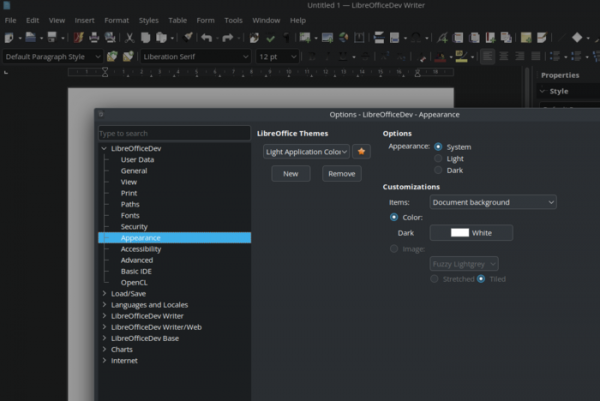
- Users can now customize the application’s appearance independently of the desktop environment's theme. A new tab 'Tools ▸ Options ▸ LibreOffice ▸ Appearance' has been added for changing theme parameters, allowing users to modify colors at will, including overriding colors borrowed from the system theme, as well as choosing a color mode (dark, light, or matching the system theme).

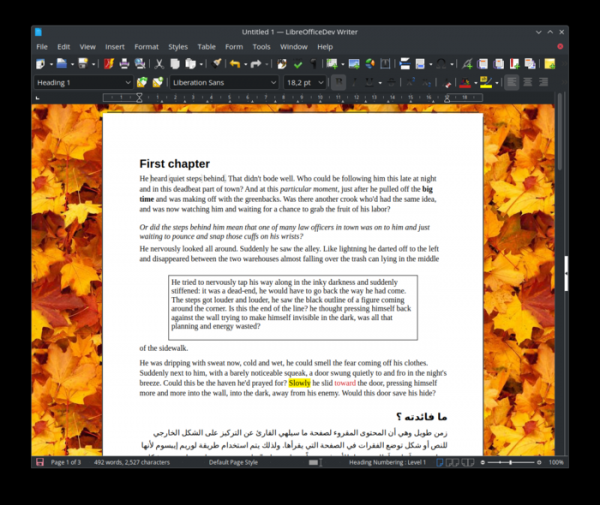
- Support has been added for placing a custom image as the background of the document window.

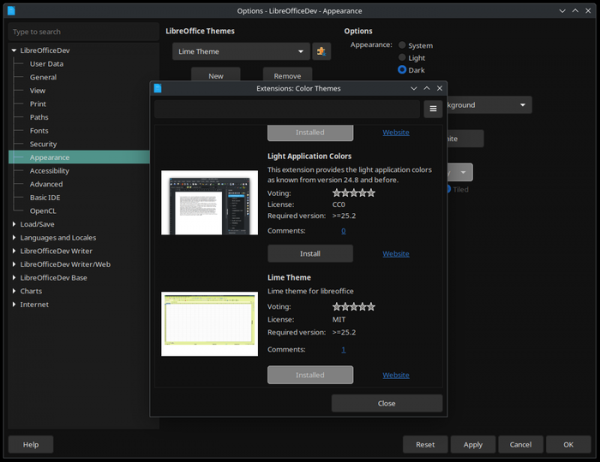
- To modify formatting settings, it is suggested to use theme extensions that can be installed by clicking the 'More Themes' button on the theme selection page.

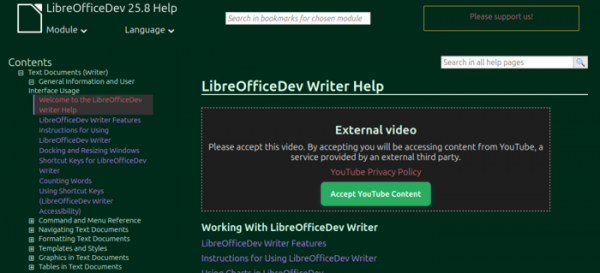
- The ability to display help pages in dark mode has been implemented.

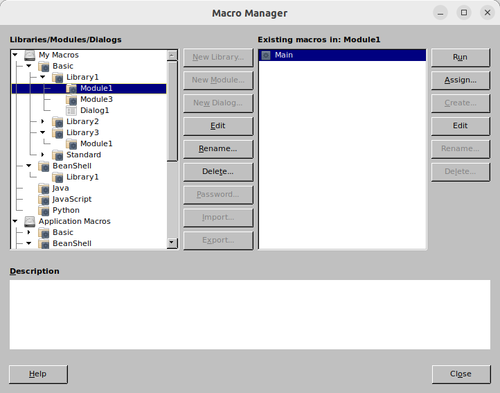
- A new experimental dialog for managing macros (Tools ▸ Macros ▸ Macro Manager) has been proposed, consolidating five previously available dialogs related to macros.

- Added the ability to show recently used files in the list (‘File ▸ Recent Documents’) only for files related to the current module (e.g., only spreadsheets in Calc). The option ‘[x] Current Module Only’ (‘[x] Only Current Module’) is provided to enable the filter.
- Settings for automatic line break word wrapping have been added to the properties section in the sidebar.
- The ability to automatically sign documents with a digital signature has been added, once the default certificate is identified.
- The ability to assign keyboard shortcuts for activating text and background color commands has been provided.
- Support has been added for pasting formatted text from the clipboard, where HTML tags
,, orare used for strikethrough. - A function has been added to remove all personal information associated with the document, such as author names, creation and edit times, printer names, settings, the used template, author names of comments, and tracked changes.
- Changes in Writer:
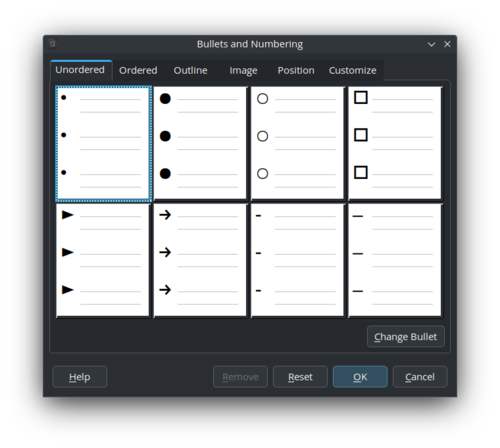
- Icons displayed before items in unordered lists have been updated.

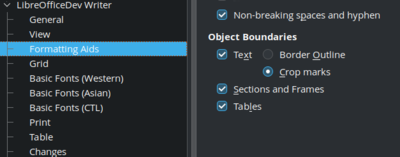
- Object borders can now be enabled through the menu ‘View ▸ Boundaries’, regardless of formatting icon settings, and configured in the section ‘Tools ▸ Options ▸ Writer ▸ Formatting Aids’.

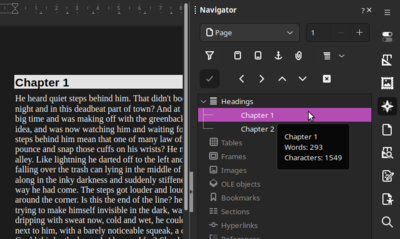
- A tooltip showing the number of words and characters in a section is displayed when hovering the mouse cursor over the section title in the Navigator panel.

- The change tracking system has improved management of numerous changes in large documents. Clear highlighting of elements in the ‘Manage Changes’ window and sidebar is provided when clicking on changes in the document. Sorting settings have been added to the dialog and sidebar related to change tracking.
- Improvements have been made for the fallback to substitute fonts and correct rendering of lines when importing DOCX documents.
- For opened documents, an option has been added to set a default zoom level, prioritized over the zoom level specified in the document itself.
- Support for converting comment replies into root comments has been added.
- An option to place the page number in existing fields has been added to the master page numbering.
- The ability to delete a specific type of content (e.g., all images) via the Navigator panel has been added.
- The ability to customize the colors of non-printing characters and comment backgrounds has been provided.
- Added support for converting all footnotes at the bottom of pages into endnotes and vice versa.
- Support for integrating headings directly into the main text, without placing them on a separate line, has been added.
- Icons displayed before items in unordered lists have been updated.
- Changes in the Calc spreadsheet application:
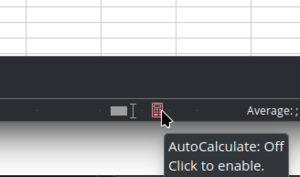
- An indicator for turning off the automatic formula recalculation mode when entering or modifying formulas has been added to the status bar (Data ▸ Calculate ▸ AutoCalculate).

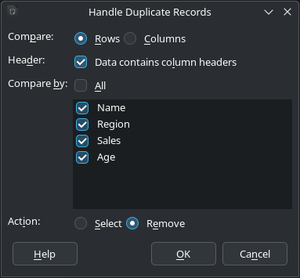
- A dialog for highlighting or removing duplicate entries in selected cells has been added.

- Support for importing and exporting the connections.xml file (Power Query) for OOXML has been added.
- The interface has been improved and search capabilities have been expanded in the Function Wizard dialog and the Functions tab in the sidebar.
- The behavior of the 'Select All' operation has been changed — when in a cell, executing this operation will first select all adjacent cells with data, and on subsequent calls will select the entire sheet. A setting, SelectRangeBeforeAll, has been added to disable this behavior.
- The ability to save Solver models in the spreadsheet file and generate sensitivity analysis reports (an analysis of the impact of input parameters on the result) has been added.
- A setting WrapNextPrevSheetTab for controlling the behavior when navigating through spreadsheet tabs using keyboard shortcuts 'Ctrl + PgDn' and 'Ctrl + PgUp' has been added.
- An option 'Summary below data' has been added to the Subtotals dialog to display summary information at the bottom of the table.
- Spreadsheet protection settings related to pivot tables, pivot charts, and auto filters have been added.
- An indicator for turning off the automatic formula recalculation mode when entering or modifying formulas has been added to the status bar (Data ▸ Calculate ▸ AutoCalculate).
- Changes in the Impress presentation system:
- The dialog for performing actions on slides during a presentation has been translated to work in a non-blocking mode.
- The ability to configure translucent text tied to individual paragraphs when exporting in SVG format has been implemented.
- In windowed mode, support for automatic slide repeat activation has been added.
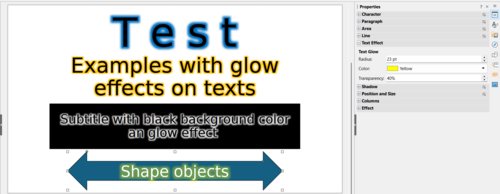
- In objects with text enclosed in a border, edge smoothing and glow effects are now allowed.

- Numerous small improvements have been made to templates. In the Nature_Illustration, Pencil, and Piano templates, images have been replaced with shapes that can be modified. In the Blueprint Plans and Metropolis templates, vector images in SVG format have replaced raster background images. The rendering of the DNA double helix has been improved in the DNA template. The final slides have been removed from the 'Blueprint Plans' and 'Vintage' templates. In Master Notes and Handout modes, all templates now have visible elements. The 'File ▸ Properties' dialogue has been updated with author information.
- The 'Align' context menu item has been enhanced with an option for centering objects in an Impress slide or on a Draw page.
- The issue of clipping protruding text in notes when printing presentations has been resolved.
- Support for clipping the contours of objects in imported PDF documents has been implemented in Draw.
- In Base, the SQL query dialog interface has been improved. User input is now preserved within a session, and the number of results is displayed. ODBC calls with Unicode support have been added.
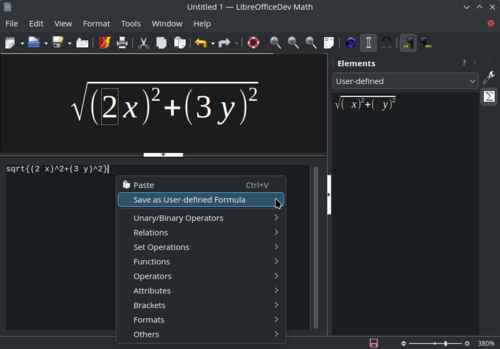
- Math now allows saving formulas in user-defined categories.

- Compatibility with the OOXML format used in MS Office has been improved.
- Support for Microsoft Visio 5 format has been enhanced. The libvisio library has been updated to version 0.1.8.
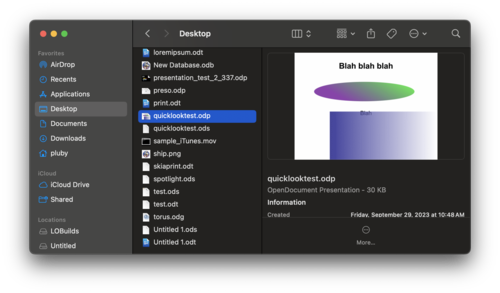
- An extension for quick document preview using the Quick Look mechanism is now available for macOS.

- Support for Windows 7 and Windows 8/8.1 will be discontinued in the next LibreOffice 25.8 release.
Source: opennet.ru
