

After six months of development, the release of the gaming platform Lutris 0.5.10 took place, providing tools to simplify the installation, configuration, and management of games on Linux. The project's code is written in Python and is distributed under the GPLv3 license.
The project maintains a catalog for quick search and installation of gaming applications, allowing users to launch games on Linux with a single click without worrying about dependencies and configurations. The runtime components required to run games are provided by the project and are independent of the distribution used. The runtime is a distribution-agnostic set of libraries, including components from SteamOS and Ubuntu, as well as various additional libraries.
It allows for the installation of games distributed through services like GOG, Steam, Epic Games Store, Battle.net, Origin, and Uplay. Lutris itself acts merely as an intermediary and does not sell games, so users must purchase commercial games from the respective service (free games can be launched with a single click from the Lutris graphical interface).
Each game in Lutris is associated with a loading script and handler describing the environment for launching the game. Ready-made profiles with optimal settings for running games under Wine are also provided. In addition to Wine, games can be launched using console emulators such as RetroArch, Dosbox, FS-UAE, ScummVM, MESS/MAME, and Dolphin.
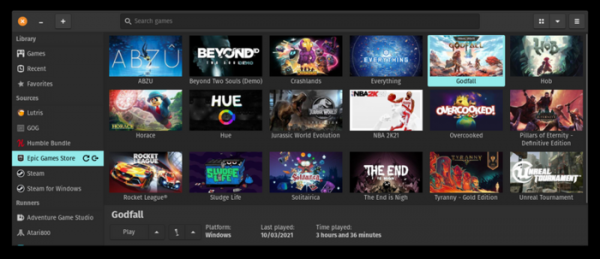
Key innovations in Lutris 0.5.10:
- Support has been added for running Lutris on the Steam Deck gaming console. Currently, installation from the Arch Linux repositories and AUR has been tested, which requires switching the system partition to write mode and reinstalling after significant updates to SteamOS. In the future, a self-contained package in Flatpak format is planned, which will not be affected by Steam Deck updates.
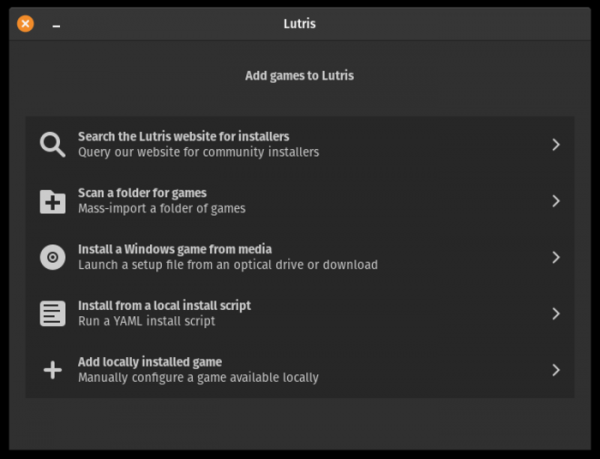
- A new section for manually adding games has been proposed. The section offers interfaces for:
- adding and configuring games that are already installed on the local system;
- scanning the directory with games previously installed via Lutris but not inspected in the client (during this operation, directory names are matched with game identifiers);
- installing Windows games from external media;
- installing using YAML installers available on the local disk (GUI version for the flags "--install");
- searching the game library offered on the lutris.net website (this feature was previously available in the 'Community installers' tab).

- Components for integration with Origin and Ubisoft Connect services have been added. Similarly to the support for the Epic Games Store catalog, the installation of the Origin and Ubisoft Connect clients is required for the new integration modules to function.
- An option has been added to add Lutris games to Steam.
- Support for coverart format has been implemented.
- The loading of missing components during launch has been ensured.
- A separate cache for shaders has been utilized for Linux and Windows games on systems with NVIDIA GPUs.
- An option for supporting the anti-cheat system BattleEye has been added.
- The ability to download patches and DLC for GOG games has been added.
- Flags "--export" and "--import" have been added for exporting and importing games.
- Flags "--install-runner", "--uninstall-runners", "--list-runners", and "--list-wine-versions" have been added for managing runners.
- The behavior of the "Stop" button has been changed, removing the action that terminates all Wine processes.
- The option for disabling Gamescope on NVIDIA GPUs has been ensured.
- The fsync mechanism is enabled by default.
Additionally, it is noteworthy that the Steam Deck gaming console, which is based on Linux, has confirmed support for 2039 games. 1053 games are marked as manually verified by Valve employees (Verified), while 986 are classified as supported (Playable).
Source: opennet.ru
