

After 6 months of development, the release of the Cinnamon 5.6 desktop environment has been formed, in which the Linux Mint distribution community develops a fork of the GNOME Shell, Nautilus file manager, and Mutter window manager, aimed at providing a classic GNOME 2 style environment with support for successful interaction elements from GNOME Shell. Cinnamon is based on GNOME components, but these components are provided as a periodically synchronized fork, not externally dependent on GNOME. The new release of Cinnamon will be offered in the Linux Mint 21.1 distribution, scheduled for release in December.
Key innovations:
- By default, the 'Home', 'Computer', 'Trash', and 'Network' icons are hidden from the desktop (they can be restored via settings). The 'Home' icon has been replaced by a button on the panel and a favorites section in the main menu, while the 'Computer', 'Trash', and 'Network' icons are rarely used and can be quickly accessed via the file manager. Mounted drives and files located in the ~/Desktop directory are still displayed on the desktop.
- The code for removing applications from the main menu has been revised — if the current user has sufficient permissions to remove an application, the administrator password is no longer required. For example, applications in the Flatpak format or shortcuts to local applications can be removed without entering a password. Synaptic and the update manager have been transitioned to use pkexec to remember the entered password, allowing the password to be requested only once for multiple operations.
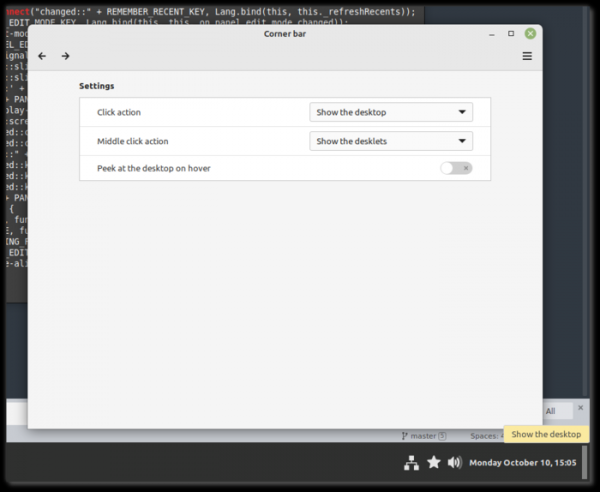
- A Corner bar applet has been proposed, placed on the right side of the panel, replacing the show-desktop applet, with a separator now positioned between the menu button and the task list. This new applet allows different actions to be assigned to different mouse button clicks; for example, it can display the desktop contents without windows, show desklets, or invoke interfaces for switching between windows and virtual desktops. The corner placement makes it easier to position the mouse pointer over the applet. The applet also allows quick placement of files on the desktop, no matter how many windows are open, simply by dragging the required files into the applet area.

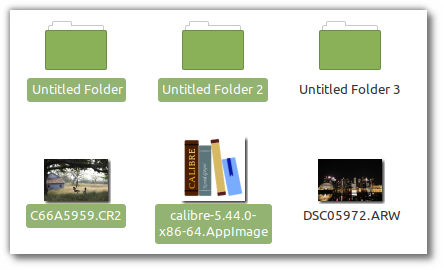
- In the Nemo file manager, in file list view with icon display, only the name of selected files is highlighted now, while the icon remains unchanged.

- Icons representing the desktop are now rotated vertically.

- The ability to pin desklet positions has been added.
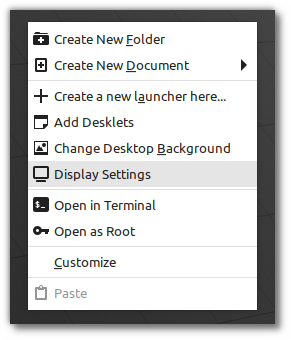
- A new item has been added to the context menu displayed when right-clicking on the desktop to access display settings.

Source: opennet.ru
