

Google has released version 121 of the Chrome web browser. At the same time, a stable release of the open-source project Chromium, which serves as the foundation for Chrome, is available. The Chrome browser differs from Chromium by utilizing Google branding, having a crash notification system, modules for playing DRM-protected video content, an automatic update installation system, constant inclusion of Sandbox isolation, providing access keys to Google APIs, and sending RLZ parameters during searches. For those who need more time for updates, a separate Extended Stable branch is supported for an additional 8 weeks. The next Chrome release, version 122, is scheduled for February 20.
Key changes in Chrome 121:
- Several experimental features using machine learning have been added, which will initially be available to users of the Windows and macOS builds in the US. An 'Experimental AI' section has been added to the configurator for enabling these features.
- Smart Tab Grouping mode (Tab Organizer) allows for automatic grouping of open tabs with similar content, as well as suggesting appropriate names and emojis for new groups. For instance, if multiple tabs with travel-related information and online shopping are open, this new feature will automatically sort these pages into corresponding groups without manual sorting. Grouping can be accessed through the tab management menu or the 'Organize Similar Tabs' option in the tab's context menu.
- A theme generator that allows users to personalize the browser's appearance based on a natural language text description provided by them. For example, users can describe their desired theme, mood, style, and color, after which the browser will create the corresponding theme automatically. The interface for generating themes can be accessed via the 'Create with AI' button on the 'Customize Chrome/Change theme' page.
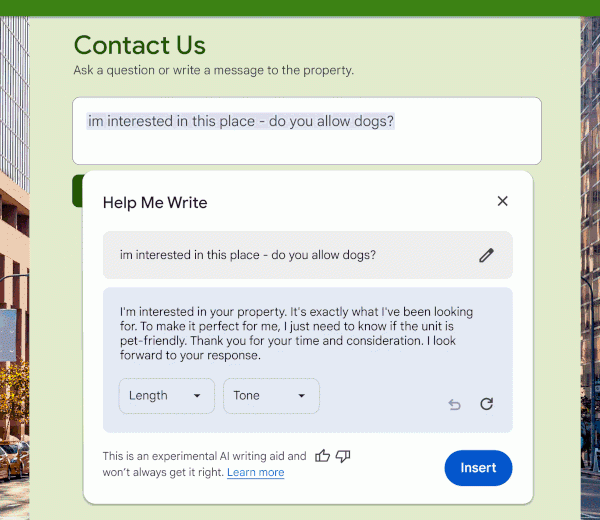
- An interactive assistant that helps generate text on a user-specified topic. For instance, with this new feature, users can draft a verbose and polite request or comment by providing a basic text template. The assistant can be accessed through the 'Help me write' button in the context menu shown for input fields.

- Smart Tab Grouping mode (Tab Organizer) allows for automatic grouping of open tabs with similar content, as well as suggesting appropriate names and emojis for new groups. For instance, if multiple tabs with travel-related information and online shopping are open, this new feature will automatically sort these pages into corresponding groups without manual sorting. Grouping can be accessed through the tab management menu or the 'Organize Similar Tabs' option in the tab's context menu.
- For 1% of users, support for third-party cookies set by sites other than the current page is disabled. Such cookies are used to track user movements between sites within advertising networks, social media widgets, and web analytics systems. These changes are being promoted as part of the Privacy Sandbox initiative, aimed at achieving a compromise between users' need for privacy and the desire of advertising networks and websites to track visitor preferences. The plan is to gradually expand the disabling of third-party cookies and reach 100% coverage by Q3 2024. To disable it without waiting for external changes, there is a setting available at 'chrome://flags/#test-third-party-cookie-phaseout'. domain With standard browser protection enabled (Safe Browsing > Standard protection), security checks for encrypted archive downloads have been implemented. After downloading an archive, the browser prompts the user for a password to decrypt the archive, computes hashes of the files contained in the archive, and sends the hashes to Google's servers for checking against known malicious components.
- For a subset of users, link behavior related to installed PWA applications has been altered as part of an experiment. After clicking a link, these users will immediately see a dedicated app interface or a list of apps that support the content type of the link. Depending on the results of the experiment, a decision will be made whether to transition all users to this new behavior in Chrome 123 or to retain the old method of handling links, which opens the link in a regular tab but shows a button in the address bar to navigate to the dedicated app. A setting for testing this new behavior is available at 'chrome://flags/#enable-user-link-capturing-pwa'.
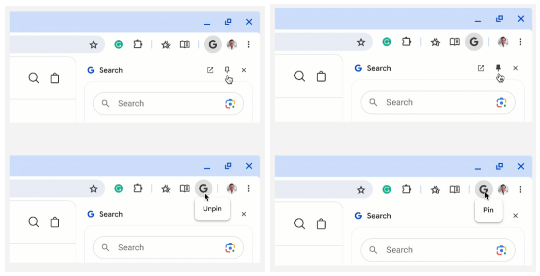
- The icon for activating the sidebar has been removed from the sidebar header, and users are instead encouraged to use the pinning features from the main toolbar and access sidebar functionalities via the main menu.
- The icon for activating the sidebar has been removed from the sidebar header, replaced by functionality for pinning items from the main toolbar and accessing sidebar capabilities from the main menu.

- The Deprecation trial is enabled to test the upcoming disregard for 'unload' event handlers, which do not allow effective use of back-forward caching (BFCache), providing instant transitions when using the 'Back' and 'Forward' buttons or navigating through previously viewed pages of the current site. The behavior of the desktop Chrome will be similar to mobile browsers, which in most cases do not generate an 'unload' event, prioritizing transition caching.
- The Android version on devices with Android 12+ and Qualcomm or ARM GPUs has enabled WebGPU API support by default, which provides a similar interface to Vulkan, Metal, and Direct3D 12 for executing GPU-side operations such as rendering and computations, and allows the use of shader languages.
- CSS now implements the inheritance of pseudo-class properties for highlighting elements, such as '::selection' and '::highlight', in relation to the pseudo-elements of the parent element.

- The CSS property font-palette, which allows selection of a palette for rendering colored fonts, now supports animation. The animation can be used for smooth transitions from one palette to another in colored fonts.
- Support for the CSS properties 'scrollbar-color' and 'scrollbar-width' has been added to customize the color and width of scrollbars.
- CSS has added the pseudo-elements '::spelling-error' and '::grammar-error' for customizing the styling and decoration of indicators for syntactic and grammatical errors.
- The ability to use the supports() expression for importing styles and CSS layers after certain conditions are met has been implemented.
- Support for SVG masks has been added in CSS, allowing parts of the content to be hidden by overlaying images at specific points. The properties mask, mask-mode, mask-composite, mask-position, and mask-repeat can be used to configure masks. Also, for SVG, loading masks from external sources is allowed. servers, for example, 'mask: url(masks.svg#star).'
- Support for speculation rules (API Speculation Rules) has been extended, enabling web authors to convey information to the browser about the most likely pages a user may navigate to. The browser uses this information for preloading and rendering page content. The new version allows for the transfer of rules via the HTTP header Speculation-Rules and adds support for an extended syntax ('document rules') that lets the browser determine a list of URLs for speculative loading from elements <a> on the page.
- An experimental (origin trial) API Element Capture has been added, allowing the video capture to narrow the focus to specific parts of the DOM and elements. For instance, in video conferencing applications, the new API allows embedding third-party applications in an iframe and streaming video from the content of that iframe to other participants.
- In the API Document Picture-in-Picture, user confirmation is now required to use the resizeBy() and resizeTo() methods.
- The showPicker method can now be used with elements to programmatically invoke the browser's provided dropdown menu implementation.
- In the Media Capabilities API, new fields hdrMetadataType, colorGamut, and transferFunction have been added to decodingInfo() to check for HDR support.
- TLS now includes support for a key encapsulation mechanism (KEM) using the hybrid algorithm X25519Kyber768, which is resistant to quantum computer attacks. X25519Kyber768 is a combination of the X25519 key exchange mechanism based on elliptic curves, currently used in TLS, and the Kyber-768 algorithm, which uses cryptographic methods based on solving lattice theory problems, with solving times that do not differ between classical and quantum computers.
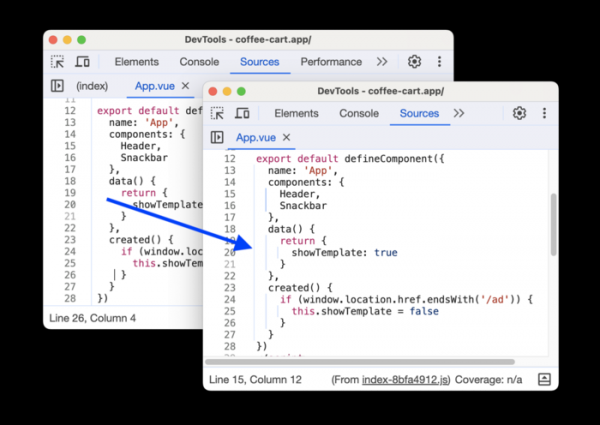
- Improvements have been made to the web developer tools. The Elements panel now supports the CSS rule '@font-palette-values'. Source map support has been enhanced. The tracking of interactive operations in the performance evaluation panel has been improved. The Sources panel now includes labels for a clearer display of indents.


In addition to new features and bug fixes, the latest version addresses 17 vulnerabilities. Many of the vulnerabilities were identified through automated testing using tools like AddressSanitizer, MemorySanitizer, Control Flow Integrity, LibFuzzer, and AFL. No critical issues were found that could bypass all browser security layers and execute code in the system outside of the sandbox environment. As part of the bug bounty program for this release, Google has awarded 11 prizes totaling $31,000 (including one prize of $11,000, one of $9,000, one of $6,000, and one of $2,000, along with three prizes of $1,000). The amounts for 4 of the rewards have yet to be determined. The highest reward of $11,000 was granted for identifying a use-after-free vulnerability in the WebAudio API implementation.
Source: opennet.ru
