

Google has released version 130 of the Chrome web browser. At the same time, the stable release of the free project Chromium, which underpins Chrome, is available. Chrome differs from Chromium in its use of Google logos, a crash notification system, modules for playing protected video content (DRM), an automatic update installation system, constant Sandbox isolation, provision of keys to Google API, and the transmission of RLZ parameters during searches. For those who need more time to update, an Extended Stable branch is maintained, which is supported for 8 weeks. The next release of Chrome 131 is scheduled for November 12.
Key changes in Chrome 130:
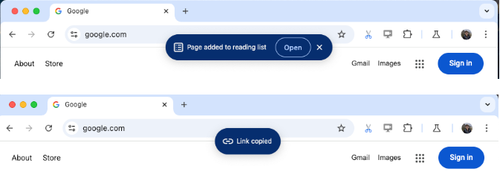
- A new compact notification form has been added to show completed actions, displayed under the address bar as a small bar overlaying the content. For example, this dialog may inform the user of a successful addition to the reading list and show a button to open the reading list in the sidebar. The rollout of this new notification form will be gradual, and a setting has been provided to manage its display: 'chrome://flags/#top-chrome-toasts'.

- With energy saving mode enabled, experimental support for automatic freezing of resource-intensive tabs that do not produce sound and have been hidden for more than 5 minutes has been implemented. Exceptions are made for tabs related to managing external devices or conducting video and audio conferences (such tabs are identified based on access to APIs for USB, Bluetooth, camera, input devices, and microphone, as well as for establishing a communication channel using RTCDataChannel or MediaStreamTrack). Settings have been added to enable auto-freezing: 'chrome://flags/#freezing-on-energy-saver' and 'chrome://flags/#freezing-on-energy-saver-testing'. In Chrome 131, auto-freezing is set to be gradually enabled by default, starting with 1% of users.
- The Android version features a built-in PDF document viewer that does not require calling external applications (there are options for downloading the PDF and opening it in a third-party application).
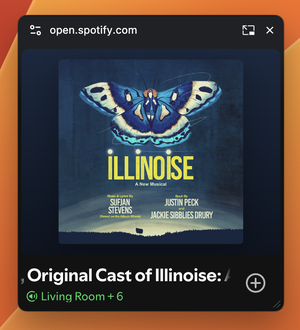
- It is now possible to open not only videos but also any elements in picture-in-picture mode to display arbitrary content over other content. For instance, in picture-in-picture mode, interfaces for video conferencing, custom video players, note-taking systems, chats, developer tools, etc., can now be displayed. Opening content in picture-in-picture mode is done using the documentPictureInPicture.requestWindow() method, which returns an object through which content can be added using the .document.body.append() method.

- The ability to access external dictionaries with compressed responses using Brotli and Zstandard algorithms has been added.
- Support for activating scroll areas during navigation using the keyboard has been introduced, allowing users without a mouse to first switch to the desired area using the Tab key and then scroll through its content using the arrow keys.
- Support for parsing non-standard URL schemes (not included in the standard schemes list) with host-path separation has been added. For example, when parsing the URL "git://example.com/path", the value "example.com" will be defined as the host and "/path" as the path (previously, "//example.com/path" was handled as a single path).
- The Android version now features integrated support for connecting third-party form autofill and password saving providers, independent of the Accessibility API.
- The behavior of the
element has been aligned with Safari and Firefox—the element does not get hidden in 'none' visibility mode, but switches to a separate style instead. - New recommendations from the CSS Working Group for handling nested rules in CSS blocks have been implemented, which now take into account the order of CSS property and rule definitions in the block (previously, all CSS rules were processed first, which led to illogical results from the developer's perspective). For example, the CSS block shown below used to set a red background color, but now it will set a green one: .foo { width: fit-content; @media screen { background-color: red; } background-color: green; }
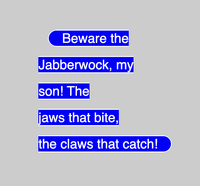
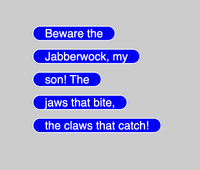
- The CSS property box-decoration-break has been implemented, which specifies how to render an element when its parts are split across different lines, columns, or pages. There are two rendering modes available: slice - the element is initially rendered in full and then cut into parts; clone - each fragment is rendered separately with its own borders and padding. This property has been supported in Firefox since 2014.


- The WebGPU API has added a 'dual-source-blending' mode for blending output from two fragment shaders with results written to a single framebuffer.
- In the 'Origin trials' mode, a Language Detector API has been implemented, allowing the language to be determined from a text fragment.
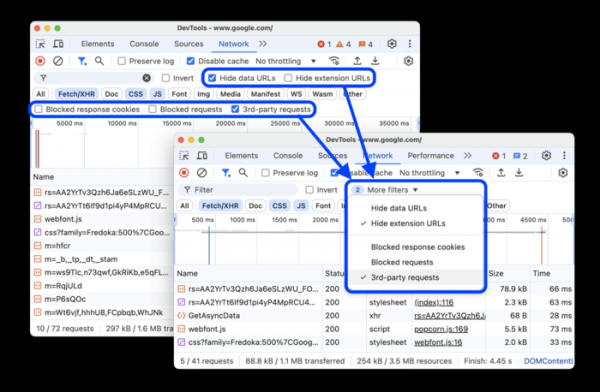
- The capabilities of web development tools have been expanded. A dropdown menu with additional filters has been added to the network activity analysis panel. An option has been added to clean sensitive data before saving the HTTP session in HAR (HTTP Archive) format.

In addition to new features and bug fixes, the latest version addresses 17 vulnerabilities. Many vulnerabilities were discovered as a result of automated testing using AddressSanitizer, MemorySanitizer, Control Flow Integrity, LibFuzzer, and AFL tools. One issue has been assigned a high severity level (accessing already freed memory in AI-related code). No critical issues that would allow bypassing all levels of browser protection and executing code outside of the sandbox environment have been found. As part of the bounty program for vulnerability discovery for this release, Google has paid out 13 rewards totaling $72,000 (one reward of $36,000, one of $4,000, and one of $3,000, two rewards of $6,000, $5,000, and $2,000, and three rewards of $1,000). The amount of one reward has yet to be determined.
Source: opennet.ru
