

Google has released version 131 of the Chrome web browser. At the same time, a stable release of the open-source project Chromium, which underlies Chrome, is available. Chrome differs from Chromium by using Google logos, having a crash report notification system, modules for playing protected content (DRM), an automatic update installation system, constant Sandbox isolation, offering keys to Google APIs, and transmitting RLZ parameters during searches. For those who need more time to update, an Extended Stable branch is also maintained, with support lasting 8 weeks. The next release, Chrome 132, is scheduled for January 14.
Key changes in Chrome 131:
- The built-in PDF viewer now has enhanced text recognition capabilities for scanned PDF documents where text is represented as images. Text is recognized locally using an integrated optical character recognition (OCR) engine based on machine learning. Unlike previous versions, scanned documents are now automatically converted to a text representation, which supports functions like highlighting, searching, and copying to the clipboard.
- The ability to enable extended checks in the PartitionAlloc memory distribution system has been introduced, which can block vulnerabilities caused by accessing already freed memory areas (use-after-free). By default, these checks are disabled due to potential negative impacts on performance. However, for deployments where security is more critical than performance, separate enterprise policies are now provided to activate additional protection.
- Trust in the Entrust certificate authority has been revoked in the built-in Chrome Root Store due to multiple violations of certificate authority requirements, including failure to respond promptly to problematic certificates, delays in certificate revocation, improper incident report documentation, and non-compliance with issuance rules. for TLS certificates EV (Extended Validation) certificates require document verification of domain ownership and confirmation of resource ownership. Due to the lack of action to address the identified deficiencies, TLS certificates issued by Entrust after November 11, 2024, will be perceived as untrustworthy in Chrome. Certificates issued before November 11 will continue to be treated as normal.
- The Android version includes the ability to connect third-party autofill and password-saving providers, independent of the Accessibility API.
- The Android version simplifies connecting to a Google account and managing data synchronization across different browsers. Synchronization is no longer presented as a separate feature in the settings but is integrated with the function to connect to a Google account, allowing you to use and save information such as passwords and bookmarks in your Google Account.
- A gradual activation of the new energy saver mode has begun among users, which automatically freezes tabs that consume a lot of CPU resources but are not producing sound and are hidden for more than 5 minutes. The only exception is for tabs related to the management of external devices or conducting video and audio conferences (such tabs are identified based on access to the API for working with USB, Bluetooth, camera, input devices, and microphone, as well as establishing a communication channel using RTCDataChannel or MediaStreamTrack). You can manage the activation of auto-freezing using the setting "chrome://flags/#freezing-on-energy-saver."
- Experimental memory saver modes have been added—Moderate, Balanced, and Maximum—which allow you to choose a method for freeing memory from inactive tabs. In Moderate mode, tab memory is deactivated only when the system is low on memory, in Maximum mode, tabs are deactivated shortly after becoming inactive, while in Balanced mode, inactive tabs are deactivated considering the free memory in the system.
- Additional performance-related settings have been added, such as the ability to specify websites that remain constantly active (without slowing down in the background), select how deactivated tabs are visually indicated, and show memory consumption in pop-up tab thumbnails.
- The 'Performance Detection' tool has been added to identify potential performance issues with viewed pages and provide a notification with one-click recommendations to resolve the issue. For instance, to speed up the current tab, the browser may suggest deactivating other resource-heavy tabs.
- In TLS 1.3 and QUIC, the 'X25519Kyber768' key encapsulation mechanism (KEM) resistant to quantum computer attacks has been updated to use the final specification of ML-KEM (CRYSTALS-Kyber), standardized by the U.S. National Institute of Standards and Technology (NIST). X25519Kyber768 combines X25519 ECDH and the ML-KEM algorithm, utilizing cryptographic methods based on lattice problem solutions, with solving times not differing between classical and quantum computers.
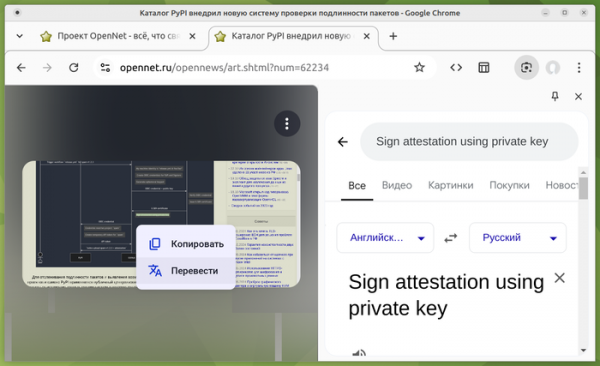
- The image search feature using Google Lens, accessible through the context menu, has added support for overlaying translations into another language (the translated text displays over the original text in the image).

- The Direct Sockets API has been introduced, allowing direct TCP and UDP connections with external systems, as well as creating listening sockets for incoming connections. Upon the first attempt to connect to a new host, the user receives a prompt to confirm the operation. The addition of the new API is justified by enabling interaction with network devices that use proprietary protocols operating over TCP and UDP and do not support interactions through HTTPS or WebSockets.
- In the 'Origin trials' mode, the Summarizer API has been implemented for text summarization (briefly outlining the essence) using a large language model.
- In the 'Origin trials' mode, the Playout Statistics API has been added, defining the AudioContext.playoutStats interface for obtaining statistics on quality and delays during sound playback via the WebAudio API.
- To prevent abuse, a prompt for permission authority has been added when using the API Keyboard Lock and Pointer Lock on the site, providing additional control over the keyboard and mouse (for example, it is possible to hide the default mouse pointer and handle mouse movement on your own). You can check the status of the permissions grant through the API Permissions.
- It is allowed to specify additional tags in the HTML element "<select>" in addition to the standard tags "<option>», «<optgroup>" and "<hr>". This change has been made in preparation for the implementation in future releases of the customizable version "<select>", which expands the menu formatting options.
- Support for specifying external SVG resources has been added to the CSS properties `clip-path`, `fill`, `stroke`, and `marker-*`. For example, you can now specify `clip-path: url('resources.svg#myPath')`.
- The model for inheriting the styles of selected text, defined through the pseudoclasses ‘::selection’ and ‘::target-text’, has been changed to inherit from the pseudoclasses ‘::highlight’, ‘::spelling-error’, and ‘::grammar-error’. It now depends not on the document structure (HTML element chain), but on how the text is selected (selection chains). In the example below, the color of nested elements with text in the paragraph “<p class="»blue»">” will now be chosen according to the style of the pseudoclass ‘::selection’, rather than the color style specified for the paragraph. p { color: deeppink; } .blue::selection { color: blue; } <p class="»blue»"> This is <em>emphasized</em> text. </p>
- The restrictions preventing CSS `display` properties from being set for HTML elements `` and `
` have been removed. A new pseudo-element `::details-content` has been added to CSS for styling the collapsible and expandable block.
- A new CSS property `font-variant-emoji` has been added to control the style of Emoji display. For example, you can choose between text or graphic representation.

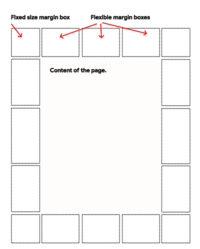
- In the CSS rule @page, designed to modify the page layout before printing or exporting to PDF, the ability to define areas for placing content in the page margins has been introduced, for example, to add your own header, sidebar notes, or footer.

- The CSS property `inset-area`, which was used to control the display of elements related to the positioning of other elements (CSS Anchor Positioning), has been declared obsolete. According to the recommendation of the working group standardizing CSS, `position-area` has come to replace `inset-area` with a fully analogous property.
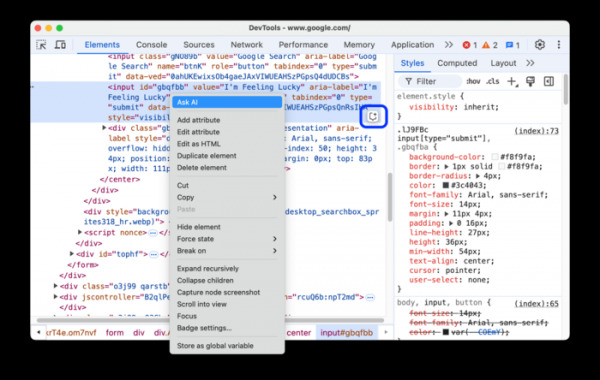
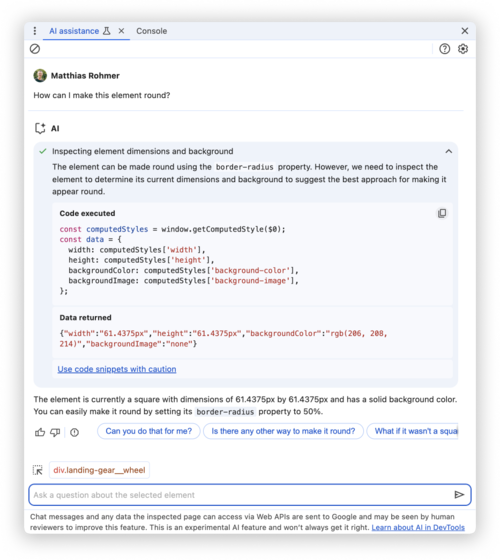
- The capabilities of web development tools have been expanded. New features have been added to the Performance panel for performance analysis. An experimental panel with an AI assistant has been suggested, where you can get answers to debugging questions or clarify certain aspects related to CSS in a chat format.



In addition to new features and bug fixes, the latest version addresses 12 vulnerabilities. Many of these vulnerabilities were discovered through automated testing using tools such as AddressSanitizer, MemorySanitizer, Control Flow Integrity, LibFuzzer, and AFL. One issue has been assigned a high severity level (a problem in the code related to handling extensions in the Blink engine). No critical issues were found that would allow bypassing all levels of browser protection and executing code on the system outside of the sandbox environment. As part of the bug bounty program for this release, Google awarded 8 prizes totaling $8,000 (each prize being $1,000). The amounts for 7 of the rewards have not yet been determined.
Source: opennet.ru
