

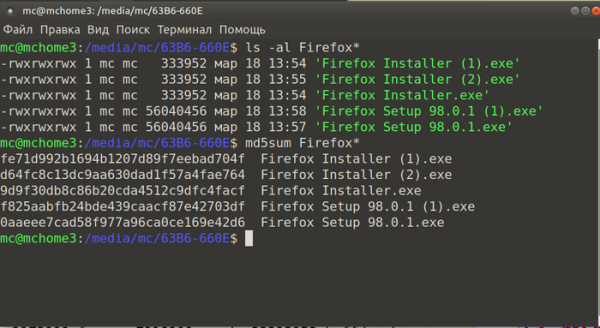
Mozilla has begun using a new method for identifying browser installations. The builds distributed from the official website, delivered as .exe files for the platform Windows, dltoken identifiers, unique to each download, are inserted. Consequently, multiple consecutive downloads of the installation archive for the same platform result in files with different checksums, since the identifiers are added directly to the downloaded file.
The effect only occurs when loading exe files from the environment. WindowsWhen trying to download from a browser or from the command line in Linux The .exe files are always the same. Archives in non-executable formats are also unmodified. It is claimed that dltoken tracking can be disabled by disabling telemetry in the browser, but it is unclear how managing telemetry in Firefox will help during initial installation or affect data substitution. server, which occurs when downloading files from a website (the problem also occurs when downloading from Google Chrome). As a workaround for obtaining Firefox installation files without identifiers, you can initiate a download directly from ftp.mozilla.org.
The reason cited for embedding the dltoken is to associate first-time installs, existing telemetry, and Google Analytics IDs with actual browser downloads. In particular, you can evaluate the reasons for deviations in the number of downloads and installations, and understand which installations are caused by which downloads (for example, you can find out that one downloaded file was used to install several instances of the browser, which explains why too many installations were recorded in a day , not corresponding to the number of downloads).


Source: opennet.ru

