

SonarQube is an open platform for continuous code quality control, supporting a wide range of programming languages and providing reports on metrics such as code duplication, adherence to coding standards, test coverage, code complexity, potential bugs, etc. SonarQube visualizes analysis results effectively and allows tracking the project's development dynamics over time.
Objective: Show developers the code quality control status in SonarQube.
There are two ways to solve this:
- Run a script to check the code quality control status in SonarQube. If the code quality control in SonarQube fails, then fail the build.
- Display the code quality control status on the project's main page.
Installing SonarQube
To install SonarQube from RPM packages, we will use the repository .
Let's install the package with the repository for CentOS 7.
yum install -y https://harbottle.gitlab.io/harbottle-main/7/x86_64/harbottle-main-release.rpmNow we install SonarQube itself.
yum install -y sonarqubeMost plugins will be installed during the installation, but we need to install findbugs and pmd additionally
yum install -y sonarqube-findbugs sonarqube-pmdStart the service and add it to the autostart
systemctl start sonarqube
systemctl enable sonarqube
If it takes a long time to load, add a random number generator to the end of the sonar.web.javaOpts options: /dev/.urandom
sonar.web.javaOpts=other parameters -Djava.security.egd=file:/dev/urandomRunning the script to check the code quality control status in SonarQube.
Unfortunately, the sonar-break-maven-plugin has not been updated for a long time. Therefore, we will write our own script.
For testing, we will use the repository .
Import into GitLab. Add the .gitlab-ci.yml file:
variables:
  MAVEN_OPTS: "-Dhttps.protocols=TLSv1.2 -Dmaven.repo.local=~/.m2/repository -Dorg.slf4j.simpleLogger.log.org.apache.maven.cli.transfer.Slf4jMavenTransferListener=WARN -Dorg.slf4j.simpleLogger.showDateTime=true -Djava.awt.headless=true"
  MAVEN_CLI_OPTS: "--batch-mode --errors --fail-at-end --show-version -DinstallAtEnd=true -DdeployAtEnd=true"
  SONAR_HOST_URL: "http://172.26.9.226:9000"
  LOGIN: "admin" # SonarQube login
  PASSWORD: "admin" # SonarQube password

cache:
  paths:
    - .m2/repository

build:
  image: maven:3.3.9-jdk-8
  stage: build
  script:
    - apt install -y jq || true
    - mvn $MAVEN_CLI_OPTS -Dmaven.test.failure.ignore=true org.jacoco:jacoco-maven-plugin:0.8.5:prepare-agent clean verify org.jacoco:jacoco-maven-plugin:0.8.5:report
    - mvn $MAVEN_CLI_OPTS -Dmaven.test.skip=true verify sonar:sonar -Dsonar.host.url=$SONAR_HOST_URL -Dsonar.login=$LOGIN -Dsonar.password=$PASSWORD -Dsonar.gitlab.project_id=$CI_PROJECT_PATH -Dsonar.gitlab.commit_sha=$CI_COMMIT_SHA -Dsonar.gitlab.ref_name=$CI_COMMIT_REF_NAME
    - export URL=$(cat target/sonar/report-task.txt | grep ceTaskUrl | cut -c11- ) # URL where report gets stored
    - echo $URL
    - |
      while : ;do
          curl -k -u "$LOGIN":"$PASSWORD" "$URL" -o analysis.txt
          export status=$(cat analysis.txt | jq -r '.task.status') # Status as SUCCESS, CANCELED, IN_PROGRESS or FAILED
          echo $status
          if [ ${status} == "SUCCESS" ];then
            echo "SONAR ANALYSIS SUCCESS";
            break
          fi
          sleep 5
      done
    - curl -k -u "$LOGIN":"$PASSWORD" "$URL" -o analysis.txt
    - export status=$(cat analysis.txt | jq -r '.task.status') # Status as SUCCESS, CANCELED or FAILED
    - export analysisId=$(cat analysis.txt | jq -r '.task.analysisId') # Get the analysis Id
    - |
      if [ "$status" == "SUCCESS" ]; then
        echo -e "SONAR ANALYSIS SUCCESSFUL...ANALYZING RESULTS";
        curl -k -u "$LOGIN":"$PASSWORD" "$SONAR_HOST_URL/api/qualitygates/project_status?analysisId=$analysisId" -o result.txt; # Analysis result like critical, major and minor issues
        export result=$(cat result.txt | jq -r '.projectStatus.status');

        if [ "$result" == "ERROR" ];then
          echo -e "91mSONAR RESULTS FAILED";
          echo "$(cat result.txt | jq -r '.projectStatus.conditions')"; # prints the critical, major and minor violations
          exit 1 # breaks the build for violations
        else
          echo -e "SONAR RESULTS SUCCESSFUL";
          echo "$(cat result.txt | jq -r '.projectStatus.conditions')";
          exit 0
        fi
      else
          echo -e "e[91mSONAR ANALYSIS FAILED";
          exit 1 # breaks the build for failure in Step2
      fi
  tags:
    - docker
The .gitlab-ci.yml file is not perfect. It was tested to see if the SonarQube checks completed with the status: "SUCCESS". So far, there have been no other statuses. Once other statuses appear, I will update the .gitlab-ci.yml in this post.
Displaying the quality control status of the source code on the project’s main page
Installing the plugin for SonarQube
yum install -y sonarqube-qualinsight-badgesLog in to SonarQube at the address
Create a regular user, for example, "badges".
Log in under this user in SonarQube.
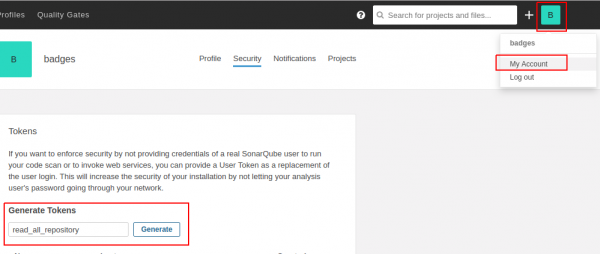
Go to "My account", create a new token, for example named "read_all_repository" and click "Generate".
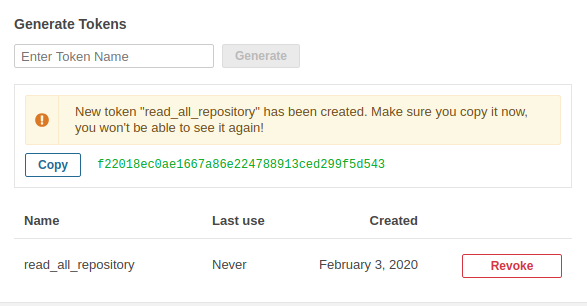
You will see that the token has appeared. It will only appear once.
Log in as an administrator.
Go to Configuration -> SVG Badges
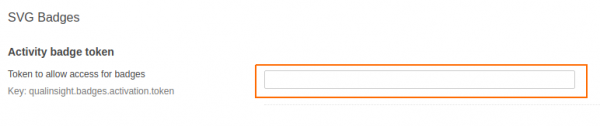
Copy this token into the "Activity badge token" field and click the save button.
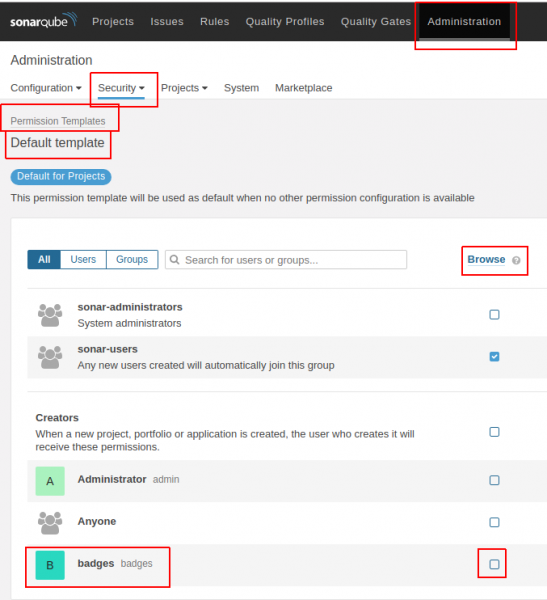
Go to Administration -> Security -> Permission Templates -> Default template (and other templates you may have).
For the user badges, you need to check the "Browse" option.
Testing.
For example, let's take a project .
We import this project.
We add the file .gitlab-ci.yml to the root of the project with the following content.
variables:
  MAVEN_OPTS: "-Dhttps.protocols=TLSv1.2 -Dmaven.repo.local=~/.m2/repository -Dorg.slf4j.simpleLogger.log.org.apache.maven.cli.transfer.Slf4jMavenTransferListener=WARN -Dorg.slf4j.simpleLogger.showDateTime=true -Djava.awt.headless=true"
  MAVEN_CLI_OPTS: "--batch-mode --errors --fail-at-end --show-version -DinstallAtEnd=true -DdeployAtEnd=true"
  SONAR_HOST_URL: "http://172.26.9.115:9000"
  LOGIN: "admin" # sonarqube login
  PASSWORD: "admin" # sonarqube password

cache:
  paths:
    - .m2/repository

build:
  image: maven:3.3.9-jdk-8
  stage: build
  script:
    - mvn $MAVEN_CLI_OPTS -Dmaven.test.failure.ignore=true org.jacoco:jacoco-maven-plugin:0.8.5:prepare-agent clean verify org.jacoco:jacoco-maven-plugin:0.8.5:report
    - mvn $MAVEN_CLI_OPTS -Dmaven.test.skip=true verify sonar:sonar -Dsonar.host.url=$SONAR_HOST_URL -Dsonar.login=$LOGIN -Dsonar.password=$PASSWORD -Dsonar.gitlab.project_id=$CI_PROJECT_PATH -Dsonar.gitlab.commit_sha=$CI_COMMIT_SHA -Dsonar.gitlab.ref_name=$CI_COMMIT_REF_NAME
  tags:
    - docker
In SonarQube, the project will look like this:
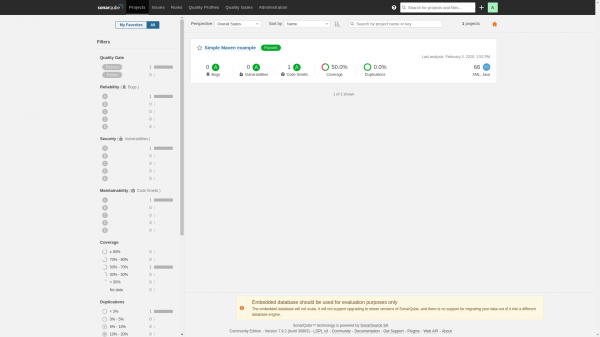
We add badges to README.md and they will look like this:
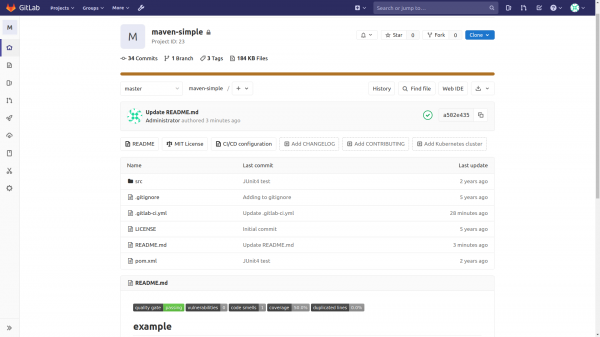
The code for displaying badges looks like this:

Parsing the badge display string:
[](http://172.26.9.115:9000/dashboard?id=com.github.jitpackmaven-simple)
[](http://172.26.9.115:9000/dashboard?id=id-project)
[](http://172.26.9.115:9000/dashboard?id=com.github.jitpackmaven-simple)
[](http://172.26.9.115:9000/dashboard?id=id-project)Where to find/check Project Key and project id.
The Project Key is located at the bottom right. The URL contains the project id.
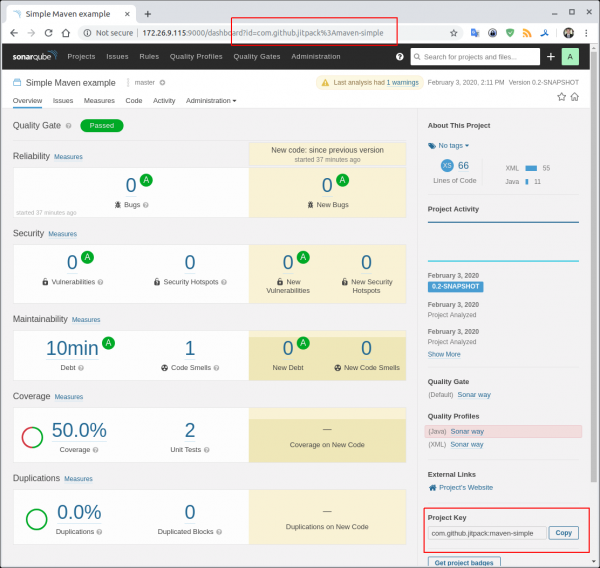
Options for obtaining metrics can be .
Please send all pull requests for improvements or bug fixes .
Telegram chat about SonarQube
Telegram chat about DevSecOps — secure DevOps
Source: habr.com
