

There is surprisingly little information available in the Russian-speaking internet about such an old and simple, yet convenient and secure technology, which is particularly relevant in light of the development of the Internet of Things, as mobile VPN (virtual private network). In this article, I will describe how and why you can set up access to your private network from any device with a SIM card without the need for specialized software.
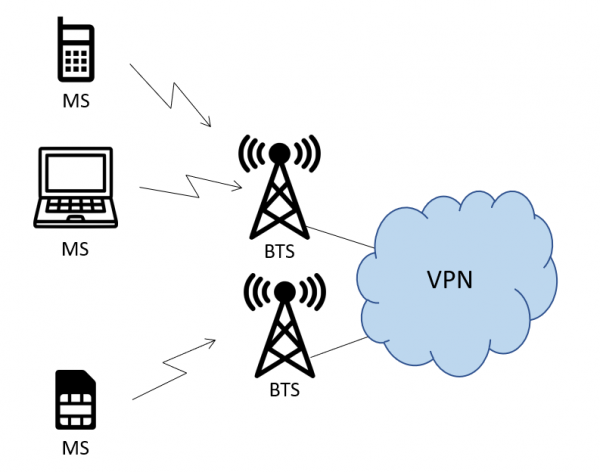
Tasks and limitations
To start, let me answer the question 'why?'. VPN as a technology is used to solve a variety of network tasks, united by a common characteristic — isolated data transmission between two devices through numerous intermediate nodes. Based on this, more complex solutions are built and various tasks are addressed. In the usual case, VPN is built using the network of a fixed-line operator (for those interested in the details, there is ) or many different network protocols (GRE, IPSec, L2TP, and others — the same author ) and software products that work with them (Cisco AnyConnect, OpenVPN, TOR — you probably know them yourself), but using them on a specific endpoint device immediately imposes several requirements which, if not met, lead to certain limitations.
The first serious limitation is that the device must be capable, at both hardware and software levels, of working with at least one of these protocols. This is usually determined by the software, which is easily available for laptops or smartphones, but there are cases where the task is posed before a device that is too simple from a hardware perspective, or its software has limitations: a water meter wants to use VPN to transmit its one unfortunate byte of data once a month, just as you might want to use VPN to edit your LinkedIn profile.
Another important limitation is the need for setup. It works for both "dumb" devices from the first point and for traditional smartphones and computers, which are unaware of the previous limitation. While setting up the former is relatively straightforward and depends on the time spent on setup, the latter presents various options. Often, organizations use VPNs for security purposes, to protect corporate endpoints from exposure to the public network without adequate corporate protection or from transmitting corporate data over public channels. End users, for their own reasons, may disable or forget to turn on the VPN, resulting in many of the company’s security systems being left "out in the cold."
Both of these limitations can be easily lifted if VPN access is provided at the network level. In the case of mobile communication, this can be implemented using a "mobile VPN." Any device capable of transmitting data, regardless of complexity, will transmit it to the correct network. It doesn't matter what settings are configured on the device; with a properly configured network, it will send data where it needs to go and nowhere else.
And as a pleasant bonus, the device will receive an address from the internal network, which can be configured remotely, and access to it will only be possible from within that network (or physically). This is very important for a certain class of devices.
How it works
PS Core
Seemingly, VPN is a classic service offered by all telecom operators for the B2B segment, so why draw attention to it? The issue lies in how the data transmission network is structured for devices connected via GPRS, HSPA, LTE, or another mobile communication technology. There are no familiar VLANs for network administrators, no switches, and not even routers in their standard sense. Instead, there is a radio access network (RAN) and a packet core (PS Core).
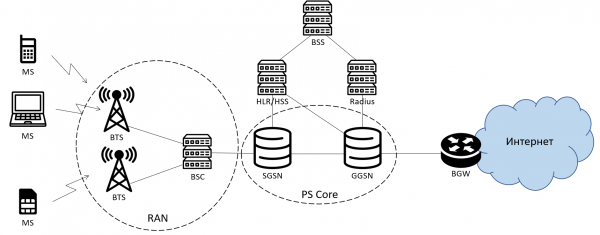
A simplified diagram of the mobile operator's packet network. It differs slightly for LTE, but the overall meaning remains the same.
In general, every device with a SIM card registered in the packet network (having undergone the GPRS attach process or a similar one) must initiate the creation of a data transfer session (PDP context) on the core packet network router, GGSN, before it can start transmitting data anywhere. The details and purpose of these processes are well described here . What's important for us: when initiating a session, the request to the GGSN includes parameters that many have seen on their phones or dealt with when setting up devices, such as USB modems. There are three fields: APN, username, and password. APN (Access Point Name) is a very important entity in the logic of GGSN operation: depending on which APN the session is initiated from, GGSN behaves differently. As a result of successfully processing the user's request, GGSN should activate a data transfer session and inform the device of its parameters, particularly the issued IP address and DNS addresses. There are several very important features here:
- In the session initiation request, the device never requests what IP address it would like to receive;
- In addition to the fields 'APN', 'username', and 'password' specified in the device's settings, the request to the GGSN also includes the subscriber's phone number (MSISDN) (here and henceforth, 'subscriber' refers to the end user, a device with a SIM card, and 'client' refers to the ordering organization that includes subscribers);
- Upon session activation, the GGSN creates a record of the new IP address in its routing table. All subscribers on the GGSN are denoted by entries in the routing table with a prefix /32, i.e., 1 subscriber = 1 entry in the table. GGSN is a highly efficient router;
- The operator's network can change the APN field in the session initiation request for various reasons at different stages (both on the SGSN and GGSN). This allows, in some cases, to reduce or even eliminate the need to configure network parameters on devices with SIM cards.
The first three points immediately raise the question: what IP address is assigned to the subscriber?
This is determined by the settings of the APN from which the session activation request has come. About 99% of mobile data users rely on standard Internet access. These are well-known access points like internet.mts.ru, internet.beeline.ru, and so on. In the case of Internet access, the GGSN assigns addresses based on the classic DHCP principle from the specified settings of the gray subnets. When connecting to the public network, these are closed by classic NAT (more specifically, the version known as PAT).
However, the GGSN is capable of more. To select an IP address, it can make an AAA request to the authorization server (such as Radius). This logic is configured for specific APNs depending on their purpose. The simplest case is the service for providing a permanent public IP address. Such addresses are typically assigned to subscribers in the operator's billing system (BSS), and depending on the IT architecture, they end up in one database or another, which the GGSN queries. Given that it knows the subscriber's MSISDN (phone number), which will be included in the request, this database can be quite simple and may only contain a pairing of the number and address. Additionally, if the client plans to use one SIM card to connect multiple devices (for instance, if the SIM card is in a WiFi router at a remote office), this table may also include the so-called 'framed route' — the prefix of the network located 'behind' the SIM card, which will be announced to all devices in the network via dynamic routing protocols.
Not just the GGSN
In addition to issuing addresses, it is also necessary to deliver subscriber traffic to client networks, each to its own. Here, everything works much more traditionally. On the GGSN, the traffic for VPN APN operations is routed to a separate operator network router (which may have different names, sometimes called a VPN router), which in turn performs the function of a classic PE in the L3VPN scheme. It adds the necessary tags, headers, and all that, and sends this entire traffic stream through the transport network routers to preconfigured interfaces or tunnels to the client’s network. This part is much more conventional and has been described many times in other contexts, so I will not focus on it in this material.
Considering all these details, there can be several ways to organize mobile VPNs, and they will differ from each other by a combination of the following features:
- IP addresses, as described earlier, can be issued dynamically (a different address each time from a specified subnet) or statically (the same address for a specific subscriber every time), which is determined by and/or the APN settings and/or the Radius server settings;
- IP addresses can be issued by a Radius server managed by the operator or managed by the client;
- Devices connected to a mobile VPN can interact either only with each other or have access to the client's regular L3VPN network through a direct interface (VPN port) with the operator or through tunneling over the Internet;
- In some cases, using a username and password for successful session activation may be mandatory, while sometimes filling in the 'APN' field is not even required.
There are several dozen such combinations with different types of tunneling, traffic balancing between access channels to the 'main' client VPN, and the principle of address issuance. For most cases, the general scheme looks as follows:
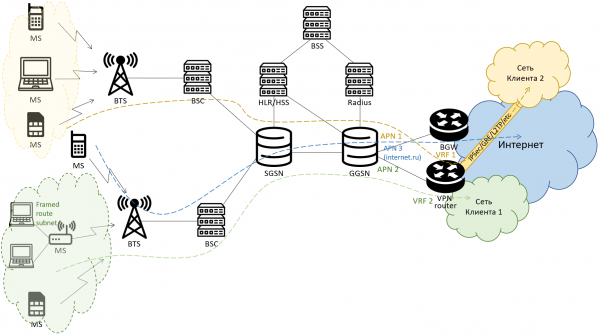
As a result of a rather quick registration process online and obtaining an IP address, the device gains access to the client’s network, and the client’s network gains access to the device. The subscriber remains isolated from all other operator subscribers unrelated to the specific client, requires no additional configurations, and all traffic is unconditionally routed to the client’s network, where it is processed according to the client's internal policies.
Source: habr.com
