

Nota de traducción.: autor del artículo — Erkan Erol, ingeniero de SAP — comparte su estudio sobre el funcionamiento del equipo kubectl exec, tan familiar para todos los que trabajan con Kubernetes. Todo el algoritmo está acompañado de listados del código fuente de Kubernetes (y proyectos relacionados), que permiten profundizar en el tema tanto como sea necesario.
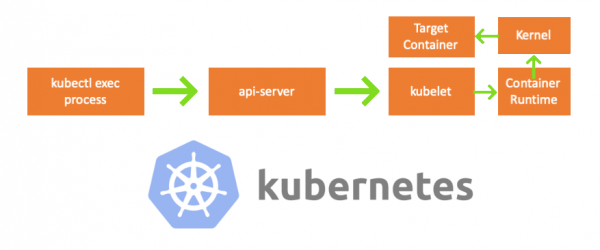
Una de esas tardes, un colega se acercó y me preguntó cómo ejecutar un comando en un pod usando . No pude responderle y de repente me di cuenta de que no sabía nada sobre el mecanismo de funcionamiento kubectl exec. Sí, tenía ciertas ideas sobre su estructura, pero no estaba 100% seguro de su corrección, así que decidí investigar el tema. Tras leer blogs, documentación y el código fuente, aprendí muchas cosas nuevas y en este artículo quiero compartir mis descubrimientos y entendimientos. Si algo no está bien, por favor contáctame en .
Preparación
Para crear un clúster en mi MacBook, cloné . Luego, corregí las direcciones IP de los nodos en la configuración de kubelet, ya que la configuración por defecto no permitía ejecutar kubectl exec. Puedes leer más sobre la razón principal .
- Cualquier máquina = mi MacBook
- IP del nodo maestro = 192.168.205.10
- IP del nodo trabajador = 192.168.205.11
- puerto del servidor API = 6443
Componentes
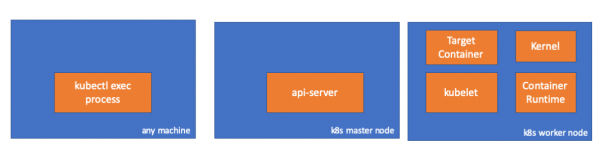
- kubectl exec process: cuando ejecutamos «kubectl exec ...», se inicia un proceso. Esto se puede hacer en cualquier máquina que tenga acceso al servidor API de K8s. Nota del traductor: Más adelante en los listados de la consola, el autor utiliza el comentario «cualquier máquina», implicando que los siguientes comandos se pueden ejecutar en cualquier máquina con acceso a Kubernetes.
- : componente en el nodo maestro que proporciona acceso a la API de Kubernetes. Es el frontend del plano de control en Kubernetes.
- : agente que ejecuta en cada nodo del clúster. Asegura la operación de los contenedores en el pod.
- (entorno de ejecución de contenedores): software que maneja la ejecución de contenedores. Ejemplos: Docker, CRI-O, containerd...
- kernel: núcleo del sistema operativo en el nodo trabajador; se encarga de gestionar los procesos.
- target (destinado) container: contenedor que forma parte del pod y se ejecuta en uno de los nodos trabajadores.
Lo que descubrí
1. Actividad del lado del cliente
Creamos un pod en el espacio de nombres default:
// any machine
$ kubectl run exec-test-nginx --image=nginx
Luego ejecutamos el comando exec y esperamos 5000 segundos para hacer más observaciones:
// any machine
$ kubectl exec -it exec-test-nginx-6558988d5-fgxgg -- sh
# sleep 5000
Aparece el proceso kubectl (con pid=8507 en nuestro caso):
// any machine
$ ps -ef |grep kubectl
501  8507  8409   0  7:19PM ttys000    0:00.13 kubectl exec -it exec-test-nginx-6558988d5-fgxgg -- sh
Si verificamos la actividad de red del proceso, descubriremos que tiene conexiones al api-server (192.168.205.10.6443):
// any machine
$ netstat -atnv |grep 8507
tcp4       0      0  192.168.205.1.51673    192.168.205.10.6443    ESTABLISHED 131072 131768   8507      0 0x0102 0x00000020
tcp4       0      0  192.168.205.1.51672    192.168.205.10.6443    ESTABLISHED 131072 131768   8507      0 0x0102 0x00000028
Veamos el código. Kubectl crea una solicitud POST con el subrecurso exec y envía la solicitud REST:
              req := restClient.Post().
                        Resource("pods").
                        Name(pod.Name).
                        Namespace(pod.Namespace).
                        SubResource("exec")
                req.VersionedParams(&corev1.PodExecOptions{
                        Container: containerName,
                        Command:   p.Command,
                        Stdin:     p.Stdin,
                        Stdout:    p.Out != nil,
                        Stderr:    p.ErrOut != nil,
                        TTY:       t.Raw,
                }, scheme.ParameterCodec)

return p.Executor.Execute("POST", req.URL(), p.Config, p.In, p.Out, p.ErrOut, t.Raw, sizeQueue)()
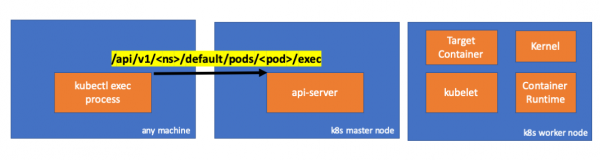
2. Actividad del lado del nodo maestro
También podemos observar una solicitud del lado del api-server:
handler.go:143] kube-apiserver: POST "/api/v1/namespaces/default/pods/exec-test-nginx-6558988d5-fgxgg/exec" satisfecha por gorestful con el servicio web /api/v1
upgradeaware.go:261] Conectando con el proxy de backend (interceptando redirecciones) https://192.168.205.11:10250/exec/default/exec-test-nginx-6558988d5-fgxgg/exec-test-nginx?command=sh&input=1&output=1&tty=1
Headers: map[Connection:[Upgrade] Content-Length:[0] Upgrade:[SPDY/3.1] User-Agent:[kubectl/v1.12.10 (darwin/amd64) kubernetes/e3c1340] X-Forwarded-For:[192.168.205.1] X-Stream-Protocol-Version:[v4.channel.k8s.io v3.channel.k8s.io v2.channel.k8s.io channel.k8s.io]]
Tenga en cuenta que la solicitud HTTP incluye una solicitud para cambiar el protocolo. permite multiplexar flujos individuales de stdin/stdout/stderr/spdy-error a través de una única conexión TCP.
El api-server recibe la solicitud y la convierte en PodExecOptions:
// PodExecOptions is the query options to a Pod's remote exec call
type PodExecOptions struct {
        metav1.TypeMeta

        // Stdin if true indicates that stdin is to be redirected for the exec call
        Stdin bool

        // Stdout if true indicates that stdout is to be redirected for the exec call
        Stdout bool

        // Stderr if true indicates that stderr is to be redirected for the exec call
        Stderr bool

        // TTY if true indicates that a tty will be allocated for the exec call
        TTY bool

        // Container in which to execute the command.
        Container string

        // Command is the remote command to execute; argv array; not executed within a shell.
        Command []string
}()
Para realizar las acciones requeridas, el api-server debe saber con qué pod debe comunicarse:
// ExecLocation returns the exec URL for a pod container. If opts.Container is blank
// and only one container is present in the pod, that container is used.
func ExecLocation(
        getter ResourceGetter,
        connInfo client.ConnectionInfoGetter,
        ctx context.Context,
        name string,
        opts *api.PodExecOptions,
) (*url.URL, http.RoundTripper, error) {
        return streamLocation(getter, connInfo, ctx, name, opts, opts.Container, "exec")
}()
Por supuesto, la información sobre el endpoint se obtiene de la información del nodo:
        nodeName := types.NodeName(pod.Spec.NodeName)
        if len(nodeName) == 0 {
                // Si el pod no ha sido asignado a un host, devuelve una ubicación vacía
                return nil, nil, errors.NewBadRequest(fmt.Sprintf("pod %s no tiene un host asignado", name))
        }
nodeInfo, err := connInfo.GetConnectionInfo(ctx, nodeName)()
¡Hurra! Ahora kubelet tiene un puerto (node.Status.DaemonEndpoints.KubeletEndpoint.Port), al que puede conectarse el api-server:
// GetConnectionInfo retrieves connection info from the status of a Node API object.
func (k *NodeConnectionInfoGetter) GetConnectionInfo(ctx context.Context, nodeName types.NodeName) (*ConnectionInfo, error) {
        node, err := k.nodes.Get(ctx, string(nodeName), metav1.GetOptions{})
        if err != nil {
                return nil, err
        }

        // Find a kubelet-reported address, using preferred address type
        host, err := nodeutil.GetPreferredNodeAddress(node, k.preferredAddressTypes)
        if err != nil {
                return nil, err
        }

        // Use the kubelet-reported port, if present
        port := int(node.Status.DaemonEndpoints.KubeletEndpoint.Port)
        if port <= 0 {
                port = k.defaultPort
        }

        return &ConnectionInfo{
                Scheme:    k.scheme,
                Hostname:  host,
                Port:      strconv.Itoa(port),
                Transport: k.transport,
        }, nil
}()
De la documentación :
Estas conexiones se cierran en el endpoint HTTPS de kubelet. Por defecto, el apiserver no verifica el certificado de kubelet, lo que hace que la conexión sea vulnerable a ataques de 'hombre en el medio' (MITM) y uso inseguro para operar en redes no confiables y/o públicas.
Ahora el api-server conoce el endpoint y establece una conexión:
// Connect returns a handler for the pod exec proxy
func (r *ExecREST) Connect(ctx context.Context, name string, opts runtime.Object, responder rest.Responder) (http.Handler, error) {
        execOpts, ok := opts.(*api.PodExecOptions)
        if !ok {
                return nil, fmt.Errorf("invalid options object: %#v", opts)
        }
        location, transport, err := pod.ExecLocation(r.Store, r.KubeletConn, ctx, name, execOpts)
        if err != nil {
                return nil, err
        }
        return newThrottledUpgradeAwareProxyHandler(location, transport, false, true, true, responder), nil
}()
Veamos qué sucede en el nodo maestro.
Primero averigüemos la IP del nodo trabajador. En nuestro caso, es 192.168.205.11:
// any machine
$ kubectl get nodes k8s-node-1 -o wide
NAME         STATUS   ROLES    AGE   VERSION   INTERNAL-IP      EXTERNAL-IP   OS-IMAGE             KERNEL-VERSION      CONTAINER-RUNTIME
k8s-node-1   Ready    <none>   9h    v1.15.3   192.168.205.11   <none>        Ubuntu 16.04.6 LTS   4.4.0-159-generic   docker://17.3.3
Luego estableceremos el puerto del kubelet (10250 en nuestro caso):
// any machine
$ kubectl get nodes k8s-node-1 -o jsonpath='{.status.daemonEndpoints.kubeletEndpoint}'
map[Port:10250]
Ahora es momento de verificar la red. ¿Hay conexión con el nodo trabajador (192.168.205.11)? ¡Sí la hay! Si 'terminamos' el proceso exec, desaparecerá, por lo que sé que la conexión ha sido establecida por el api-server como resultado de un comando exec ejecutado.
// master node
$ netstat -atn |grep 192.168.205.11
tcp        0      0 192.168.205.10:37870    192.168.205.11:10250    ESTABLISHED
… 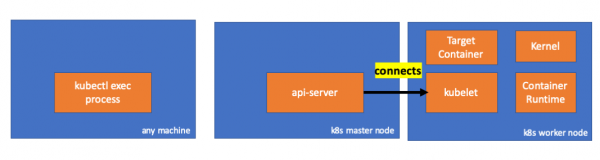
La conexión entre kubectl y el api-server aún está abierta. Además, hay otra conexión que vincula el api-server y el kubelet.
3. Actividad en el nodo trabajador
Ahora conectémonos al nodo trabajador y veamos qué está sucediendo.
Primero, vemos que también hay conexión establecida (segunda línea); 192.168.205.10 es la IP del nodo maestro:
 // worker node
  $ netstat -atn |grep 10250
  tcp6       0      0 :::10250                :::*                    LISTEN
  tcp6       0      0 192.168.205.11:10250    192.168.205.10:37870    ESTABLISHED
¿Y qué pasa con nuestro comando? nos permiten despertar cualquier proceso que necesite el bloqueo que acabamos de liberar:? Ура, она тоже присутствует!
 // worker node
  $ ps -afx
  ...
  31463 ?        Sl     0:00      _ docker-containerd-shim 7d974065bbb3107074ce31c51f5ef40aea8dcd535ae11a7b8f2dd180b8ed583a /var/run/docker/libcontainerd/7d974065bbb3107074ce31c51
  31478 pts/0    Ss     0:00          _ sh
  31485 pts/0    S+     0:00              _ sleep 5000
  …
Pero espera: ¿cómo hizo esto kubelet? En kubelet hay un daemon que abre el acceso a la API a través de un puerto para las solicitudes del api-server:
// Server is the library interface to serve the stream requests.
type Server interface {
        http.Handler

        // Get the serving URL for the requests.
        // Requests must not be nil. Responses may be nil iff an error is returned.
        GetExec(*runtimeapi.ExecRequest) (*runtimeapi.ExecResponse, error)
        GetAttach(req *runtimeapi.AttachRequest) (*runtimeapi.AttachResponse, error)
        GetPortForward(*runtimeapi.PortForwardRequest) (*runtimeapi.PortForwardResponse, error)

        // Start the server.
        // addr is the address to serve on (address:port) stayUp indicates whether the server should
        // listen until Stop() is called, or automatically stop after all expected connections are
        // closed. Calling Get{Exec,Attach,PortForward} increments the expected connection count.
        // Function does not return until the server is stopped.
        Start(stayUp bool) error
        // Stop the server, and terminate any open connections.
        Stop() error
}()
Kubelet calcula el endpoint de respuesta para las solicitudes exec:
func (s *server) GetExec(req *runtimeapi.ExecRequest) (*runtimeapi.ExecResponse, error) {
        if err := validateExecRequest(req); err != nil {
                return nil, err
        }
        token, err := s.cache.Insert(req)
        if err != nil {
                return nil, err
        }
        return &runtimeapi.ExecResponse{
                Url: s.buildURL("exec", token),
        }, nil
}()
No te confundas. Él no devuelve el resultado del comando, sino el endpoint para la comunicación:
type ExecResponse struct {
        // URL completamente calificada del servidor de streaming exec.
        Url                  string   `protobuf:"bytes,1,opt,name=url,proto3" json:"url,omitempty"`
        XXX_NoUnkeyedLiteral struct{} `json:"-"`
        XXX_sizecache        int32    `json:"-"`
}()
Kubelet implementa la interfaz RuntimeServiceClient, que es parte de la Interfaz Runtime de Contenedor (hemos escrito más sobre esto, por ejemplo, — nota del traductor):
Un listado extenso de cri-api en kubernetes/kubernetes
// For semantics around ctx use and closing/ending streaming RPCs, please refer to https://godoc.org/google.golang.org/grpc#ClientConn.NewStream.
type RuntimeServiceClient interface {
        // Version returns the runtime name, runtime version, and runtime API version.
        Version(ctx context.Context, in *VersionRequest, opts ...grpc.CallOption) (*VersionResponse, error)
        // RunPodSandbox creates and starts a pod-level sandbox. Runtimes must ensure
        // the sandbox is in the ready state on success.
        RunPodSandbox(ctx context.Context, in *RunPodSandboxRequest, opts ...grpc.CallOption) (*RunPodSandboxResponse, error)
        // StopPodSandbox stops any running process that is part of the sandbox and
        // reclaims network resources (e.g., IP addresses) allocated to the sandbox.
        // If there are any running containers in the sandbox, they must be forcibly
        // terminated.
        // This call is idempotent, and must not return an error if all relevant
        // resources have already been reclaimed. kubelet will call StopPodSandbox
        // at least once before calling RemovePodSandbox. It will also attempt to
        // reclaim resources eagerly, as soon as a sandbox is not needed. Hence,
        // multiple StopPodSandbox calls are expected.
        StopPodSandbox(ctx context.Context, in *StopPodSandboxRequest, opts ...grpc.CallOption) (*StopPodSandboxResponse, error)
        // RemovePodSandbox removes the sandbox. If there are any running containers
        // in the sandbox, they must be forcibly terminated and removed.
        // This call is idempotent, and must not return an error if the sandbox has
        // already been removed.
        RemovePodSandbox(ctx context.Context, in *RemovePodSandboxRequest, opts ...grpc.CallOption) (*RemovePodSandboxResponse, error)
        // PodSandboxStatus returns the status of the PodSandbox. If the PodSandbox is not
        // present, returns an error.
        PodSandboxStatus(ctx context.Context, in *PodSandboxStatusRequest, opts ...grpc.CallOption) (*PodSandboxStatusResponse, error)
        // ListPodSandbox returns a list of PodSandboxes.
        ListPodSandbox(ctx context.Context, in *ListPodSandboxRequest, opts ...grpc.CallOption) (*ListPodSandboxResponse, error)
        // CreateContainer creates a new container in specified PodSandbox
        CreateContainer(ctx context.Context, in *CreateContainerRequest, opts ...grpc.CallOption) (*CreateContainerResponse, error)
        // StartContainer starts the container.
        StartContainer(ctx context.Context, in *StartContainerRequest, opts ...grpc.CallOption) (*StartContainerResponse, error)
        // StopContainer stops a running container with a grace period (i.e., timeout).
        // This call is idempotent, and must not return an error if the container has
        // already been stopped.
        // TODO: what must the runtime do after the grace period is reached?
        StopContainer(ctx context.Context, in *StopContainerRequest, opts ...grpc.CallOption) (*StopContainerResponse, error)
        // RemoveContainer removes the container. If the container is running, the
        // container must be forcibly removed.
        // This call is idempotent, and must not return an error if the container has
        // already been removed.
        RemoveContainer(ctx context.Context, in *RemoveContainerRequest, opts ...grpc.CallOption) (*RemoveContainerResponse, error)
        // ListContainers lists all containers by filters.
        ListContainers(ctx context.Context, in *ListContainersRequest, opts ...grpc.CallOption) (*ListContainersResponse, error)
        // ContainerStatus returns status of the container. If the container is not
        // present, returns an error.
        ContainerStatus(ctx context.Context, in *ContainerStatusRequest, opts ...grpc.CallOption) (*ContainerStatusResponse, error)
        // UpdateContainerResources updates ContainerConfig of the container.
        UpdateContainerResources(ctx context.Context, in *UpdateContainerResourcesRequest, opts ...grpc.CallOption) (*UpdateContainerResourcesResponse, error)
        // ReopenContainerLog asks runtime to reopen the stdout/stderr log file
        // for the container. This is often called after the log file has been
        // rotated. If the container is not running, container runtime can choose
        // to either create a new log file and return nil, or return an error.
        // Once it returns error, new container log file MUST NOT be created.
        ReopenContainerLog(ctx context.Context, in *ReopenContainerLogRequest, opts ...grpc.CallOption) (*ReopenContainerLogResponse, error)
        // ExecSync runs a command in a container synchronously.
        ExecSync(ctx context.Context, in *ExecSyncRequest, opts ...grpc.CallOption) (*ExecSyncResponse, error)
        // Exec prepares a streaming endpoint to execute a command in the container.
        Exec(ctx context.Context, in *ExecRequest, opts ...grpc.CallOption) (*ExecResponse, error)
        // Attach prepares a streaming endpoint to attach to a running container.
        Attach(ctx context.Context, in *AttachRequest, opts ...grpc.CallOption) (*AttachResponse, error)
        // PortForward prepares a streaming endpoint to forward ports from a PodSandbox.
        PortForward(ctx context.Context, in *PortForwardRequest, opts ...grpc.CallOption) (*PortForwardResponse, error)
        // ContainerStats returns stats of the container. If the container does not
        // exist, the call returns an error.
        ContainerStats(ctx context.Context, in *ContainerStatsRequest, opts ...grpc.CallOption) (*ContainerStatsResponse, error)
        // ListContainerStats returns stats of all running containers.
        ListContainerStats(ctx context.Context, in *ListContainerStatsRequest, opts ...grpc.CallOption) (*ListContainerStatsResponse, error)
        // UpdateRuntimeConfig updates the runtime configuration based on the given request.
        UpdateRuntimeConfig(ctx context.Context, in *UpdateRuntimeConfigRequest, opts ...grpc.CallOption) (*UpdateRuntimeConfigResponse, error)
        // Status returns the status of the runtime.
        Status(ctx context.Context, in *StatusRequest, opts ...grpc.CallOption) (*StatusResponse, error)
} ()
Simplemente utiliza gRPC para invocar el método a través de la Interfaz Runtime de Contenedor:
type runtimeServiceClient struct {
        cc *grpc.ClientConn
}()
func (c *runtimeServiceClient) Exec(ctx context.Context, in *ExecRequest, opts ...grpc.CallOption) (*ExecResponse, error) {
        out := new(ExecResponse)
        err := c.cc.Invoke(ctx, "/runtime.v1alpha2.RuntimeService/Exec", in, out, opts...)
        if err != nil {
                return nil, err
        }
        return out, nil
}()
El Runtime de Contenedor es responsable de la implementación RuntimeServiceServer:
Un listado extenso de cri-api en kubernetes/kubernetes
// RuntimeServiceServer is the server API for RuntimeService service.
type RuntimeServiceServer interface {
        // Version returns the runtime name, runtime version, and runtime API version.
        Version(context.Context, *VersionRequest) (*VersionResponse, error)
        // RunPodSandbox creates and starts a pod-level sandbox. Runtimes must ensure
        // the sandbox is in the ready state on success.
        RunPodSandbox(context.Context, *RunPodSandboxRequest) (*RunPodSandboxResponse, error)
        // StopPodSandbox stops any running process that is part of the sandbox and
        // reclaims network resources (e.g., IP addresses) allocated to the sandbox.
        // If there are any running containers in the sandbox, they must be forcibly
        // terminated.
        // This call is idempotent, and must not return an error if all relevant
        // resources have already been reclaimed. kubelet will call StopPodSandbox
        // at least once before calling RemovePodSandbox. It will also attempt to
        // reclaim resources eagerly, as soon as a sandbox is not needed. Hence,
        // multiple StopPodSandbox calls are expected.
        StopPodSandbox(context.Context, *StopPodSandboxRequest) (*StopPodSandboxResponse, error)
        // RemovePodSandbox removes the sandbox. If there are any running containers
        // in the sandbox, they must be forcibly terminated and removed.
        // This call is idempotent, and must not return an error if the sandbox has
        // already been removed.
        RemovePodSandbox(context.Context, *RemovePodSandboxRequest) (*RemovePodSandboxResponse, error)
        // PodSandboxStatus returns the status of the PodSandbox. If the PodSandbox is not
        // present, returns an error.
        PodSandboxStatus(context.Context, *PodSandboxStatusRequest) (*PodSandboxStatusResponse, error)
        // ListPodSandbox returns a list of PodSandboxes.
        ListPodSandbox(context.Context, *ListPodSandboxRequest) (*ListPodSandboxResponse, error)
        // CreateContainer creates a new container in specified PodSandbox
        CreateContainer(context.Context, *CreateContainerRequest) (*CreateContainerResponse, error)
        // StartContainer starts the container.
        StartContainer(context.Context, *StartContainerRequest) (*StartContainerResponse, error)
        // StopContainer stops a running container with a grace period (i.e., timeout).
        // This call is idempotent, and must not return an error if the container has
        // already been stopped.
        // TODO: what must the runtime do after the grace period is reached?
        StopContainer(context.Context, *StopContainerRequest) (*StopContainerResponse, error)
        // RemoveContainer removes the container. If the container is running, the
        // container must be forcibly removed.
        // This call is idempotent, and must not return an error if the container has
        // already been removed.
        RemoveContainer(context.Context, *RemoveContainerRequest) (*RemoveContainerResponse, error)
        // ListContainers lists all containers by filters.
        ListContainers(context.Context, *ListContainersRequest) (*ListContainersResponse, error)
        // ContainerStatus returns status of the container. If the container is not
        // present, returns an error.
        ContainerStatus(context.Context, *ContainerStatusRequest) (*ContainerStatusResponse, error)
        // UpdateContainerResources updates ContainerConfig of the container.
        UpdateContainerResources(context.Context, *UpdateContainerResourcesRequest) (*UpdateContainerResourcesResponse, error)
        // ReopenContainerLog asks runtime to reopen the stdout/stderr log file
        // for the container. This is often called after the log file has been
        // rotated. If the container is not running, container runtime can choose
        // to either create a new log file and return nil, or return an error.
        // Once it returns error, new container log file MUST NOT be created.
        ReopenContainerLog(context.Context, *ReopenContainerLogRequest) (*ReopenContainerLogResponse, error)
        // ExecSync runs a command in a container synchronously.
        ExecSync(context.Context, *ExecSyncRequest) (*ExecSyncResponse, error)
        // Exec prepares a streaming endpoint to execute a command in the container.
        Exec(context.Context, *ExecRequest) (*ExecResponse, error)
        // Attach prepares a streaming endpoint to attach to a running container.
        Attach(context.Context, *AttachRequest) (*AttachResponse, error)
        // PortForward prepares a streaming endpoint to forward ports from a PodSandbox.
        PortForward(context.Context, *PortForwardRequest) (*PortForwardResponse, error)
        // ContainerStats returns stats of the container. If the container does not
        // exist, the call returns an error.
        ContainerStats(context.Context, *ContainerStatsRequest) (*ContainerStatsResponse, error)
        // ListContainerStats returns stats of all running containers.
        ListContainerStats(context.Context, *ListContainerStatsRequest) (*ListContainerStatsResponse, error)
        // UpdateRuntimeConfig updates the runtime configuration based on the given request.
        UpdateRuntimeConfig(context.Context, *UpdateRuntimeConfigRequest) (*UpdateRuntimeConfigResponse, error)
        // Status returns the status of the runtime.
        Status(context.Context, *StatusRequest) (*StatusResponse, error)
} ()
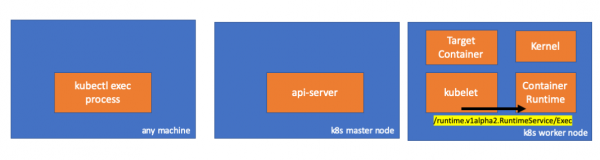
Si es así, deberíamos ver una conexión entre kubelet y el entorno de ejecución del contenedor, ¿verdad? Vamos a comprobarlo.
Ejecuta este comando antes y después del comando exec y observa las diferencias. En mi caso, la diferencia es la siguiente:
// worker node
$ ss -a -p |grep kubelet
...
u_str  ESTAB      0      0       * 157937                * 157387                users:(("kubelet",pid=5714,fd=33))
...
Hmm… Una nueva conexión a través de sockets unix entre kubelet (pid=5714) y algo desconocido. ¿Qué podría ser esto? Correcto, es Docker (pid=1186)!
// worker node
$ ss -a -p |grep 157387
...
u_str  ESTAB      0      0       * 157937                * 157387                users:(("kubelet",pid=5714,fd=33))
u_str  ESTAB      0      0      /var/run/docker.sock 157387                * 157937                users:(("dockerd",pid=1186,fd=14))
...
Como recordarán, este es el proceso del demonio docker (pid=1186), que ejecuta nuestro comando:
// worker node
$ ps -afx
...
 1186 ?        Ssl    0:55 /usr/bin/dockerd -H fd://
17784 ?        Sl     0:00      _ docker-containerd-shim 53a0a08547b2f95986402d7f3b3e78702516244df049ba6c5aa012e81264aa3c /var/run/docker/libcontainerd/53a0a08547b2f95986402d7f3
17801 pts/2    Ss     0:00          _ sh
17827 pts/2    S+     0:00              _ sleep 5000
...
4. Actividad en el entorno ejecutable del contenedor
Examinemos el código fuente de CRI-O para entender qué está sucediendo. En Docker, la lógica es similar.
Hay un servidor responsable de la implementación RuntimeServiceServer:
// Server implements the RuntimeService and ImageService
type Server struct {
        config          libconfig.Config
        seccompProfile  *seccomp.Seccomp
        stream          StreamService
        netPlugin       ocicni.CNIPlugin
        hostportManager hostport.HostPortManager

        appArmorProfile string
        hostIP          string
        bindAddress     string

        *lib.ContainerServer
        monitorsChan      chan struct{}
        defaultIDMappings *idtools.IDMappings
        systemContext     *types.SystemContext // Never nil

        updateLock sync.RWMutex

        seccompEnabled  bool
        appArmorEnabled bool
}()
// Exec prepares a streaming endpoint to execute a command in the container.
func (s *Server) Exec(ctx context.Context, req *pb.ExecRequest) (resp *pb.ExecResponse, err error) {
        const operation = "exec"
        defer func() {
                recordOperation(operation, time.Now())
                recordError(operation, err)
        }()

        resp, err = s.getExec(req)
        if err != nil {
                return nil, fmt.Errorf("unable to prepare exec endpoint: %v", err)
        }

        return resp, nil
}()
Al final de la cadena, el entorno ejecutable del contenedor ejecuta el comando en el nodo de trabajo:
// ExecContainer prepares a streaming endpoint to execute a command in the container.
func (r *runtimeOCI) ExecContainer(c *Container, cmd []string, stdin io.Reader, stdout, stderr io.WriteCloser, tty bool, resize <-chan remotecommand.TerminalSize) error {
        processFile, err := prepareProcessExec(c, cmd, tty)
        if err != nil {
                return err
        }
        defer os.RemoveAll(processFile.Name())

        args := []string{rootFlag, r.root, "exec"}
        args = append(args, "--process", processFile.Name(), c.ID())
        execCmd := exec.Command(r.path, args...)
        if v, found := os.LookupEnv("XDG_RUNTIME_DIR"); found {
                execCmd.Env = append(execCmd.Env, fmt.Sprintf("XDG_RUNTIME_DIR=%s", v))
        }
        var cmdErr, copyError error
        if tty {
                cmdErr = ttyCmd(execCmd, stdin, stdout, resize)
        } else {
                if stdin != nil {
                        // Use an os.Pipe here as it returns true *os.File objects.
                        // This way, if you run 'kubectl exec <pod> -i bash' (no tty) and type 'exit',
                        // the call below to execCmd.Run() can unblock because its Stdin is the read half
                        // of the pipe.
                        r, w, err := os.Pipe()
                        if err != nil {
                                return err
                        }
                        go func() { _, copyError = pools.Copy(w, stdin) }()

                        execCmd.Stdin = r
                }
                if stdout != nil {
                        execCmd.Stdout = stdout
                }
                if stderr != nil {
                        execCmd.Stderr = stderr
                }

                cmdErr = execCmd.Run()
        }

        if copyError != nil {
                return copyError
        }
        if exitErr, ok := cmdErr.(*exec.ExitError); ok {
                return &utilexec.ExitErrorWrapper{ExitError: exitErr}
        }
        return cmdErr
}()
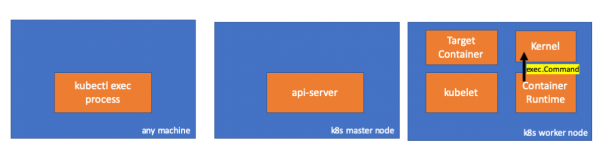
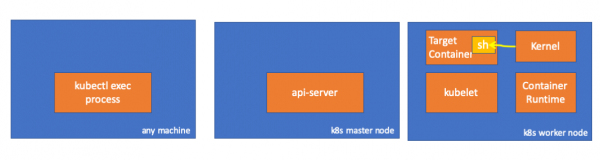
Finalmente, el núcleo ejecuta los comandos:
Recordatorios
- El API Server también puede inicializar una conexión con kubelet.
- Las siguientes conexiones se mantienen hasta que finaliza la sesión exec interactiva:
- entre kubectl y el api-server;
- entre el api-server y kubectl;
- entre kubelet y el entorno ejecutable del contenedor.
- Kubectl o el api-server no pueden ejecutar nada en los nodos de trabajo. Kubelet puede ejecutar, pero para esas acciones también interactúa con el entorno ejecutable del contenedor.
Recursos
- Discusión "" en kubernetes-dev;
- Artículo "»;
- Discusión "" en Server Fault.
P.D. del traductor
También puedes leer en nuestro blog:
- "¿Qué sucede en Kubernetes al ejecutar kubectl run?" y ;
- «»;
- «»;
- «».
Fuente: habr.com
