

LINQ tuli .NET-i uue võimsana andmehalduse keele. LINQ to SQL võimaldab selle osana suhelda andmebaasidega, näiteks Entity Frameworki kaudu, üsna mugavalt. Siiski, seda kasutades unustavad arendajad tihti vaadata, millist SQL-päringut genereerib queryable provider, teie puhul — Entity Framework.
Vaatame kaht põhiaspekti näite abil.
Selleks loome SQL Serveris andmebaasi Test ning seal loome kaks tabelit järgmise päringuga:
Tabelite loomine
USE [TEST]
GO

SET ANSI_NULLS ON
GO

SET QUOTED_IDENTIFIER ON
GO

CREATE TABLE [dbo].[Ref](
	[ID] [int] NOT NULL,
	[ID2] [int] NOT NULL,
	[Name] [nvarchar](255) NOT NULL,
	[InsertUTCDate] [datetime] NOT NULL,
 CONSTRAINT [PK_Ref] PRIMARY KEY CLUSTERED
(
	[ID] ASC
)WITH (PAD_INDEX = OFF, STATISTICS_NORECOMPUTE = OFF, IGNORE_DUP_KEY = OFF, ALLOW_ROW_LOCKS = ON, ALLOW_PAGE_LOCKS = ON) ON [PRIMARY]
) ON [PRIMARY]
GO

ALTER TABLE [dbo].[Ref] ADD  CONSTRAINT [DF_Ref_InsertUTCDate]  DEFAULT (getutcdate()) FOR [InsertUTCDate]
GO

USE [TEST]
GO

SET ANSI_NULLS ON
GO

SET QUOTED_IDENTIFIER ON
GO

CREATE TABLE [dbo].[Customer](
	[ID] [int] NOT NULL,
	[Name] [nvarchar](255) NOT NULL,
	[Ref_ID] [int] NOT NULL,
	[InsertUTCDate] [datetime] NOT NULL,
	[Ref_ID2] [int] NOT NULL,
 CONSTRAINT [PK_Customer] PRIMARY KEY CLUSTERED
(
	[ID] ASC
)WITH (PAD_INDEX = OFF, STATISTICS_NORECOMPUTE = OFF, IGNORE_DUP_KEY = OFF, ALLOW_ROW_LOCKS = ON, ALLOW_PAGE_LOCKS = ON) ON [PRIMARY]
) ON [PRIMARY]
GO

ALTER TABLE [dbo].[Customer] ADD  CONSTRAINT [DF_Customer_Ref_ID]  DEFAULT ((0)) FOR [Ref_ID]
GO

ALTER TABLE [dbo].[Customer] ADD  CONSTRAINT [DF_Customer_InsertUTCDate]  DEFAULT (getutcdate()) FOR [InsertUTCDate]
GO
Nüüd täidame tabeli Ref järgmise skripti käivitamisega:
Tabeli Ref täitmine
USE [TEST]
GO

DECLARE @ind INT=1;

WHILE(@ind<1200000)
BEGIN
	INSERT INTO [dbo].[Ref]
           ([ID]
           ,[ID2]
           ,[Name])
    SELECT
           @ind
           ,@ind
           ,CAST(@ind AS NVARCHAR(255));

	SET @ind=@ind+1;
END
GO
Samuti täidame tabeli Customer järgmise skripti abil:
Tabeli Customer täitmine
KASUTA [TEST]
GO

DECLARE @ind INT=1;
DECLARE @ind_ref INT=1;

WHILE(@ind<=12000000)
BEGIN
	IF(@ind%3=0) SET @ind_ref=1;
	ELSE IF (@ind%5=0) SET @ind_ref=2;
	ELSE IF (@ind%7=0) SET @ind_ref=3;
	ELSE IF (@ind=0) SET @ind_ref=4;
	ELSE IF (@ind=0) SET @ind_ref=5;
	ELSE IF (@ind=0) SET @ind_ref=6;
	ELSE IF (@ind=0) SET @ind_ref=7;
	ELSE IF (@ind=0) SET @ind_ref=8;
	ELSE IF (@ind=0) SET @ind_ref=9;
	ELSE IF (@ind=0) SET @ind_ref=10;
	ELSE IF (@ind=0) SET @ind_ref=11;
	ELSE SET @ind_ref=@ind90000;

	INSERT INTO [dbo].[Customer]
	 ([ID]
	 ,[Name]
	 ,[Ref_ID]
	 ,[Ref_ID2])
	 SELECT
	 @ind,
	 CAST(@ind AS NVARCHAR(255)),
	 @ind_ref,
	 @ind_ref;


	SET @ind=@ind+1;
END
GO
Nii saime kaks tabelit, milles ühes on üle 1 miljoni andmerea ja teises üle 10 miljoni andmerea.
Nüüd on Visual Studio-s vajalik luua testprojekt Visual C# Console App (.NET Framework):
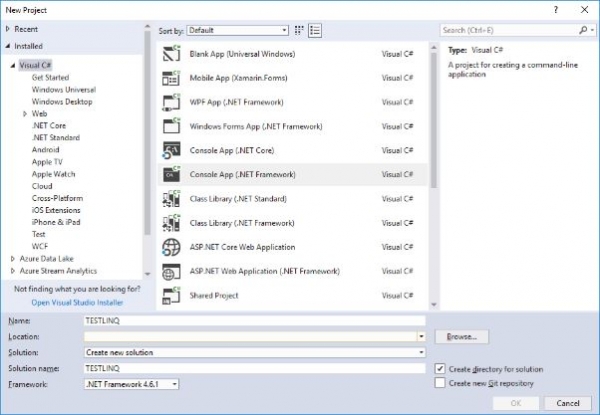
Edasi tuleb andmebaasiga suhtlemiseks lisada Entity Frameworki teek.
Selle lisamiseks klõpsame projektil parema hiireklahviga ja valime kontekstimenüüst Manage NuGet Packages:
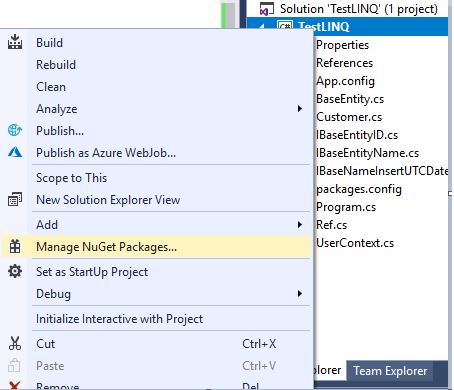
Seejärel sisestame avanevas NuGet-pakettide haldamise aknas otsinguväljale sõna „Entity Framework” ja valime paketi Entity Framework ning installime selle:

Järgmisena peame faili App.config pärast elemendi configSections sulgemist lisama järgmise ploki:
connectionString'i tuleb sisestada ühenduse string.
Nüüd loome kolmes eraldi failis 3 liidest:
- Liidese IBaseEntityID rakendus
namespace TestLINQ { public interface IBaseEntityID { int ID { get; set; } } } - Liidese IBaseEntityName rakendus
namespace TestLINQ { public interface IBaseEntityName { string Name { get; set; } } } - Liidese IBaseNameInsertUTCDate rakendus
namespace TestLINQ
{
    public interface IBaseNameInsertUTCDate
    {
        DateTime InsertUTCDate { get; set; }
    }
}
Ja eraldi failis loome põhiklasi BaseEntity meie kahe entiteedi jaoks, kuhu kuuluvad ühised väljad:
Põhiklassi BaseEntity rakendus
namespace TestLINQ
{
    public class BaseEntity : IBaseEntityID, IBaseEntityName, IBaseNameInsertUTCDate
    {
        public int ID { get; set; }
        public string Name { get; set; }
        public DateTime InsertUTCDate { get; set; }
    }
}
Seejärel loome eraldi failidesse meie kaks entiteeti:
- Klassi Ref rakendus
using System.ComponentModel.DataAnnotations.Schema; namespace TestLINQ { [Table("Ref")] public class Ref : BaseEntity { public int ID2 { get; set; } } } - Klassi Customer rakendus
using System.ComponentModel.DataAnnotations.Schema;

namespace TestLINQ
{
    [Table("Customer")]
    public class Customer: BaseEntity
    {
        public int Ref_ID { get; set; }
        public int Ref_ID2 { get; set; }
    }
}
Nüüd loome eraldi failis konteksti UserContext:
Klassi UserContext rakendus
using System.Data.Entity;

namespace TestLINQ
{
    public class UserContext : DbContext
    {
        public UserContext()
            : base("DbConnection")
        {
            Database.SetInitializer(null);
        }

        public DbSet Customer { get; set; }
        public DbSet Ref { get; set; }
    }
}
Oleme saanud valmis lahenduse testide läbiviimiseks optimeerimise osas LINQ to SQL kaudu EF jaoks MS SQL Serveris:
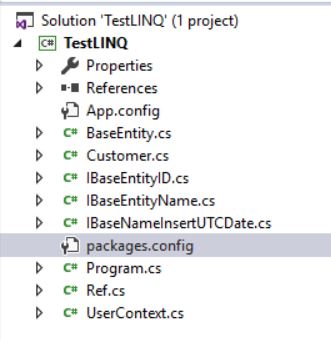
Nüüd sisestame faili Program.cs järgmise koodi:
Fail Program.cs
kasutades System;
kasutades System.Collections.Generic;
kasutades System.Linq;

(nimi TestLINQ
{
    klass Program
    {
        staatiline void Main(string[] args)
        {
            kasutades (UserContext db = new UserContext())
            {
                var dblog = new List();
                db.Database.Log = dblog.Add;

                var query = from e1 in db.Customer
                            from e2 in db.Ref
                            where (e1.Ref_ID == e2.ID)
                                 && (e1.Ref_ID2 == e2.ID2)
                            select new { Data1 = e1.Name, Data2 = e2.Name };

                var result = query.Take(1000).ToList();

                Console.WriteLine(dblog[1]);

                Console.ReadKey();
            }
        }
    }
}
Jätkame meie projekti käivitamist.
Töö lõpetamisel prinditakse konsoolile:
Genereeritud SQL-päring
SELECT TOP (1000)
    [Extent1].[Ref_ID] AS [Ref_ID],
    [Extent1].[Name] AS [Name],
    [Extent2].[Name] AS [Name1]
    FROM  [dbo].[Customer] AS [Extent1]
    INNER JOIN [dbo].[Ref] AS [Extent2] ON ([Extent1].[Ref_ID] = [Extent2].[ID]) AND ([Extent1].[Ref_ID2] = [Extent2].[ID2])
See tähendab, et kokkuvõttes genereeris LINQ päring üsna korraliku SQL-päringu MS SQL Serveri andmebaasile.
Nüüd muutke LINQ-päringus JAH tingimus EI asemel.
LINQ-päring
var query = from e1 in db.Customer
                            from e2 in db.Ref
                            where (e1.Ref_ID == e2.ID)
                                || (e1.Ref_ID2 == e2.ID2)
                            select new { Data1 = e1.Name, Data2 = e2.Name };
Ja käivitame taas oma rakenduse.
Täideviimisel ilmneb viga, mis on seotud käsu täitmisaja ületamisega 30 sekundi jooksul:
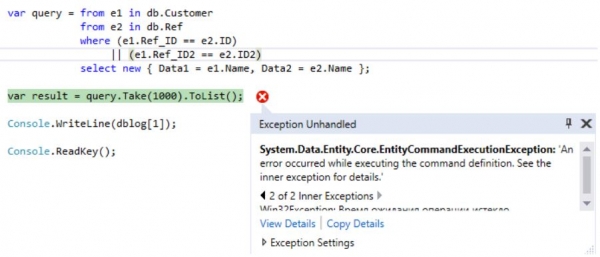
Kui vaatamata sellele, milline päring on LINQ-i poolt genereeritud.
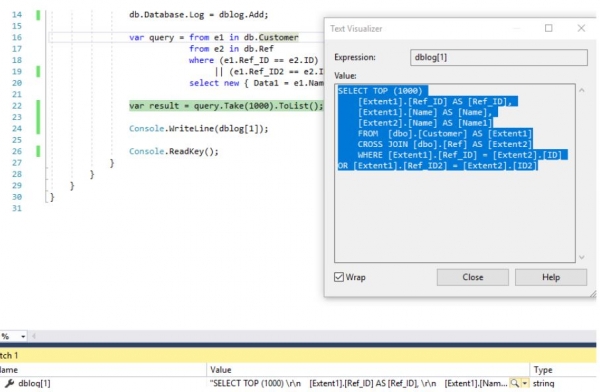
, siis võib veenduda, et valik toimub kahe hulga (tabeli) kartesiaansest korrutamisest:
Genereeritud SQL-päring
SELECT TOP (1000)
    [Extent1].[Ref_ID] AS [Ref_ID],
    [Extent1].[Name] AS [Name],
    [Extent2].[Name] AS [Name1]
    FROM  [dbo].[Customer] AS [Extent1]
    CROSS JOIN [dbo].[Ref] AS [Extent2]
    WHERE [Extent1].[Ref_ID] = [Extent2].[ID] OR [Extent1].[Ref_ID2] = [Extent2].[ID2]
Üks võimalus on kirjutada LINQ-päring järgmiselt:
Optimeeritud LINQ-päring
var query = (from e1 in db.Customer
                   join e2 in db.Ref
                   on e1.Ref_ID equals e2.ID
                   select new { Data1 = e1.Name, Data2 = e2.Name }).Union(
                        from e1 in db.Customer
                        join e2 in db.Ref
                        on e1.Ref_ID2 equals e2.ID2
                        select new { Data1 = e1.Name, Data2 = e2.Name });
Siis saame järgmise SQL-päringu:
SQL-päring
VALISELECT
    [Limit1].[C1] AS [C1],
    [Limit1].[C2] AS [C2],
    [Limit1].[C3] AS [C3]
    FROM ( SELECT DISTINCT TOP (1000)
        [UnionAll1].[C1] AS [C1],
        [UnionAll1].[Name] AS [C2],
        [UnionAll1].[Name1] AS [C3]
        FROM  (SELECT
            1 AS [C1],
            [Extent1].[Name] AS [Name],
            [Extent2].[Name] AS [Name1]
            FROM  [dbo].[Customer] AS [Extent1]
            INNER JOIN [dbo].[Ref] AS [Extent2] ON [Extent1].[Ref_ID] = [Extent2].[ID]
        UNION ALL
            SELECT
            1 AS [C1],
            [Extent3].[Name] AS [Name],
            [Extent4].[Name] AS [Name1]
            FROM  [dbo].[Customer] AS [Extent3]
            INNER JOIN [dbo].[Ref] AS [Extent4] ON [Extent3].[Ref_ID2] = [Extent4].[ID2]) AS [UnionAll1]
    )  AS [Limit1]
Kahjuks LINQ-küsimustes võib liitumise tingimus olla ainult üks, seega on võimalik teha ekvivalentne päring kahe päringuga, et iga tingimus eraldi ja seejärel ühendada need Unioniga, et eemaldada ridade vahelised duplikaadid.
Jah, päringud on eriti juhul mitteekvivalentsed, kuna ka täielikud duplikaadid võivad tagasi tulla. Siiski, reaalses elus ei ole täielikud duplikaadid vajalikud ja neist püütakse vabaneda.
Võrdleme nüüd nende kahe päringu täitmise plaane:
- CROSS JOINi keskmine täitmise aeg on 195 sek:

- INNER JOIN-UNIONi keskmine täitmise aeg on alla 24 sek:

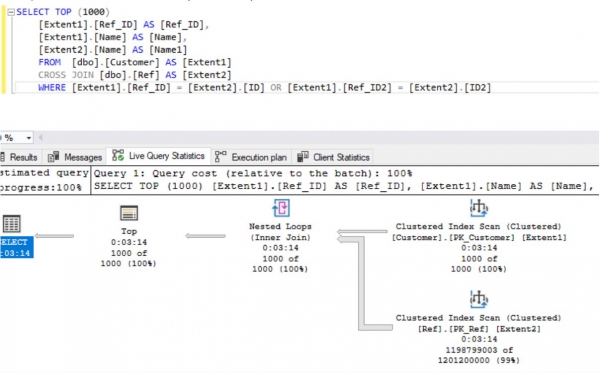
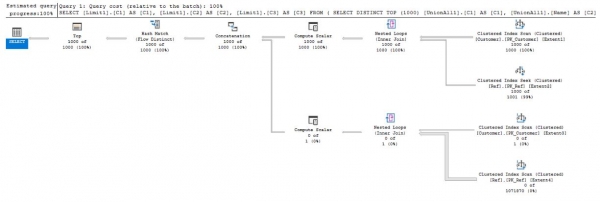
Nagu nähtub tulemustest, töötab kahe miljoni kirje puhul optimeeritud LINQ-päring kordades kiiremini kui mitteoptimeeritud.
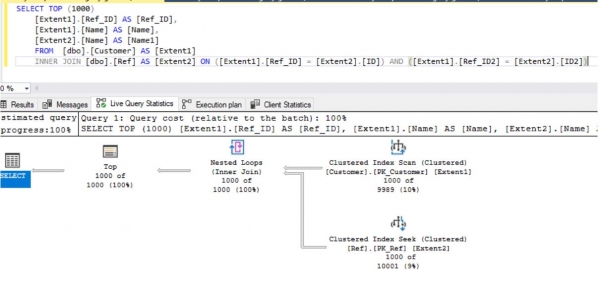
Jaotisega, kus on ja LINQ-päringu tingimus:
LINQ-päring
var query = from e1 in db.Customer
                            from e2 in db.Ref
                            where (e1.Ref_ID == e2.ID)
                                 && (e1.Ref_ID2 == e2.ID2)
                            select new { Data1 = e1.Name, Data2 = e2.Name };
peaaegu alati genereeritakse õige SQL-päring, mille täitmise keskmine on umbes 1 sek:
Samuti LINQ to Objects manipuleerimise korral võite kasutada järgmist päringut:
LINQ-päring (1. variant)
var query = from e1 in seq1
                            from e2 in seq2
                            where (e1.Key1==e2.Key1)
                               && (e1.Key2==e2.Key2)
                            select new { Data1 = e1.Data, Data2 = e2.Data };
võite kasutada järgnevat päringut:
LINQ-päring (2. variant)
var query = from e1 in seq1
                            join e2 in seq2
                            on new { e1.Key1, e1.Key2 } equals new { e2.Key1, e2.Key2 }
                            select new { Data1 = e1.Data, Data2 = e2.Data };
kus:
Kahes massiivi määratlemine
Para[] seq1 = new[] { new Para { Key1 = 1, Key2 = 2, Data = "777" }, new Para { Key1 = 2, Key2 = 3, Data = "888" }, new Para { Key1 = 3, Key2 = 4, Data = "999" } };
Para[] seq2 = new[] { new Para { Key1 = 1, Key2 = 2, Data = "777" }, new Para { Key1 = 2, Key2 = 3, Data = "888" }, new Para { Key1 = 3, Key2 = 5, Data = "999" } };
, ja tüüpi Para määratlemine on järgmine:
Tüübi Para määratlemine
class Para
{
        public int Key1, Key2;
        public string Data;
}
Nii, me oleme vaadanud mõningaid aspekte LINQ-päringute optimeerimisel MS SQL Serveri jaoks.
Kahjuks unustavad isegi kogenud ja juhtivad .NET-arendajad, et nad peavad aru saama, mida teevad nende kasutatavad käsud. Muul juhul muutuvad nad seadistajateks ja võivad tulevikus, nii suurendades programmirakendust kui ka väikesi keskkonna muutusi, külvata aja pommi.
Samuti tehti väikene ülevaade ja .
Allikad testimiseks - projekt, tabelite loomine andmebaasis TEST, ning nende tabelite andmetega täitmine on .
Samuti asub selles repositooriumis kaustas Plans päringute täitmise plaanid, millel on tingimused OR.
Allikas: habr.com
