

Selectelist: see the second part of the article about browser fingerprints (). Today we will discuss the legality of collecting browser fingerprints by third-party services and websites, as well as how to protect against information gathering.
So what about the legality of collecting browser fingerprints?
We have examined this topic in detail, but could not find specific laws (referring to US legislation — ed.). If you can point to laws that regulate the collection of browser fingerprints in your country, please let us know.
However, the European Union has laws and directives (namely, the GDPR and ePrivacy Directive) that regulate the use of browser fingerprints. It is quite legal, but only if the organization can prove the necessity of such work.
In addition, user consent is required to use the information. However, to this rule:
- When a browser fingerprint is required for the 'sole purpose of transmitting a message over an electronic communications network.'
- When the collection of browser fingerprints is required for adapting the user interface of a specific device. For example, when you are surfing the web from a mobile device, fingerprint collection and analysis technology is used to ensure you receive an adapted version.
Most likely, similar laws apply in other countries as well. So the key point here is that the service or website needs user consent to work with browser fingerprints.
But there is a problem — the issue is not always clear. Most often, the user is only shown a banner saying 'I agree to the terms of use.' Yes, the banner always includes a link to the terms themselves. But who reads them?
So usually, the user grants permission for the collection of browser fingerprints and analysis of this information when they click the 'agree' button.
Check your browser fingerprint
Okay, we discussed what data can be collected above. But what about the specific situation — your own browser?
To understand what information can be gathered with it, the easiest way is to use the resource . See, what a third-party observer can gather from your browser.
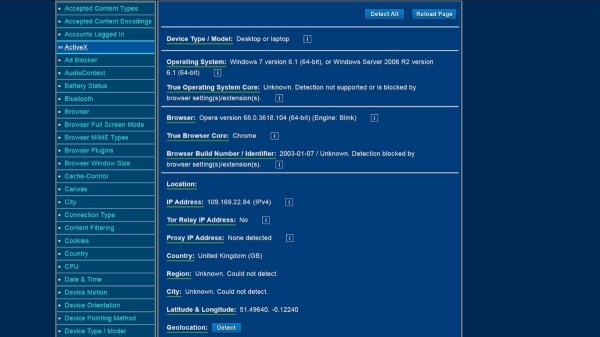
Do you see this list on the left? This is far from everything; the rest of the list will appear as you scroll the page. The city and region on the screenshot do not display due to the authors using a VPN.
There are also several other sites that help conduct browser fingerprint testing. These are from EFF and , an open-source site.
What is browser fingerprint entropy?
This is an assessment of the uniqueness of your browser fingerprint. The higher the entropy value, the higher the uniqueness of the browser.
The entropy of the browser fingerprint is measured in bits. You can check this parameter on the Panopticlick website.
How accurate are these tests?
In general, they can be trusted as they collect the same data as third-party resources. This is when evaluating information collection by points.
However, when it comes to assessing uniqueness, things aren't so good, and here’s why:
- Testing sites do not account for random fingerprints that can be obtained, for example, using Brave Nightly.
- Sites like Panopticlick and AmIUnique have huge data archives that contain information about old and outdated browsers used by users who have undergone testing. So if you're testing with a new browser, you'll likely receive a high uniqueness score for your fingerprint, despite hundreds of other users working with the same browser version as you.
- Finally, they do not take into account screen resolution or browser window size changes. For instance, the font may be too large or too small, or the text may be hard to read due to color. Whatever the reason, these tests do not account for that.
Overall, fingerprint uniqueness tests are not useless. They are worth trying out to find out your entropy level. But it's best to simply evaluate what information you are exposing externally.
How to protect yourself from browser fingerprinting (simple methods)
It should be said right away that completely blocking the formation and collection of a browser fingerprint is not possible — it's a basic technology. If you want to completely protect yourself, you should just avoid using the internet.
However, the amount of information collected by third-party services and resources can be reduced. Here, such tools will help.
Mug Firefoxi muudetud seadistustega
See brauser ei ole halb kasutaja andmete kaitsmise küsimustes. Hiljuti kaitsesid Firefoxi arendajad kasutajaid kolmandate osapoolte jälgimise eest.
Kuid kaitse taset saab tõsta. Selleks tuleb minna brauseri seadistustesse, sisestades aadressiribale "about:config". Seejärel valime ja muutame järgmisi valikuid:
- webgl.disabled — valime "true".
- geo.enabled — valime "false".
- privacy.resistFingerprinting — valime "true". See valik annab põhilise kaitse brauseri jälgimise eest. Kuid see on kõige efektiivsem koos teiste valikutega loetelus.
- privacy.firstparty.isolate — muudame "true"-ks. See valik võimaldab blokeerida first-party domeenide küpsised.
- media.peerconnection.enabled — valik, mis ei ole kohustuslik, kuid kui töötate VPN-iga, tasub see valida. See võimaldab vältida WebRTC lekkeid ja oma IP kuvamist.
Mug Brave
Veel üks kasutajasõbralik brauser, mis pakub tõsist isikuandmete kaitset. Brauser blokeerib erinevaid jälgijaid, kasutab HTTPS-i igal võimalikul juhul ja blokeerib skripte.
Lisaks võimaldab Brave blokeerida suurema osa brauseri jälgimisinstrumentidest.
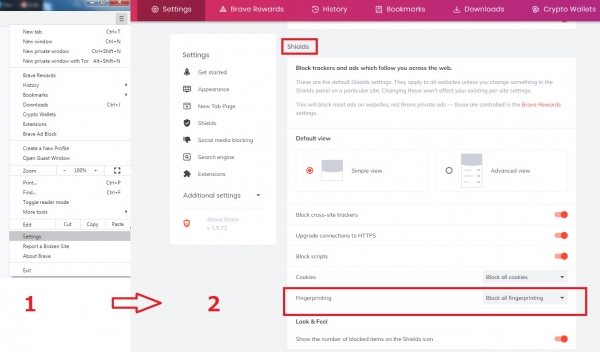
Kasutame Panopticlicki, et hinnata entropia taset. Opera võrreldes saime 16.31 bitti 17.89 asemel. Erinevus ei ole suur, kuid see on olemas.
Brave'i kasutajad on pakkunud hulgaliselt viise brauseri jälgimise eemaldamiseks. Üksikasju on nii palju, et ühes artiklis ei ole võimalik kõiki ära tuua. Kõik üksikasjad .
Kohandatud brauseri laiendused
Laiendused on delikaatne teema, kuna need võivad mõnikord suurendada brauseri unikaalsust. Kas kasutada neid või mitte — see on kasutaja valik.
Siin on mõned soovitused:
- — muudab user-agent'i väärtusi. Saate määrata perioodi "igal 10. minutil", näiteks.
- — kaitse erinevate jälgimisviiside eest.
- — teeb enam-vähem sama, mis Chameleon.
- — kaitse digitaalsete jälgimiste kogumise eest canvasest.
Kasutage parem ühte laiendust, mitte kõiki korraga.
Tor brauser ilma Torita Võrk
Habr'is ei pea selgitama, mis on Tor brauser. Vaikesuunas pakub see mitmeid vahendeid isikuandmete kaitsmiseks:
- HTTPS igal pool ja alati.
- NoScript.
- Blokeerimine WebGl.
- Blokeerimine canvas image extraction.
- Operatsioonisüsteemi versiooni muutmine.
- Aja- ja keelepäringute teabe blokeerimine.
- Kõik muud jälgimistööriistade blokeerimise funktsioonid.
Kuid Tor võrk ei mõju nii muljetavaldavalt kui brauser ise. Siin on põhjus:
- See töötab aeglaselt. Kõige selle tõttu, et servereid on umbes 6000, aga kasutajaid ligikaudu 2 miljonit.
- Paljud saidid blokeerivad Tor-i liiklust – näiteks Netflix.
- Toimuvad isikuandmete lekked, üks suurimaid juhtus 2017. aastal.
- Tor-l on kummalised suhted USA valitsusega – seda võib nimetada tihedaks koostööks. Lisaks toetab valitsus finantsiliselt .
- Saab ühenduda .
Ühesõnaga, on võimalus kasutada Tor brauserit ilma Tor-võrguta. Seda ei ole nii lihtne teha, kuid meetod on täiesti kergesti kättesaadav. Ülesanne on luua kaks faili, mis keelavad Tor-võrgu.
Parim on seda teha Notepad++ programmis. Avame selle ja lisame esimesse vahekaardisse sellised read:
pref(‘general.config.filename’, ‘firefox.cfg’);
pref(‘general.config.obscure_value’, 0);
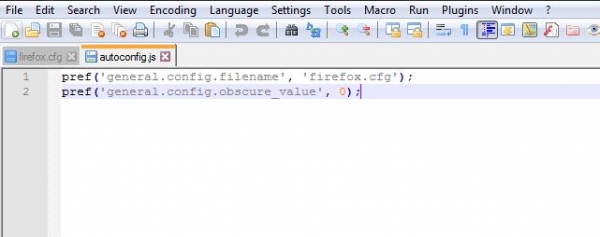
Seejärel läheme Edit — EOL Conversion, valime Unix (LF) ja salvestame faili nimega autoconfig.js kausta Tor Browser/defaults/pref.
Siis avame uue vahekaart ja kopeerime need read:
//
lockPref(‘network.proxy.type’, 0);
lockPref(‘network.proxy.socks_remote_dns’, false);
lockPref(‘extensions.torlauncher.start_tor’, false);
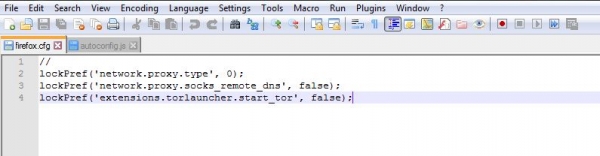
Faili nimi on firefox.cfg, see tuleb salvestada Tor Browser/Browser kausta.
Nüüd on kõik valmis. Brauseri käivitamisel kuvatakse tõrge, kuid sellele ei pea tähelepanu pöörama.

Ja jah, võrgu väljalülitamine ei mõjuta brauseri sõrmejälge. Panopticlick näitab 10.3 bitise entropia taset, mis on palju vähem kui Brave brauseriga (oli 16.31 bitti).
Ülalmainitud faile saab laadida .
Kolmandas, viimases osas räägime radikaalsetest meetoditest jälgimise keelamiseks. Arutame ka isikuandmete ja muu teabe kaitsmise küsimust VPN-i abil.
Allikas: habr.com
