

Tere, Habr. See on 2. artikkel ssh-chat'i tsüklist.
Mida me teeme:
- Lisame võimaluse luua oma vormindusfunktsioone
- Lisame markdowni toe
- Lisame botide toe
- Paroolide turvalisust suurendame (hash ja sool)
Kahjuks failide saatmine ei toimu
Kohandatud vormindusfunktsioonid
Praegu on meil rakendatud järgmised vormindusfunktsioonid:
@color@bold@underline@hex@box
Aga on vaja lisada võimalus luua oma funktsioone:
Kõik funktsioonid on salvestatud
Nii et piisab funktsiooni loomise alustamiseksregisterMethod:
// parserExec.js at end
module.exports.registerMethod  =  function(name, func) {
  methods[name] =  func
}
Samuti tuleb see meetod tagastada serveri loomise järel
// index.js at require part
const { registerMethod } = require('./parserExec')

// index.js at end
module.exports.registerMethod  =  registerMethod
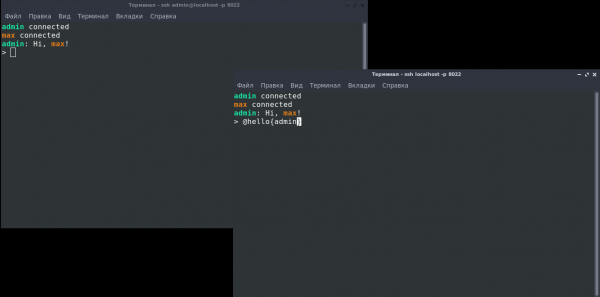
Nüüd saame serveri loomisel registreerida vormindusmeetodeid. Näide:
const chat = require('.')
const { formatNick } = require('./format')

chat({})

chat.registerMethod('hello', function(p, name){
  return 'Tere, ' + formatNick(name) + '!'
})
Markdowni tugi
Markdown on väga mugav, seega lisame selle
// format.js near require
const marked = require('marked');
const TerminalRenderer = require('marked-terminal');

marked.setOptions({
  renderer: new TerminalRenderer()
});

// format.js line 23
message = marked(message)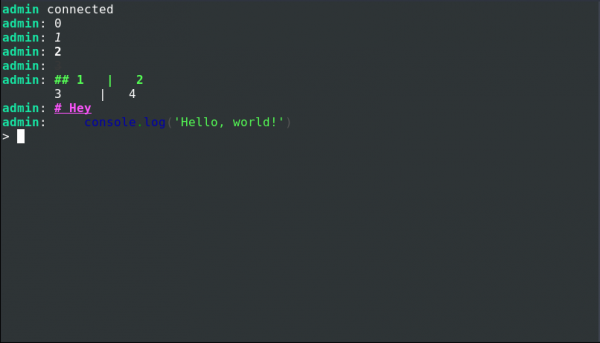
Botid
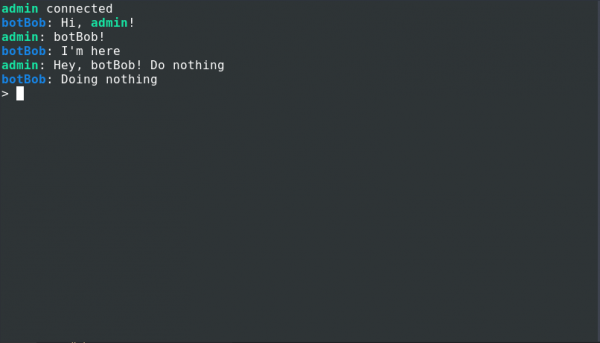
Kuidas see töötab
let writeBotBob = chat.registerBot({
  name: 'botBob',

  onConnect(nick, write){
    write('@hello{' + nick + '}')
  },

  onDisconnect(nick, write){},

  onMessage(nick, message, write) {
    if(message == 'botBob!') write('Ma olen siin')
  },

  onCommand(command, write) {
    write('Töötan ' + command)
  }
})
onCommand võib kutsuda, kasutades @bot(botBob){Command}
Kõik botidega töötamise kohta on kirjeldatud failis:
let bots = []; // Все боты

let onWrite = () => {};

function getWrite(bot) { // Генерирует метод отправки сообщения для бота
  return msg => {
    onWrite(bot.name, msg);
  };
}

module.exports.message = function message(nick, message) { // index.js выполнит эту функцию после отправки сообщения
  bots.forEach(bot => {
    try {
      bot.onMessage(nick, message, getWrite(bot));
    } catch (e) {
      console.error(e);
    }
  });
};

module.exports.connect = function message(nick) { // При соединении
  bots.forEach(bot => {
    try {
      bot.onConnect(nick, getWrite(bot));
    } catch (e) {
      console.error(e);
    }
  });
};

module.exports.disConnect = function message(nick) { // При отсоединении
  bots.forEach(bot => {
    try {
      bot.onDisconnect(nick, message, getWrite(bot));
    } catch (e) {
      console.error(e);
    }
  });
};

module.exports.command = function message(name, message) { // При выполнении команды
  bots.forEach(bot => {
    if (bot.name == name) {
      try {
        bot.onCommand(message, getWrite(bot));
      } catch (e) {
        console.error(e);
      }
    }
  });
};

module.exports.registerBot = function(bot) {
  bots.push(bot);
  return  getWrite(bot)
};

module.exports.onMessage = func => {
  onWrite = func;
};
Mida saab botidega teha:
- Koormuse jälgimine
- Juurutada
- Ülesannete nimekiri
Hash ja sool
Miks mitte ssh võtmed? Sest ssh võtmed on erinevates seadmetes erinevad.
Loome faili, mis vastutab paroolide kontrollimise ja loomise eest.
// crypto.js
const crypto = require('crypto');

function genRandomString(length) {
  return crypto
    .randomBytes(Math.ceil(length / 2))
    .toString('hex')
    .slice(0, length);
}

function sha512(password, salt){
  const hash = crypto.createHmac('sha512', salt); /** Hashing algorithm sha512 */
  hash.update(password);
  const value = hash.digest('hex');
  return value
};

function checkPass(pass, obj){
  return obj.password == sha512(pass, obj.salt)
}

function encodePass(pass){
  const salt = genRandomString(16)
  return JSON.stringify({
    salt,
    password: sha512(pass, salt)
  })
}

module.exports.encodePass = encodePass
module.exports.checkPass = checkPass
Samuti skript parooli soolamiseks ja hashimiseks.
// To generate password run node ./encryptPassword password
const { encodePass } =require('./crypto')
console.log(encodePass(process.argv[2]))
Uuendame users.json ja lobby.js-s kasutame checkPassword'i asemel.
Kokkuvõte
Nii et meil on ssh põhine vestlus võimalustega vormindamiseks ja botideks.
Allikas: habr.com
