

Usun, et paljusid huvitab pärast WWDC 2019 Sign In with Apple (lühidalt SIWA). Selles artiklis räägin, millised konkreetsed takistused pidid meid meie litsentsiportaalis selle funktsiooni integreerimisel ootama. See artikkel pole mõeldud neile, kes just alles SIWA-ga tutvuma hakkavad (neile olen lõpus jaganud mitmeid tutvustavaid linke). Sellest materjalist leiavad tõenäoliselt paljud vastuseid küsimustele, mis võivad tekkida Apple'i uue teenuse integreerimisel.
Apple ei luba kohandatud suunamisi
Tegelikult ei näe ma siiani sellele küsimusele vastust arendajate foorumites. Üksikasjad on sellised: kui soovite kasutada SIWA JS API-d, st mitte töötada läbi natiivse SDK, kuna see pole mingil põhjusel saadaval (ei macOS/iOS või vanad versioonid), siis on teil vaja oma avalikku portaali, muidu ei saa. Sest WWDR-portaalis peate registreerima ja kinnitama, et olete oma domeeni omanik, ja ainult sellele domeenile saab panna Apple'i vaatepunktist lubatud suunamisi:
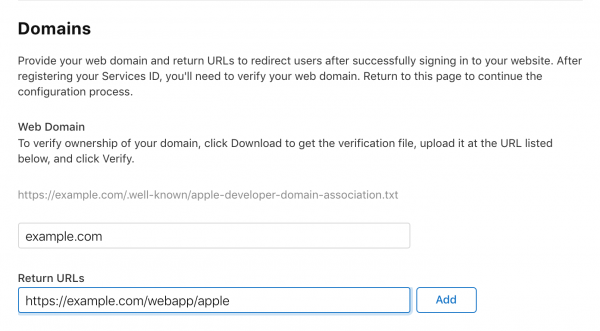
Mis siis, kui on soov suunamist rakenduses kinni püüda? Me lahendasime selle probleemi äärmiselt lihtsalt: lõime oma portaali loendi lubatud suunamistest oma rakenduste jaoks, mille me tellime enne SIWA autentimisse lehe kuvamist. Ja lihtsalt suuname andmed, mis on saadud Apple'ilt, portaalist rakendusse. Lihtne ja tõhus.
Probleemid e-kirjadega
Vaatame, kuidas me lahendasime kasutaja e-kirja probleemid. Esiteks, pole olemas REST API-d, mis võimaldaks saada seda teavet tagaplaanilt - ainult klient saab neid andmeid kätte ja võib need koos autentimiskoodiga edastada.
Teiseks, kasutaja nime ja e-kirja teave edastatakse vaid ühe korra, esimesel sisselogimisel rakendusse läbi Apple'i, kus kasutaja valib oma isiklike andmete jagamise valikud.
Needless to say, these issues are not critical if a connection with the social profile has been successfully established on the portal — the user ID remains the same and is linked to the Team ID — meaning it is consistent across all applications integrated with SIWA. However, if the login was completed via Apple, and then an error occurred leading to the connection not being made on the portal, the only option is to direct the user to appleid.apple.com, sever the link with the application, and try again. Essentially, the issue is addressed by writing the relevant KB article and providing a link to it.
The next, more unpleasant issue is that Apple has introduced a new concept with proxy email. In our case, if a user has already logged into the licensing portal with their real email and chooses the option to hide their email upon their first login through Apple, a new account is created with this proxy email, which obviously doesn’t contain any licenses, leaving the end user in a difficult situation.
The solution to this problem is quite simple: since the user ID remains the same in SIWA and does not depend on the selected options/application during sign in, we allow via a special script to switch this link from Apple to another account with the real email of the user, thereby 'restoring their purchases.' After this procedure, the user starts to access the different account on the portal through SIWA and everything works correctly for them.
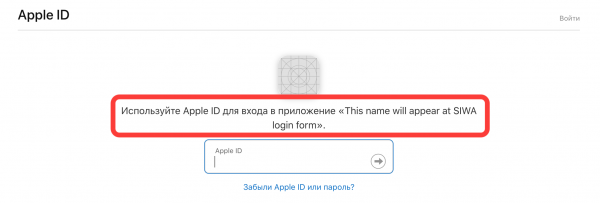
There is no application icon during Sign In via the web portal.
To resolve another issue, we reached out for clarification from Apple representatives, and we are sharing the knowledge we gained:
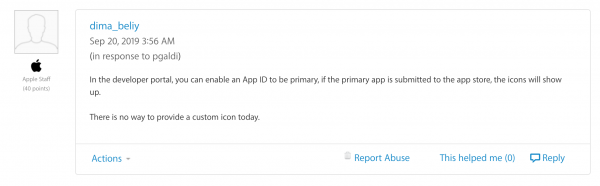
In other words, the essence is as follows: at the head of the SIWA group, only a macOS/iOS application can be placed, into which the required service IDs of the portals are added. Consequently, for the icon to appear for the main application, there must be published versions in the App Store with media that have passed Apple's review. The icon will be taken from there.
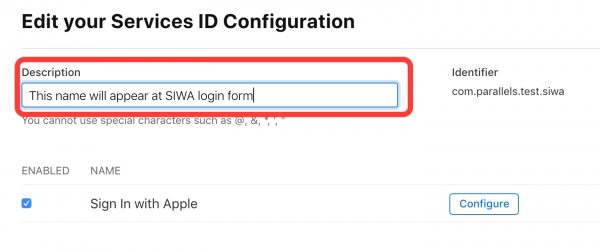
Therefore, if you only have a portal and no App Store application, there won't be a nice icon, but you can make do with the application name — in the absence of media for the main application, this information is taken from the Description of the service ID:
The number of elements in the SIWA group is limited to 5.
Selle probleemi jaoks ei ole hetkel muud lahendust kui kasutada mitmeid gruppe; kui sul on puudu 6 identifikaatorist: 1 peamine rakendus ja 5 sõltuvat, siis järgmise registreerimise katsel näed sellist teadet:
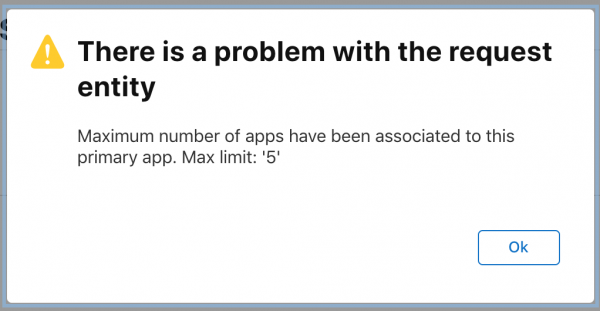
Oleme loonud grupid meie litsentsimisportaalile ja igale rakendusele, mis selle portaaliga opereerib. Teema slotide piirangutest oleme juba teavitanud Apple'it ja ootame nende vastust.
Kasulikud lingid
Kõige kasulikum , minu arvates, mille abil ma kogu asja tegin. Apple'i poolikult kasulik dokumentatsioon .
Naudi! Küsimused, mõtted, ideed ja ettepanekud on kommentaarides oodatud.
Allikas: habr.com
